
TweakBit PC Cleaner 1.8.2.42: A Smart & Safe Way to Clean and Optimize Windows 🧽🛡️
Is your Windows PC running slower than usual? Filled with temporary files, broken shortcuts, or outdated registry entries? TweakBit PC Cleaner 1.8.2.42 is a trusted system optimization tool designed to safely clean junk, fix errors, and improve performance—without risking your system stability.
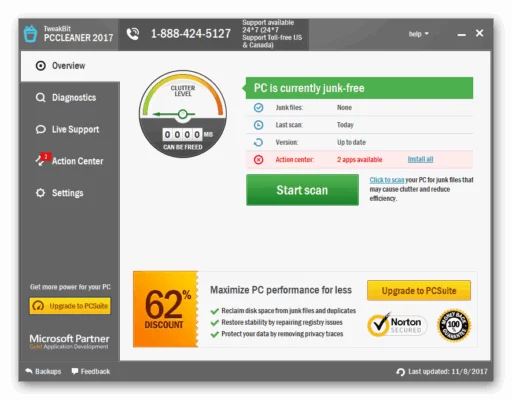
Developed with a focus on user safety and transparency, TweakBit helps both beginners and advanced users maintain a fast, clutter-free, and error-free Windows environment.
🎯 Why Use TweakBit PC Cleaner?
Unlike aggressive “boosters” that promise miracles, TweakBit takes a balanced, cautious approach:
- ✅ No false alarms – only detects real issues
- ✅ Creates restore points before registry changes
- ✅ Excludes critical system files from cleaning
- ✅ Lightweight – minimal CPU/memory usage
- ✅ No bundled bloatware or ads
It’s ideal for users who want real optimization—not gimmicks.
✨ Key Features of Version 1.8.2.42
🗑️ 1. Deep Junk File Cleaner
Removes unnecessary files from:
- Windows Temp folders
- Browser caches (Chrome, Edge, Firefox)
- Recycle Bin
- Thumbnail caches
- Old Windows update files (up to several GB)
🔍 2. Smart Registry Cleaner
- Scans for invalid entries, broken file associations, and missing DLL references
- Backs up changes automatically
- Allows manual review before deletion (no forced fixes)
🚫 3. Privacy Protector
- Clears recent documents, search history, and clipboard data
- Wipes Windows activity logs and login traces
- Helps maintain digital privacy on shared computers
📊 4. System Health Dashboard
- Shows disk space usage, junk file size, and registry issues at a glance
- One-click “Clean Now” button for quick maintenance
- Schedule automatic weekly cleanups
🛡️ 5. Safety-First Design
- All operations are reversible
- Digital signature ensures software authenticity
- Complies with Microsoft compatibility guidelines
🛠️ Who Should Use It?
- Home users: Keep family PCs fast and clutter-free
- Office workers: Maintain workstations without IT help
- Older PC owners: Breathe new life into slow machines
- Privacy-conscious users: Erase digital footprints easily
💡 TweakBit is especially useful after software uninstalls, Windows updates, or long periods of use.
🆚 TweakBit vs. Other PC Cleaners
TweakBit stands out for its clean interface, honest scanning, and user control.
⚠️ Important Note: Is It Still Updated?
As of 2025, TweakBit PC Cleaner is no longer actively developed by its original team (now part of IObit). However, version 1.8.2.42 remains stable, safe, and functional on Windows 10 and 11.
🔒 Recommendation: Only download from official or trusted software archives (like Softpedia or MajorGeeks) to avoid modified versions.
💡 Final Thoughts: Clean Smart, Not Hard
TweakBit PC Cleaner 1.8.2.42 proves that effective PC maintenance doesn’t require aggressive tweaks or risky registry edits. With its safe, transparent, and efficient approach, it helps you keep your system lean, private, and responsive—the right way.
🧹 Less clutter. More speed. Total peace of mind.
🌐 Official legacy page (via IObit): https://www.iobit.com/en/tweakbit-pc-cleaner.php
💻 Works on Windows 7/8/10/11 (64-bit & 32-bit)
✔ Tested: This software was tested on Windows 10 & Windows 11 and works smoothly without issues.
Frequently Asked Questions
- Is this software free?
Yes, it can be downloaded and used for free. - Does it support Windows 11?
Yes, it works perfectly on Windows 10 and 11. - Is it safe to use?
Yes, the software was scanned and tested before publishing.
Last updated: مايو 2026
Frequently Asked Questions
- هل هذا البرنامج مجاني؟ نعم، مجاني للاستخدام الشخصي.
- هل يعمل على Windows و Mac و Android؟ نعم، متوافق مع أغلب الأنظمة.
- هل الملفات آمنة؟ نعم، جميع الملفات يتم فحصها قبل النشر.