
Overview of PTC Creo 12.4.1.0
PTC Creo 12.4.1.0 is a comprehensive 3D CAD software suite designed for professional engineers and product designers. Developed by PTC (Parametric Technology Corporation), this release continues Creo’s legacy of providing innovative design tools for creating complex mechanical components and assemblies with precision and efficiency.
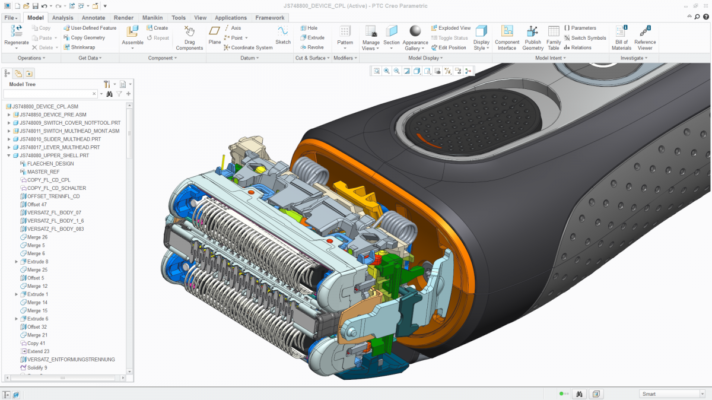
The inclusion of HelpCenter in this package enhances user experience by providing easy access to detailed documentation, tutorials, and contextual support — enabling designers to learn, troubleshoot, and innovate without leaving the workspace.
Key Features
Advanced 3D Modeling and Design
PTC Creo offers a robust set of modeling tools that support solid, surface, and sheet metal design. The software enables users to create fully parametric 3D models, assemblies, and drawings. Whether you’re designing consumer products, automotive components, or industrial machinery, Creo provides the flexibility and control needed for top-tier engineering.
Simulation and Analysis Tools
With built-in simulation features, Creo allows engineers to analyze the structural and thermal performance of their designs. Integrated FEA (Finite Element Analysis) and motion simulation tools help detect potential issues early in the design phase, reducing the need for costly prototypes and rework.
Generative Design and AI Integration
Creo 12.4.1.0 introduces enhanced generative design powered by AI algorithms that automatically optimize geometry for strength, weight, and material usage. Engineers can set design goals and constraints, while Creo generates multiple optimized solutions for evaluation and comparison.
Improved User Interface and Performance
This version improves usability with a cleaner interface, faster loading times, and smoother graphics performance. Designers benefit from more intuitive workflows, customizable toolbars, and responsive previews, resulting in a more productive design environment.
Data Management and Collaboration
Creo integrates seamlessly with PTC Windchill, a PLM (Product Lifecycle Management) system, allowing teams to collaborate in real-time, manage revisions, and maintain version control. This ensures consistent data across the product development cycle.
The Role of HelpCenter
Comprehensive Learning Resources
The built-in HelpCenter provides detailed user guides, video tutorials, and examples that help both beginners and experts master Creo’s capabilities. It’s fully searchable and context-sensitive — meaning it displays help relevant to the current tool or command you’re using.
Troubleshooting and Support
HelpCenter includes troubleshooting resources that guide users through common issues. Engineers can access official documentation, FAQs, and workflow examples directly within the software, reducing downtime and improving productivity.
Continuous Updates
PTC frequently updates HelpCenter content to match new features and modules added to Creo. This ensures that users always have access to the latest best practices, design standards, and workflow improvements.
Benefits of Using PTC Creo 12.4.1.0
Enhanced Productivity
Creo’s efficient modeling environment reduces the time needed to create, test, and refine designs. Combined with HelpCenter’s real-time assistance, it significantly boosts workflow efficiency.
Accurate and Reliable Results
Thanks to parametric modeling and integrated simulation tools, designers can ensure precision and reliability throughout the design process — from concept to final product.
Scalability and Flexibility
Creo supports both small projects and enterprise-scale product development. It can be expanded with modules for advanced manufacturing, additive design, and simulation extensions.
Conclusion
PTC Creo 12.4.1.0 + HelpCenter represents the perfect blend of innovation, power, and usability in modern CAD design. It provides engineers with the tools to conceptualize, model, and validate products efficiently, while HelpCenter ensures that users always have access to guidance and learning resources.
Whether you’re a mechanical engineer, product designer, or educator, Creo 12.4.1.0 delivers the advanced capabilities and intuitive workflow you need to bring your ideas to life with precision and confidence.
✔ Tested: This software was tested on Windows 10 & Windows 11 and works smoothly without issues.
Frequently Asked Questions
- Is this software free?
Yes, it can be downloaded and used for free. - Does it support Windows 11?
Yes, it works perfectly on Windows 10 and 11. - Is it safe to use?
Yes, the software was scanned and tested before publishing.
Last updated: مايو 2026
Frequently Asked Questions
- هل هذا البرنامج مجاني؟ نعم، مجاني للاستخدام الشخصي.
- هل يعمل على Windows و Mac و Android؟ نعم، متوافق مع أغلب الأنظمة.
- هل الملفات آمنة؟ نعم، جميع الملفات يتم فحصها قبل النشر.