
In today’s fast-paced digital world, managing PDF documents efficiently across devices is essential — whether you’re working from your desktop, tablet, or smartphone. MobiPDF Ultimate 10.30.59210 delivers a seamless and professional-grade PDF experience with powerful editing tools, optical character recognition (OCR), form support, and synchronization across platforms and buy.
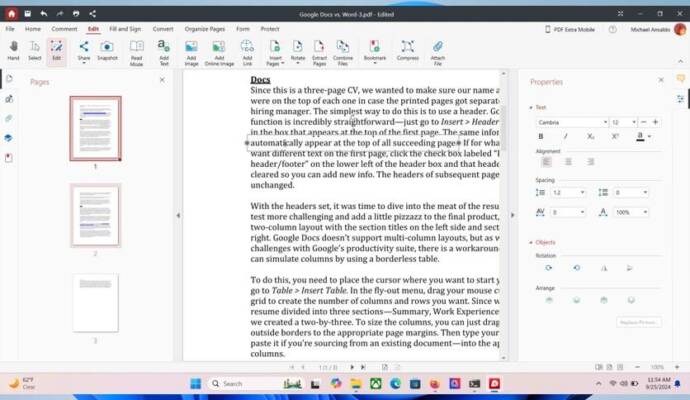
Unlike basic PDF viewers, MobiPDF Ultimate is built for users who demand full control over their documents , offering desktop performance with mobile flexibility. It’s an excellent choice for business professionals, students, legal staff, and remote workers.
Let’s explore what makes MobiPDF Ultimate 10.30.59210 one of the most versatile PDF solutions available today.
📌 What Is MobiPDF Ultimate 10.30.59210?
MobiPDF Ultimate 10.30.59210 is a comprehensive PDF editing software developed by MobiSystems. It combines desktop power with mobile accessibility , allowing users to create, edit, annotate, convert, secure, and sign PDF files — not only on Windows but also via companion apps on Android and iOS.
The “Ultimate” version includes all premium features, including OCR, batch processing, cloud integration, and advanced form handling , making it ideal for heavy PDF users.
🛠️ Key Features of MobiPDF Ultimate 10.30.59210
1. ✏️ Full PDF Editing
Edit text and images directly within PDFs — change fonts, adjust paragraph spacing, resize pictures, and reflow content without needing the original source file.
2. 🔍 Built-in OCR (Optical Character Recognition)
Convert scanned documents and image-based PDFs into fully editable and searchable text. Supports multiple languages and maintains layout accuracy.
3. 📁 Create & Convert PDFs
Create new PDFs from scratch or convert files from Word, Excel, PowerPoint, TXT, HTML, and images. Export PDFs back to these formats with high fidelity.
4. 💬 Annotate & Comment
Add highlights, sticky notes, stamps, shapes, arrows, and freehand drawings. Perfect for reviewing contracts, academic papers, or design proofs.
5. 🧾 Fill & Create PDF Forms
Easily fill interactive forms or create your own using text fields, checkboxes, radio buttons, and signature lines. Save time on paperwork and automate workflows.
6. 🔒 Secure Your Documents
Protect PDFs with passwords, restrict editing/printing permissions, and apply digital signatures to ensure authenticity and compliance.
7. ☁️ Cloud & Sync Integration
Seamlessly connect with Google Drive, Dropbox, OneDrive, Box , and other services. Sync your recent files and annotations across Windows, Android, and iOS devices.
8. 📦 Batch Processing
Apply edits, conversions, or security settings to multiple PDFs at once — ideal for managing large document sets.
9. 🖥️ Multi-Platform Support
Use MobiPDF on Windows PC , then continue working on your Android or iPhone/iPad with the same interface and features.
10. 🗂️ Organize with Bookmarks & Thumbnails
Navigate long documents easily using bookmarks, page thumbnails, and a structured outline view.
👥 Who Should Use MobiPDF Ultimate 10.30.59210?
- Business Professionals: For editing contracts, reports, and presentations on the go.
- Legal & Administrative Staff: To manage forms, redact sensitive data, and sign documents digitally.
- Students & Educators: Annotate research papers, submit assignments, and organize study materials.
- Remote Workers: Stay productive across devices with synced PDFs and real-time access.
- Home Users: Handle bills, manuals, receipts, and personal records securely.
🖥️ System Requirements (Windows)
- Operating System: Windows 10 or later (64-bit)
- Processor: 1 GHz or faster
- RAM: 2 GB minimum (4 GB recommended)
- Hard Disk Space: 500 MB free space
- Internet Connection: Required for activation and cloud sync
📈 Why Choose MobiPDF Ultimate 10.30.59210?
- ✅ Cross-Platform Workflow: Work seamlessly between PC and mobile devices
- ✅ True Text Editing: Not just overlay — actually edit existing text like in Word
- ✅ Powerful OCR Engine: Extract text from scans with high accuracy
- ✅ Cloud Sync Ready: Always have your latest files at hand
- ✅ No Subscription Lock-In: One-time purchase with lifetime license option
- ✅ Clean, Modern Interface: Intuitive and easy to learn
✅ Final Thoughts
MobiPDF Ultimate 10.30.59210 is more than just a PDF editor — it’s a complete document productivity suite that bridges the gap between desktop power and mobile convenience. With its rich feature set, excellent OCR, and true cross-device compatibility, it stands out as a top alternative to Adobe Acrobat Pro, especially for users who value mobility and affordability.
If you need a reliable, intelligent, and flexible PDF solution that works wherever you do, MobiPDF Ultimate 10.30.59210 is definitely worth trying .
✔ Tested: This software was tested on Windows 10 & Windows 11 and works smoothly without issues.
Frequently Asked Questions
- Is this software free?
Yes, it can be downloaded and used for free. - Does it support Windows 11?
Yes, it works perfectly on Windows 10 and 11. - Is it safe to use?
Yes, the software was scanned and tested before publishing.
Last updated: مايو 2026
Frequently Asked Questions
- هل هذا البرنامج مجاني؟ نعم، مجاني للاستخدام الشخصي.
- هل يعمل على Windows و Mac و Android؟ نعم، متوافق مع أغلب الأنظمة.
- هل الملفات آمنة؟ نعم، جميع الملفات يتم فحصها قبل النشر.