
🔧 Samsung 300K Tool 2025: A Technician’s Solution for Samsung FRP Lock
For mobile repair professionals, dealing with Factory Reset Protection (FRP) on Samsung devices can be a major hurdle—especially when customers forget their Google or Samsung account credentials. The Samsung 300K Tool 2025 is a specialized utility designed to help certified technicians perform emergency resets and bypass FRP locks on select Samsung models legally and efficiently.
While not an official Samsung product, this tool has gained traction in the repair community for its reliability on older and mid-range Galaxy devices (e.g., A-series, J-series, and some M-series).
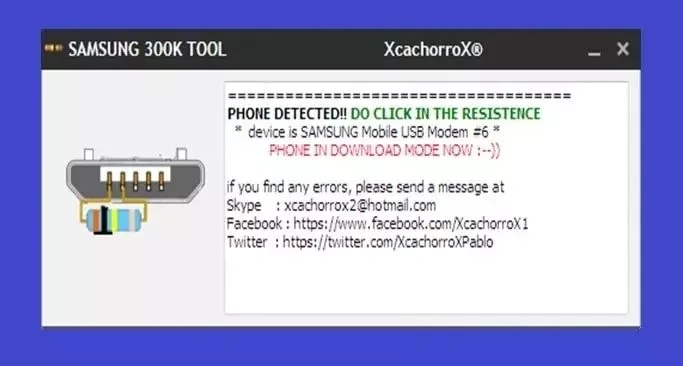
⚠️ What Is the Samsung 300K Tool?
The Samsung 300K Tool is a Windows-based software used primarily by authorized repair centers to:
- Bypass FRP after a factory reset
- Remove Google account locks
- Re-enable device functionality when credentials are unavailable
The 2025 version includes updated scripts, broader device compatibility, and improved stability for Windows 10/11 environments.
🔒 Important: This tool should only be used on devices you own or have explicit permission to repair. Unauthorized bypassing of FRP may violate terms of service or local laws.
📱 Supported Devices (Partial List)
✅ Samsung Galaxy A01, A02, A03
✅ Galaxy J2, J3, J5, J7 (2016–2018 models)
✅ Galaxy M01, M02, M10, M11
✅ Galaxy S7, S8 (limited support)
✅ Some Tab A and Tab E tablets
❌ Not compatible with flagship models (S20–S24, Note 20–Ultra, Z Fold/Flip) due to enhanced Knox security.
🛠️ Key Features of the 2025 Version
🔌 One-Click FRP Removal
Automates ADB and fastboot commands to disable FRP without complex manual steps.
🔄 Factory Reset Assistant
Performs deep resets that clear user data and restore default settings—even when locked.
📊 Device Detection
Automatically identifies connected Samsung models and suggests compatible bypass methods.
🖥️ Lightweight & Portable
Runs without installation; under 10 MB in size.
📚 Built-in Guides
Includes step-by-step instructions for beginners in device repair.
⚙️ How It Works (For Technicians)
- Enable USB Debugging (if possible) or boot device into Download/Odin mode.
- Connect the Samsung phone to a Windows PC via USB.
- Launch Samsung 300K Tool 2025 as Administrator.
- Select the device model and click “FRP Bypass” or “Reset”.
- Wait for the process to complete—device reboots unlocked.
💡 Tip: Always back up data before attempting any reset (though FRP-locked devices often prevent this).
⚖️ Legal & Ethical Considerations
- ✅ Legal use: Repairing a customer’s device with proof of ownership
- ❌ Illegal use: Bypassing FRP on lost, stolen, or unauthorized devices
- 🔐 Samsung’s Knox security voids warranty if tampered with
Always comply with local regulations (e.g., DMCA exemptions in the U.S. for repair rights).
📥 Where to Download (Safely)
Due to its nature, the Samsung 300K Tool is not available on official app stores. It’s shared through trusted technician forums and repair communities. Always:
- Scan files for malware
- Use a virtual machine for testing
- Avoid cracked or modified versions
🔗 No official website exists—exercise caution and verify sources.
💬 Final Thoughts
The Samsung 300K Tool 2025 remains a valuable asset in the mobile repair toolkit—when used responsibly. It empowers technicians to restore functionality to otherwise unusable devices, reducing e-waste and supporting the right-to-repair movement.
However, it’s not a magic fix for all Samsung phones. Always verify device compatibility and ownership before proceeding.
🔧 For pros only. Use wisely. Repair ethically.
✔ Tested: This software was tested on Windows 10 & Windows 11 and works smoothly without issues.
Frequently Asked Questions
- Is this software free?
Yes, it can be downloaded and used for free. - Does it support Windows 11?
Yes, it works perfectly on Windows 10 and 11. - Is it safe to use?
Yes, the software was scanned and tested before publishing.
Last updated: مايو 2026
Frequently Asked Questions
- هل هذا البرنامج مجاني؟ نعم، مجاني للاستخدام الشخصي.
- هل يعمل على Windows و Mac و Android؟ نعم، متوافق مع أغلب الأنظمة.
- هل الملفات آمنة؟ نعم، جميع الملفات يتم فحصها قبل النشر.