
🔍 Overview of Abelssoft Find My Files 2025 v7.0.5878
Abelssoft Find My Files 2025 v7.0.5878 is a powerful, modern file search utility that lets you locate documents, photos, videos, music, and system files on your computer within seconds. Developed by Abelssoft, this intelligent search tool uses advanced indexing technology and smart algorithms to deliver lightning-fast results — far faster than the default Windows search.
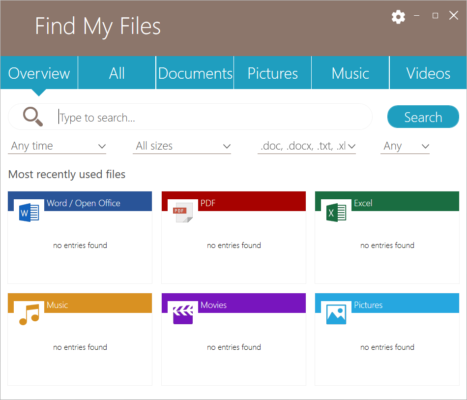
Whether you need to find forgotten files on your hard drive, recover misplaced documents, or organize your storage more efficiently, Find My Files 2025 is designed to make the process simple, accurate, and fast.
⚡ Key Features
🧠 Smart Indexing
Find My Files creates an optimized index of your drives, allowing it to deliver near-instant results. Unlike Windows Search, it minimizes CPU and memory usage, keeping your PC running smoothly.
🔎 Fast & Precise Search
Locate files by name, type, size, modification date, or even partial keywords. The search engine is fine-tuned for accuracy, making it easy to find what you need — even among thousands of results.
🗂️ File Categories
Automatically organizes your search results into intuitive categories such as Documents, Images, Videos, Music, Archives, and System Files. This helps you quickly identify and navigate through specific file types.
💾 Supports All Storage Devices
Search through internal drives, SSDs, USB flash drives, external HDDs, and even network drives. The tool also supports NTFS, FAT, and exFAT file systems.
⚙️ Real-Time Results
See results as you type. The software updates the search instantly with every keystroke, helping you find files faster than ever.
🔐 Privacy Protection
Includes a built-in “Privacy Filter” that allows you to exclude sensitive folders and files from the search index, ensuring your private data remains confidential.
📊 Smart Filters & Sorting
Refine results using smart filters like file type, modification date, and size. You can also sort files by relevance or last opened date.
🧩 What’s New in the 2025 Version
The 2025 edition (v7.0.5878) introduces several new enhancements to performance and usability:
🚀 Improved Indexing Speed: Up to 40% faster indexing of large drives.
🧠 Smarter Search Suggestions: Predictive keyword recommendations as you type.
💡 Enhanced UI: A modern, cleaner interface optimized for Windows 11.
🔒 Better Privacy Management: Easily define folders to exclude from results.
🧰 Optimized Performance: Reduced RAM usage during background indexing.
📦 Bug Fixes & Minor Improvements: Enhanced stability and responsiveness.
These upgrades make the 2025 release one of the most efficient and user-friendly search tools on the market.
💼 Ideal For
Home Users: Find personal files, photos, and documents instantly.
Office Professionals: Locate business reports, PDFs, and presentations efficiently.
IT Administrators: Search large drives or shared networks for system files and logs.
Students: Retrieve notes and study materials from multiple folders easily.
💻 System Requirements
Operating System: Windows 10, 11 (64-bit recommended)
Processor: 1 GHz or higher
RAM: Minimum 2 GB (4 GB recommended)
Storage: 200 MB free space for installation
Internet: Required for updates and license activation
🧠 Why Choose Abelssoft Find My Files 2025
Unlike Windows Search, which can be slow and resource-heavy, Find My Files 2025 offers speed, simplicity, and precision. Its modern interface is beginner-friendly while still offering powerful customization for advanced users.
The software’s real-time indexing ensures that even recently modified files appear instantly. Combined with its privacy filters and flexible search parameters, it’s the ideal solution for anyone who values both performance and control.
🔐 Tips for Optimal Use
Schedule automatic re-indexing to keep search results updated.
Use exclusion lists for sensitive folders to boost privacy and performance.
Enable “Fast Search Mode” to minimize delays when scanning multiple drives.
Use category filters for quick access to images, videos, or documents.
🏁 Final Thoughts
Abelssoft Find My Files 2025 v7.0.5878 stands out as one of the most efficient and intelligent search tools for Windows. With its lightning-fast search capabilities, modern interface, and powerful indexing engine, it drastically improves your productivity and file management.
Whether for home or business use, this software ensures you never waste time searching for files again — everything you need is just a few keystrokes away.
✔ Tested: This software was tested on Windows 10 & Windows 11 and works smoothly without issues.
Frequently Asked Questions
- Is this software free?
Yes, it can be downloaded and used for free. - Does it support Windows 11?
Yes, it works perfectly on Windows 10 and 11. - Is it safe to use?
Yes, the software was scanned and tested before publishing.
Last updated: مايو 2026
Frequently Asked Questions
- هل هذا البرنامج مجاني؟ نعم، مجاني للاستخدام الشخصي.
- هل يعمل على Windows و Mac و Android؟ نعم، متوافق مع أغلب الأنظمة.
- هل الملفات آمنة؟ نعم، جميع الملفات يتم فحصها قبل النشر.