
What Is x64dbg?
x64dbg 2025-08-19 is a powerful, open-source debugger built for Windows that supports both x64 and x32 applications. It’s widely used by reverse engineers, malware analysts, and software developers to inspect, analyze, and debug executable files.
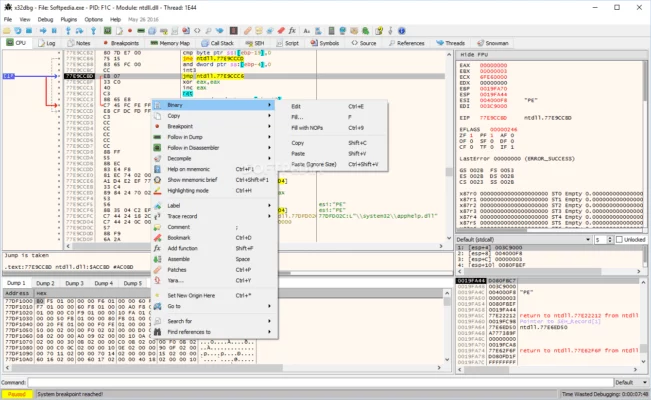
Designed to be both user-friendly and feature-rich, x64dbg offers a modern interface, an integrated disassembler, and a scripting engine — making it one of the most popular free debugging tools today.
Key Features of x64dbg 2025-08-19
1. Supports x64 and x32 Architectures
x64dbg includes two main components: x64dbg for 64-bit programs and x32dbg for 32-bit applications. This dual compatibility makes it perfect for debugging a wide range of Windows executables, from legacy software to modern games and applications.
2. User-Friendly Interface
Unlike many traditional debuggers, x64dbg provides a clean and intuitive interface. Users can easily navigate between memory views, disassembly code, and breakpoints. It’s designed to be approachable even for users new to reverse engineering.
3. Advanced Disassembler and Hex Editor
x64dbg integrates a powerful disassembler and hex editor, enabling you to analyze code at the assembly level. You can step through instructions, inspect registers, and modify values in real-time — essential features for deep software inspection.
4. Plugin Support
x64dbg supports a wide range of community-developed plugins that extend its functionality. Whether you need API tracing, unpacking tools, or automation scripts, plugins help you customize x64dbg to your workflow.
5. Scripting and Automation
The debugger includes a built-in scripting engine that allows repetitive tasks to be automated. Scripts can be written to perform actions like patching, data extraction, or automatic breakpoint handling.
What’s New in Version 2025-08-19
Improved Stability and Performance
The 2025-08-19 release introduces several performance optimizations and bug fixes that make debugging smoother and faster, especially on large binaries.
Updated Disassembler Engine
This version updates the internal disassembler for better instruction recognition and code analysis accuracy, improving the debugging experience for modern Windows applications.
Enhanced Plugin API
Developers will appreciate the new plugin API enhancements, which make it easier to integrate custom tools or extensions without modifying the core of x64dbg.
Why Choose x64dbg?
x64dbg remains one of the most respected debugging tools for Windows because it combines open-source transparency with advanced capabilities found in professional software.
It’s ideal for:
Reverse engineering malware or protected executables
Debugging your own applications to fix runtime issues
Learning assembly language and software internals
Security research and analysis
The tool is updated regularly by a dedicated community, ensuring stability, compatibility, and modern debugging support.
How to Download and Install
You can download x64dbg 2025-08-19 from its official GitHub repository or project website.
Simply extract the package, run x64dbg.exe or x32dbg.exe, and start debugging immediately — no installation required.
✔ Tested: This software was tested on Windows 10 & Windows 11 and works smoothly without issues.
Frequently Asked Questions
- Is this software free?
Yes, it can be downloaded and used for free. - Does it support Windows 11?
Yes, it works perfectly on Windows 10 and 11. - Is it safe to use?
Yes, the software was scanned and tested before publishing.
Last updated: مايو 2026
Frequently Asked Questions
- هل هذا البرنامج مجاني؟ نعم، مجاني للاستخدام الشخصي.
- هل يعمل على Windows و Mac و Android؟ نعم، متوافق مع أغلب الأنظمة.
- هل الملفات آمنة؟ نعم، جميع الملفات يتم فحصها قبل النشر.