
VNote 3.19.2: A Developer-Friendly Notebook for Structured, Code-Centric Notes 🧠⌨️
For developers, researchers, and technical writers who live in code and documentation, VNote 3.19.2 is a powerful, open-source note-taking app built specifically for Markdown—with a unique notebook-style interface that mimics physical lab notebooks.
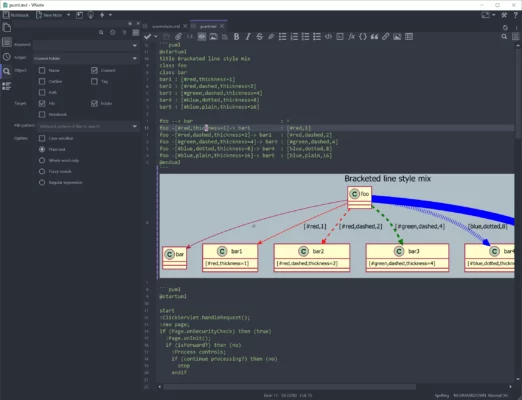
Unlike generic note apps, VNote treats your notes as plain-text files in folders, supports code blocks with syntax highlighting, LaTeX math, diagrams, and tabbed editing—all while staying fast, lightweight, and 100% offline.
🎯 Why Choose VNote?
- ✅ Open-source & free (no tracking, no cloud lock-in)
- ✅ Notebook + folder structure – ideal for projects, courses, or documentation
- ✅ True Markdown experience with live preview and editing
- ✅ Built for code: syntax highlighting for 100+ languages
- ✅ Cross-platform: Windows, Linux, and macOS support
Perfect for software engineers, students, data scientists, and technical bloggers who need a structured, distraction-free writing environment.
✨ Key Features of VNote 3.19.2
📁 1. Notebook-Based Organization
- Create multiple notebooks (e.g., “Web Dev”, “Machine Learning”, “Personal Wiki”)
- Each notebook = a local folder on your disk (fully portable)
- Nested folders and subfolders for deep organization
- Tabbed interface to work on multiple notes simultaneously
📝 2. Enhanced Markdown Editor
- Split-view (edit + preview) or live preview mode
- Supports GitHub Flavored Markdown (GFM)
- Insert images, tables, task lists, and footnotes easily
- Auto-save and version history (via local backups)
💻 3. Developer-First Tools
- Syntax highlighting for Python, JavaScript, C++, SQL, and more
- Code block folding and line numbers
- Snippets library to save and reuse common code blocks
- Terminal integration (on Linux/macOS)
🧮 4. Math & Diagram Support
- Render LaTeX math inline or block (
$$...$$) - Embed Mermaid, Graphviz, or PlantUML diagrams
- Ideal for academic notes, algorithms, or system designs
🔍 5. Fast Search & Navigation
- Instant full-text search across notebooks
- Outline view (table of contents from headers)
- Backlinks and note relationships (experimental)
🛠️ Ideal For:
- Developers: Document APIs, debug logs, or architecture
- Students: Take lecture notes with code + equations
- Researchers: Organize experiments and references
- Technical Writers: Draft docs in Markdown with confidence
💡 Since notes are stored as real
.mdfiles, you can edit them in VS Code, Obsidian, or any text editor—no vendor lock-in!
🆚 VNote vs. Popular Markdown Apps
VNote stands out with its structured notebook metaphor and developer-native workflow.
💡 Final Thoughts: Notes That Think Like You Do
VNote 3.19.2 isn’t just another Markdown editor—it’s a thoughtfully designed workspace for people who think in code, logic, and structure. By blending the simplicity of plain text with the power of modern editing, it helps you capture ideas clearly and build knowledge systematically.
✍️ Write code. Explain logic. Organize knowledge. All in one place.
🌐 Free & open-source.
🔗 Download: https://tamlok.github.io/vnote
💻 Source on GitHub: https://github.com/tamlok/vnote
✔ Tested: This software was tested on Windows 10 & Windows 11 and works smoothly without issues.
Frequently Asked Questions
- Is this software free?
Yes, it can be downloaded and used for free. - Does it support Windows 11?
Yes, it works perfectly on Windows 10 and 11. - Is it safe to use?
Yes, the software was scanned and tested before publishing.
Last updated: مايو 2026
Frequently Asked Questions
- هل هذا البرنامج مجاني؟ نعم، مجاني للاستخدام الشخصي.
- هل يعمل على Windows و Mac و Android؟ نعم، متوافق مع أغلب الأنظمة.
- هل الملفات آمنة؟ نعم، جميع الملفات يتم فحصها قبل النشر.