SysTools Excel Recovery 4.1 — Professional Solution for Excel File Repair
SysTools Excel Recovery 4.1 is a powerful and reliable software tool designed to repair corrupted or damaged Microsoft Excel files. Whether your Excel documents have been affected by system crashes, virus attacks, or accidental shutdowns, this tool can efficiently restore your valuable data without any loss.
It supports both .XLS (Excel 97–2003) and .XLSX (Excel 2007–2021) file formats, making it an all-in-one recovery solution for users and professionals who rely on Excel for managing data, reports, and analytics.
Key Features of SysTools Excel Recovery 4.1
Advanced Excel File Repair
SysTools Excel Recovery uses a robust recovery algorithm to detect and repair multiple types of Excel corruption. It recovers important elements like formulas, filters, formatting, and merged cells, ensuring that the restored file maintains its original structure.
Support for Batch Recovery
Users can repair multiple Excel files simultaneously, saving time and effort. This feature is particularly useful for businesses or IT departments that handle large datasets and numerous spreadsheet files.
Preview Before Saving
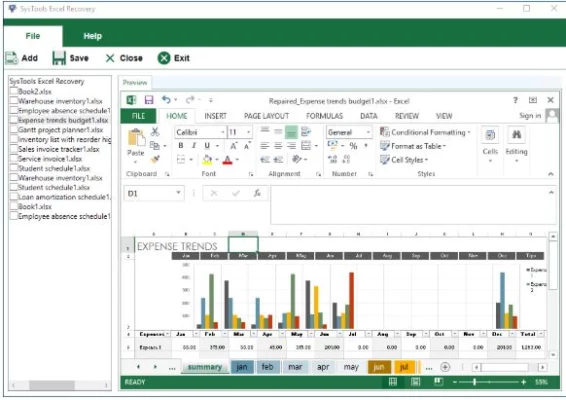
Before finalizing recovery, the software allows users to preview the repaired Excel sheets, including all rows, columns, and data formatting. This ensures you can verify the results before exporting.
What’s New in Version 4.1
Enhanced Performance and Compatibility
SysTools Excel Recovery 4.1 includes improved support for Microsoft Excel 2021 and Windows 11. The recovery process is now faster and more stable, capable of handling larger Excel files with complex formulas.
Improved Data Accuracy
The latest version refines its recovery algorithm to better preserve formulas, conditional formatting, and embedded charts. Users can recover not only cell values but also complete data integrity.
Modernized User Interface
The new user interface is cleaner and more intuitive, with simplified navigation that guides users through each recovery step — from file selection to saving the repaired output.
How SysTools Excel Recovery 4.1 Works
Step 1: Load the Corrupted File
Launch the program and import one or multiple Excel files that you want to repair.
Step 2: Scan and Analyze
The software scans the selected files to identify and fix corruption issues automatically.
Step 3: Preview Results
Once the scanning process is complete, you can preview the recovered data including tables, charts, and cell formatting.
Step 4: Save the Repaired File
Finally, export the restored Excel sheet to your preferred location. The output file remains fully compatible with Microsoft Excel.
Benefits of Using SysTools Excel Recovery
No Data Loss: Safely recovers all elements including formulas, filters, and charts.
Easy to Use: Simple interface ideal for both beginners and professionals.
Batch Processing: Repair multiple Excel files in one go.
Wide Compatibility: Supports Excel 97–2021 and Windows 7–11.
Fast and Reliable: Recovers damaged spreadsheets in minutes.
SysTools Excel Recovery 4.1 ensures smooth and efficient Excel file recovery for users dealing with damaged or inaccessible workbooks.
Conclusion
SysTools Excel Recovery 4.1 is a dependable and feature-rich tool that simplifies the process of restoring broken or corrupted Excel files. It’s designed for anyone who values their spreadsheet data — from accountants and data analysts to students and IT professionals.
With its advanced repair engine, batch recovery support, and enhanced accuracy, SysTools Excel Recovery 4.1 stands out as one of the most effective solutions for recovering Excel files without compromising data integrity or layout.
✔ Tested: This software was tested on Windows 10 & Windows 11 and works smoothly without issues.
Frequently Asked Questions
- Is this software free?
Yes, it can be downloaded and used for free. - Does it support Windows 11?
Yes, it works perfectly on Windows 10 and 11. - Is it safe to use?
Yes, the software was scanned and tested before publishing.
Last updated: مايو 2026
Frequently Asked Questions
- هل هذا البرنامج مجاني؟ نعم، مجاني للاستخدام الشخصي.
- هل يعمل على Windows و Mac و Android؟ نعم، متوافق مع أغلب الأنظمة.
- هل الملفات آمنة؟ نعم، جميع الملفات يتم فحصها قبل النشر.