Solid Automator 10.1.18270.10854 Overview
Solid Automator 10.1.18270.10854 is a professional PDF automation tool that allows you to batch process documents for conversion, creation, and optimization. Developed by Solid Documents, this software is designed to simplify repetitive PDF-related tasks, saving time and improving productivity for individuals and businesses.
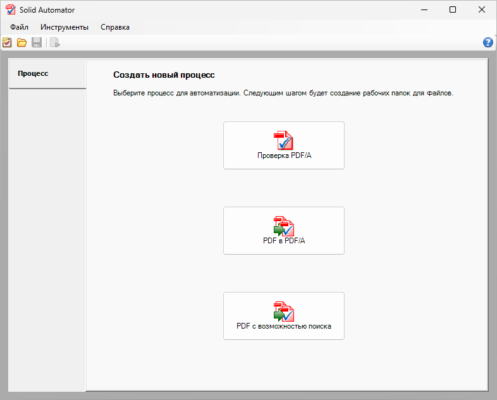
With Solid Automator, you can automate operations such as converting Word, Excel, and other office documents to PDF, extracting text or images, repairing corrupted files, or running OCR on scanned documents. Its automation engine ensures consistent, high-quality results with minimal user intervention.
Key Features of Solid Automator 10.1.18270.10854
1. Batch PDF Conversion
Convert multiple files to or from PDF in one go. Solid Automator supports PDF to Word, Excel, PowerPoint, and text conversions with precise layout retention.
2. Intelligent OCR Engine
The built-in Optical Character Recognition (OCR) feature recognizes text in scanned images or PDFs, making them fully searchable and editable.
3. PDF Repair and Optimization
Solid Automator can repair damaged or corrupted PDF files and optimize file size without losing quality — ideal for sharing and archiving.
4. Folder Monitoring
This tool can monitor folders for new files and automatically process them using predefined rules. It’s perfect for offices that need continuous PDF automation without manual input.
5. Flexible Automation Rules
Create and customize automation profiles that define specific actions for each type of document — convert, compress, OCR, rename, and more.
How to Use Solid Automator
Create a new automation profile based on your workflow.
Add files or select a folder to process automatically.
Choose actions such as Convert to PDF, OCR, or Optimize.
Set output preferences for file naming and location.
Start the automation and let Solid Automator handle the rest.
Why Choose Solid Automator 10.1?
This version introduces faster processing, better OCR accuracy, and improved integration with Microsoft Office. The intuitive interface allows both beginners and advanced users to create efficient document workflows.
Solid Automator is ideal for document management departments, legal firms, banks, and educators who deal with large volumes of PDFs daily.
System Requirements
Operating System: Windows 11, 10, 8, 7
Processor: 1 GHz or faster
RAM: 2 GB or more
Disk Space: 200 MB free space
Conclusion
Solid Automator 10.1.18270.10854 is an essential productivity tool for professionals who need to automate PDF-related workflows. With powerful OCR, flexible batch processing, and folder monitoring, it offers a seamless way to manage, convert, and optimize your PDF documents automatically.
✔ Tested: This software was tested on Windows 10 & Windows 11 and works smoothly without issues.
Frequently Asked Questions
- Is this software free?
Yes, it can be downloaded and used for free. - Does it support Windows 11?
Yes, it works perfectly on Windows 10 and 11. - Is it safe to use?
Yes, the software was scanned and tested before publishing.
Last updated: مايو 2026
Frequently Asked Questions
- هل هذا البرنامج مجاني؟ نعم، مجاني للاستخدام الشخصي.
- هل يعمل على Windows و Mac و Android؟ نعم، متوافق مع أغلب الأنظمة.
- هل الملفات آمنة؟ نعم، جميع الملفات يتم فحصها قبل النشر.