
Modern PCs run multiple processes at the same time, which often leads to slowdowns, lags, and unstable performance. While Windows manages processes by default, it doesn’t always allocate resources efficiently. This is where Bitsum Process Lasso Pro 16.0.1.16 comes in—a powerful tool that optimizes CPU usage, controls running processes, and improves overall system responsiveness and buy.
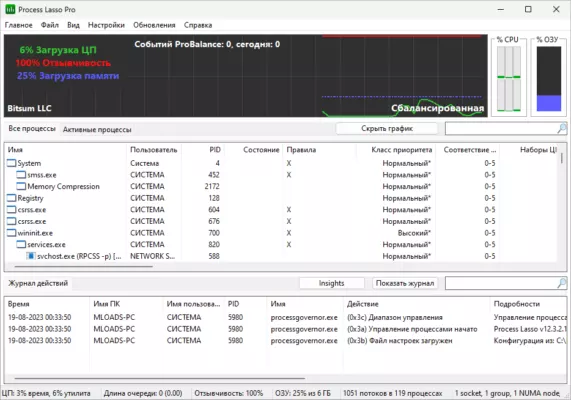
What is Process Lasso Pro?
Process Lasso Pro, developed by Bitsum, is a Windows optimization tool designed to keep your system fast and stable under heavy workloads. Unlike traditional system boosters, it doesn’t rely on gimmicks or temporary tweaks. Instead, it uses advanced real-time algorithms to manage CPU priorities and balance resource usage.
The latest version, 16.0.1.16, introduces stability improvements and enhanced features, making it an essential utility for power users, gamers, and professionals.
Key Features of Bitsum Process Lasso Pro 16.0.1.16
1. ProBalance Technology
Automatically adjusts process priorities to prevent system slowdowns caused by background tasks.
2. CPU Affinity Optimization
Assigns specific CPU cores to selected processes, ensuring optimal performance.
3. Power Plans
Dynamic power management that switches between energy-saving and high-performance modes based on workload.
4. Automated Rules
Create custom rules for launching, prioritizing, or limiting processes automatically.
5. Instance Balancing
Distributes multiple instances of software evenly across CPU cores.
6. System Responsiveness Boost
Keeps your system responsive even during heavy multitasking or gaming.
7. Detailed Monitoring
Provides real-time graphs and statistics for CPU, RAM, and process usage.
What’s New in Version 16.0.1.16?
Improved ProBalance algorithms for more accurate process prioritization.
Enhanced stability and performance on Windows 11.
Faster load times with optimized background service.
Updated interface with clearer graphs and statistics.
Bug fixes and minor improvements for smoother user experience.
Benefits of Using Process Lasso Pro
For Gamers
Ensures smoother gameplay by preventing background processes from consuming critical CPU resources.
For Professionals
Helps with video editing, 3D rendering, and other CPU-heavy tasks by allocating resources intelligently.
For Everyday Users
Keeps Windows responsive even when running multiple applications or browser tabs.
For Power Users
Provides deep customization with advanced rules, CPU affinity settings, and power profile management.
How to Use Bitsum Process Lasso Pro 16.0.1.16
Step 1: Install the Software
Download and install the latest version from the official Bitsum website.
Step 2: Enable ProBalance
Activate ProBalance to let the software automatically optimize CPU priority.
Step 3: Configure Rules
Set up process rules for frequently used applications, such as forcing high priority for games.
Step 4: Monitor Performance
Use the real-time graphs and logs to analyze CPU usage and system stability.
Step 5: Customize Power Plans
Switch between Bitsum Highest Performance Mode and energy-saving profiles as needed.
Why Choose Process Lasso Over Other Optimizers?
Unlike many so-called “PC boosters,” Process Lasso Pro doesn’t just clear temporary files or overclock hardware. It delivers real performance improvements by intelligently managing processes and CPU priorities.
Its lightweight design ensures it runs in the background without consuming excessive resources, making it more reliable than traditional system optimizers.
Conclusion
Bitsum Process Lasso Pro 16.0.1.16 is a powerful optimization tool that ensures maximum system responsiveness, stability, and performance. Whether you’re a gamer, professional, or everyday PC user, it helps you make the most of your hardware by managing processes intelligently.
With features like ProBalance, CPU affinity optimization, and dynamic power plans, it provides the perfect balance between performance and efficiency. If you want a smoother, faster, and more stable PC experience, Process Lasso Pro is an excellent choice.
✔ Tested: This software was tested on Windows 10 & Windows 11 and works smoothly without issues.
Frequently Asked Questions
- Is this software free?
Yes, it can be downloaded and used for free. - Does it support Windows 11?
Yes, it works perfectly on Windows 10 and 11. - Is it safe to use?
Yes, the software was scanned and tested before publishing.
Last updated: مايو 2026
Frequently Asked Questions
- هل هذا البرنامج مجاني؟ نعم، مجاني للاستخدام الشخصي.
- هل يعمل على Windows و Mac و Android؟ نعم، متوافق مع أغلب الأنظمة.
- هل الملفات آمنة؟ نعم، جميع الملفات يتم فحصها قبل النشر.