
Overview of XD-AntiSpy 4.13
XD-AntiSpy 4.13 is a lightweight and powerful utility designed to give Windows users full control over their system privacy settings. It helps you disable unwanted telemetry, background tracking, and automatic data sharing features that send information to Microsoft and third-party services.
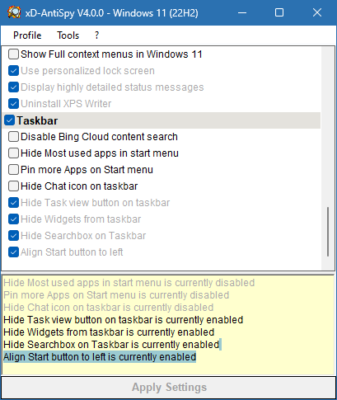
Originally developed to simplify privacy management, XD-AntiSpy remains one of the most trusted tools for protecting your data and improving system performance. This version introduces refined controls for newer versions of Windows 10 and Windows 11, ensuring stronger privacy with minimal configuration.
Key Features
Disable Windows Telemetry
XD-AntiSpy allows you to easily turn off various telemetry services that collect data about your system and user activity. With just one click, you can block Windows from sending diagnostic or usage reports in the background.
Control Automatic Updates
The program provides options to manage or disable automatic Windows updates, giving users full control over when and how updates are installed. This feature helps prevent unwanted restarts and potential compatibility issues.
Manage Background Services
Users can view and disable unnecessary background processes that consume resources and may send anonymous data to external servers. This not only enhances privacy but also improves overall system performance.
Network and Firewall Adjustments
XD-AntiSpy allows you to modify network policies and firewall rules to block specific services or connections. These adjustments strengthen your computer’s defense against hidden network communication.
Simple and Portable Design
The tool is fully portable — no installation is required. You can run it directly from a USB drive, making it perfect for technicians and privacy-conscious users who manage multiple systems.
What’s New in Version 4.13
The 4.13 release brings several enhancements and new compatibility updates:
Improved compatibility with Windows 11 and the latest Windows 10 builds
Updated privacy presets for modern telemetry services
Enhanced system backup and restore functions before applying changes
Optimized interface for better clarity and accessibility
Minor bug fixes and performance tweaks
Benefits of Using XD-AntiSpy
Enhanced Privacy Protection
With XD-AntiSpy, you regain control over your personal information. It ensures that your data remains private and prevents unwanted background communication between your device and external servers.
Better System Performance
By disabling unneeded background services and telemetry, your system becomes faster and more efficient, reducing CPU usage and improving responsiveness.
Full User Control
Unlike many built-in Windows settings, XD-AntiSpy provides direct access to system-level privacy options — all organized in a clear, easy-to-use interface.
Conclusion
XD-AntiSpy 4.13 is an essential tool for users who value privacy, transparency, and performance. It offers a simple yet effective way to disable Windows telemetry, manage automatic updates, and block hidden communication services. Whether you’re a casual user or a system administrator, this utility helps ensure your PC operates securely and privately — exactly the way you want it to.
✔ Tested: This software was tested on Windows 10 & Windows 11 and works smoothly without issues.
Frequently Asked Questions
- Is this software free?
Yes, it can be downloaded and used for free. - Does it support Windows 11?
Yes, it works perfectly on Windows 10 and 11. - Is it safe to use?
Yes, the software was scanned and tested before publishing.
Last updated: مايو 2026
Frequently Asked Questions
- هل هذا البرنامج مجاني؟ نعم، مجاني للاستخدام الشخصي.
- هل يعمل على Windows و Mac و Android؟ نعم، متوافق مع أغلب الأنظمة.
- هل الملفات آمنة؟ نعم، جميع الملفات يتم فحصها قبل النشر.