In today’s digital workplace, handling PDF documents efficiently is essential. Whether you’re editing contracts, converting reports, securing sensitive files, or digitizing scanned paper documents, having a reliable and feature-rich PDF tool makes all the difference and buy.
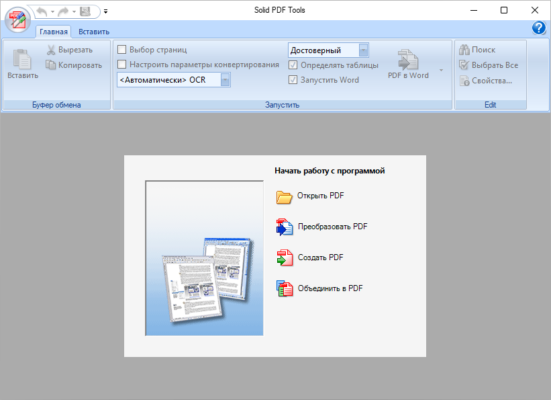
Enter Solid PDF Tools 10.1.18270.10854 — a comprehensive, professional-grade PDF suite developed by Solid Documents . This version delivers advanced functionality in a clean, user-friendly interface, combining PDF editing, conversion, creation, security, and OCR (Optical Character Recognition) into one seamless application.
Trusted by businesses, legal teams, engineers, and government agencies worldwide, Solid PDF Tools 10 stands out as a robust alternative to Adobe Acrobat Pro — offering similar capabilities at a more accessible price point.
Let’s explore what makes this release a top choice for serious PDF management.
📌 What Is Solid PDF Tools 10.1.18270.10854?
Solid PDF Tools 10.1.18270.10854 is the latest stable release of Solid’s flagship desktop software for Windows. It enables users to:
- Edit text and images directly within PDFs
- Convert PDFs to editable formats like Word, Excel, PowerPoint, and HTML
- Create new PDFs from scratch or existing files
- Apply OCR to scanned documents
- Secure files with passwords and permissions
Unlike online converters that require uploading sensitive data, Solid PDF Tools runs entirely offline , ensuring your documents stay private and secure on your local machine.
It’s designed for both everyday users and professionals who need accurate, high-quality results without relying on cloud services.
🛠️ Key Features of Solid PDF Tools 10.1.18270.10854
1. ✏️ Direct PDF Editing
Edit existing text as easily as in Microsoft Word — change fonts, adjust paragraph spacing, resize images, and reflow content — all while preserving layout integrity.
Perfect for updating forms, reports, or proposals without the original source file.
2. 🔁 High-Fidelity Format Conversion
Convert PDFs to:
- Word (.docx) – Maintain formatting and tables
- Excel (.xlsx) – Extract data from charts and spreadsheets
- PowerPoint (.pptx) – Turn presentations into editable slides
- HTML, RTF, TXT, JPG/PNG
Reverse conversions are also supported — create PDFs from any format.
3. 🔍 Built-in OCR Engine
Transform scanned paper documents into fully searchable and editable PDFs using advanced OCR technology. Supports multiple languages and maintains document structure.
Ideal for digitizing archives, invoices, and legacy records.
4. 💬 Annotate & Comment
Add highlights, sticky notes, stamps, arrows, and freehand drawings to review contracts, academic papers, or design proofs.
5. 🔐 Secure Your PDFs
Protect sensitive documents with:
- Passwords to restrict opening (user password)
- Permissions to prevent copying, printing, or editing (owner password)
- AES-128 or AES-256 encryption standards
Complies with GDPR, HIPAA, and other regulatory requirements.
6. 🧩 Merge & Split PDF Files
Combine multiple documents into one cohesive file or split large PDFs into smaller sections by page range.
7. 🖋️ Fill & Create PDF Forms
Fill interactive forms electronically or create your own using text fields, checkboxes, radio buttons, and signature lines.
8. ☁️ Batch Processing Support
Apply edits, conversions, or security settings to multiple files at once — saves time when managing large volumes of documents.
9. 🖥️ Standalone Operation
No need for Adobe Acrobat, Reader, or third-party plugins. Works independently and integrates smoothly with Windows.
10. 🔄 Update & Repair Corrupted PDFs
Open and repair damaged or incomplete PDF files caused by transfer errors or crashes.
👥 Who Should Use Solid PDF Tools 10.1.18270.10854?
- Legal Professionals: Edit and secure contracts and case files.
- Accountants & Finance Teams: Convert financial statements and reports.
- Engineers & Architects: Update technical drawings and schematics.
- IT & Admin Staff: Automate document workflows.
- Academics & Researchers: Digitize and annotate research materials.
- Home Users: Handle personal documents securely.
🖥️ System Requirements
- Operating System: Windows 10 / 11 (64-bit recommended)
- RAM: 2 GB minimum (4 GB suggested)
- Hard Disk Space: 500 MB free space
- Display: 1280×1024 resolution or higher
- .NET Framework: 4.6.1 or later (usually pre-installed)
📈 Why Choose Solid PDF Tools 10.1.18270.10854?
- ✅ All-in-One PDF Solution
- ✅ Offline Processing = Enhanced Privacy
- ✅ Accurate OCR & Conversion
- ✅ Professional-Grade Security
- ✅ Stable, Regular Updates
- ✅ Excellent Customer Support
✅ Final Thoughts
Solid PDF Tools 10.1.18270.10854 is not just another PDF converter — it’s a complete document productivity suite built for accuracy, reliability, and real-world use. With its powerful editing tools, intelligent OCR, and strong focus on data privacy, it stands tall among premium PDF applications.
If you’re looking for a secure, efficient, and versatile alternative to Adobe Acrobat , especially for business or technical environments, Solid PDF Tools 10 is definitely worth considering .
For professionals who demand control, quality, and confidentiality in their PDF workflows, Solid PDF Tools delivers excellence — every time .
✔ Tested: This software was tested on Windows 10 & Windows 11 and works smoothly without issues.
Frequently Asked Questions
- Is this software free?
Yes, it can be downloaded and used for free. - Does it support Windows 11?
Yes, it works perfectly on Windows 10 and 11. - Is it safe to use?
Yes, the software was scanned and tested before publishing.
Last updated: مايو 2026
Frequently Asked Questions
- هل هذا البرنامج مجاني؟ نعم، مجاني للاستخدام الشخصي.
- هل يعمل على Windows و Mac و Android؟ نعم، متوافق مع أغلب الأنظمة.
- هل الملفات آمنة؟ نعم، جميع الملفات يتم فحصها قبل النشر.