
XMedia Recode 3.6.1.8 Overview
XMedia Recode 3.6.1.8 is a free and powerful media conversion software for Windows that supports nearly every video and audio format. Designed for both beginners and advanced users, it provides intuitive controls and detailed settings for professional-level results. Whether you want to convert a movie for playback on mobile devices or compress large video files, XMedia Recode delivers excellent speed and quality.
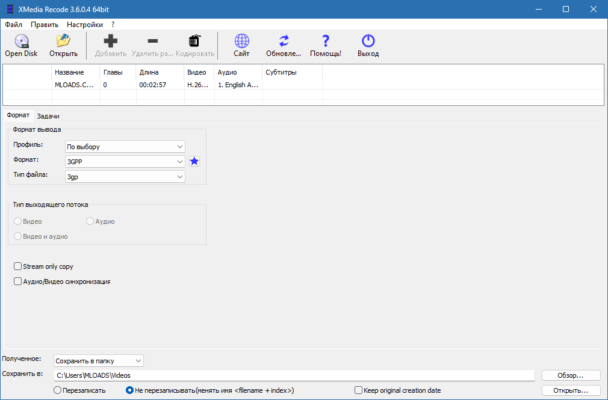
This version introduces better codec support, improved stability, and updated device presets, making it one of the best free converters available today.
Key Features of XMedia Recode 3.6.1.8
1. Wide Format Support
Convert between MP4, MKV, AVI, MOV, WMV, FLV, MP3, AAC, FLAC, and many more. The program includes the latest codec updates to ensure compatibility with modern devices and formats.
2. Device Presets
XMedia Recode includes ready-made profiles for smartphones, tablets, consoles, and TVs, saving time when choosing conversion settings.
3. Built-in Video Editor
It offers basic editing tools like cutting, trimming, cropping, rotating, and adding subtitles — perfect for preparing media before conversion.
4. Batch Conversion
Convert multiple files simultaneously with custom settings, helping you save time when dealing with large media libraries.
5. Subtitle and Audio Track Management
You can add or remove subtitles, sync them accurately, and choose between multiple audio tracks within one file.
6. GPU Acceleration
Hardware acceleration via Intel, NVIDIA, and AMD improves performance, making conversions faster and smoother.
Advantages of Using XMedia Recode
Free, lightweight, and portable.
Supports both video and audio conversion with advanced customization.
Allows fine-tuning of bitrate, resolution, and codecs.
Regular updates to support the latest formats.
Clean interface that’s easy to navigate.
How to Use XMedia Recode
Open XMedia Recode and add your video or audio files.
Choose an output format or device preset.
Adjust settings such as resolution, bitrate, and audio quality.
(Optional) Use the editor to trim or crop clips.
Click Add to Queue → Encode to start conversion.
System Requirements
OS: Windows 11, 10, 8, 7 (64-bit)
Processor: Dual-core CPU or higher
RAM: 2 GB minimum
Disk Space: 200 MB free
GPU: Optional for hardware acceleration
Conclusion
XMedia Recode 3.6.1.8 remains one of the most efficient and reliable media converters for Windows users. With support for almost every format, customizable output settings, and built-in editing tools, it’s a complete solution for both casual users and video professionals. Fast, free, and flexible — it’s the ultimate all-in-one converter you can trust.
✔ Tested: This software was tested on Windows 10 & Windows 11 and works smoothly without issues.
Frequently Asked Questions
- Is this software free?
Yes, it can be downloaded and used for free. - Does it support Windows 11?
Yes, it works perfectly on Windows 10 and 11. - Is it safe to use?
Yes, the software was scanned and tested before publishing.
Last updated: مايو 2026
Frequently Asked Questions
- هل هذا البرنامج مجاني؟ نعم، مجاني للاستخدام الشخصي.
- هل يعمل على Windows و Mac و Android؟ نعم، متوافق مع أغلب الأنظمة.
- هل الملفات آمنة؟ نعم، جميع الملفات يتم فحصها قبل النشر.