
Keeping device drivers updated is essential for maintaining system stability, performance, and security. IObit Driver Booster Pro 13.0.0.143 is one of the most popular driver update tools designed to automatically detect outdated drivers and install the latest versions with a single click. It saves time, reduces errors, and improves both everyday use and gaming performance and buy .
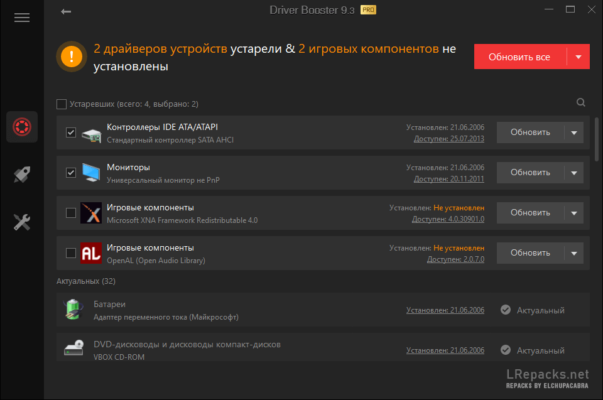
What is Driver Booster Pro?
IObit Driver Booster Pro is a Windows utility that specializes in keeping your computer’s drivers and game components up to date. Unlike manually searching for drivers, Driver Booster automates the process, checking against a massive online database and ensuring safe downloads directly from official sources.
The Pro version offers additional benefits over the free edition, such as faster downloads, automatic updates in the background, and priority access to newly released drivers.
Key Features of IObit Driver Booster Pro 13.0.0.143
Large Driver Database
Driver Booster Pro includes support for millions of drivers, covering everything from graphics cards and sound devices to network adapters and peripherals. This ensures compatibility across nearly all modern hardware.
One-Click Updates
The software simplifies driver management with one-click update functionality, allowing users to update all outdated drivers instantly without navigating through multiple manufacturer websites.
Game Performance Boost
Gamers benefit from Game Ready Drivers that enhance FPS, reduce latency, and ensure smoother gameplay. The software also installs essential game components like DirectX, Visual C++ Redistributables, and PhysX.
Automatic Backups
Every driver update is backed up automatically. If a new driver causes issues, users can roll back to a previous version with ease.
Silent Background Updates
Driver Booster Pro 13.0.0.143 can run updates quietly in the background, letting you continue working without interruptions.
What’s New in Version 13.0.0.143
The latest release brings several improvements to enhance performance and reliability.
Improved Scan Engine
The scan engine has been optimized to detect outdated drivers faster and more accurately, minimizing false positives.
Expanded Driver Database
With an even larger driver library, version 13.0.0.143 provides better support for the latest hardware components and devices.
Enhanced Stability
Bug fixes and stability improvements reduce the chances of driver installation errors and improve overall system compatibility.
Benefits of Using Driver Booster Pro
For Everyday Users
The software keeps essential drivers updated to prevent system crashes, audio glitches, or network problems. It ensures smooth daily performance with minimal effort.
For Gamers
Gamers gain instant access to the newest graphics and sound drivers, helping optimize performance for AAA titles and competitive eSports games.
For Professionals
Professionals using heavy applications such as design, video editing, or CAD software benefit from improved driver reliability, reducing downtime and increasing productivity.
Why Choose the Pro Version?
While the free version of Driver Booster covers basic needs, the Pro edition offers:
Priority updates for rare and critical drivers.
Faster download speeds.
Automatic driver backups and rollbacks.
Scheduled updates with no user input required.
For users who want a fully automated, reliable, and safe driver management system, the Pro version is the smarter choice.
Final Thoughts
IObit Driver Booster Pro 13.0.0.143 is a must-have tool for Windows users who want to keep their systems optimized and secure. By combining a massive driver database with one-click updates, automatic backups, and gaming optimizations, it provides convenience and peace of mind.
If you’re tired of dealing with outdated drivers and hardware issues, upgrading to Driver Booster Pro 13.0.0.143 will save you time, prevent errors, and deliver smoother performance across all your applications.
✔ Tested: This software was tested on Windows 10 & Windows 11 and works smoothly without issues.
Frequently Asked Questions
- Is this software free?
Yes, it can be downloaded and used for free. - Does it support Windows 11?
Yes, it works perfectly on Windows 10 and 11. - Is it safe to use?
Yes, the software was scanned and tested before publishing.
Last updated: مايو 2026
Frequently Asked Questions
- هل هذا البرنامج مجاني؟ نعم، مجاني للاستخدام الشخصي.
- هل يعمل على Windows و Mac و Android؟ نعم، متوافق مع أغلب الأنظمة.
- هل الملفات آمنة؟ نعم، جميع الملفات يتم فحصها قبل النشر.