
Hasleo Data Recovery 6.6.0: Your Lifeline When Files Go Missing 💻🛡️
Lost important photos, documents, or videos due to accidental deletion, formatting, or system crashes? Hasleo Data Recovery 6.6.0 is a fast, reliable, and user-friendly solution that helps you recover lost data from hard drives, SSDs, USB flash drives, memory cards, and more—on Windows PCs.
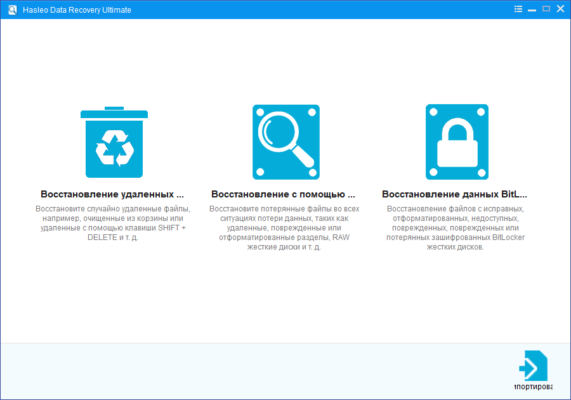
With deep scanning algorithms and a clean interface, Hasleo makes data recovery simple, safe, and effective—even for non-technical users.
🚨 When Can Hasleo Help?
Hasleo Data Recovery 6.6.0 supports recovery in common data loss scenarios:
- ❌ Accidentally deleted files (Shift + Delete or emptied Recycle Bin)
- 💾 Formatted drives (accidental or quick format)
- 💥 Corrupted partitions or RAW drives
- 🧨 System crashes or failed OS updates
- 📁 Lost folders after malware or power failure
⚠️ Act fast: The sooner you scan, the higher the recovery success rate—avoid writing new data to the affected drive.
✨ Key Features of Hasleo Data Recovery 6.6.0
🔍 1. Deep & Fast Scanning Engine
- Quick Scan: Recovers recently deleted files in seconds
- Deep Scan: Finds lost data from formatted or corrupted drives using signature-based analysis
- Supports NTFS, FAT32, exFAT, and ReFS file systems
📂 2. Wide File Type Support
Recovers over 1,000 file types, including:
- 📸 Photos: JPG, PNG, RAW (CR2, NEF, ARW)
- 🎥 Videos: MP4, AVI, MOV, MKV
- 📄 Documents: DOCX, PDF, XLSX, PPT
- 🎵 Audio: MP3, WAV, FLAC
- 💾 Archives: ZIP, RAR
💻 3. Works with All Storage Devices
- Internal/external HDDs & SSDs
- USB flash drives and SD/microSD cards
- Memory sticks, cameras, and MP3 players
👁️ 4. Preview Before Recovery
View recovered files (especially photos and documents) before restoring—so you only recover what you need.
🛡️ 5. Safe & Non-Destructive
Hasleo reads only—it never writes to the source drive, ensuring your original data stays intact during recovery.
🛠️ How to Recover Files in 3 Easy Steps
- 📥 Launch & Select Drive: Open Hasleo Data Recovery 6.6.0 and choose the drive or partition where files were lost.
- 🔍 Scan: Click “Scan” — Quick Scan starts automatically; switch to Deep Scan if needed.
- ✅ Recover: Preview found files, select what you need, and save them to a different drive (never the same one!).
💡 Pro Tip: Use “Filter” or “Search” to quickly locate files by name, type, or size.
🆚 Hasleo vs. Other Recovery Tools
Hasleo offers the best balance of simplicity, speed, and reliability—especially for home and small business users.
💡 Final Thoughts: Don’t Panic—Recover with Confidence
Hasleo Data Recovery 6.6.0 turns data disasters into recoverable moments. Whether it’s a family photo album, a critical work report, or years of personal videos, your files aren’t truly gone until you overwrite them.
🛡️ Stop using the drive. Download Hasleo. Scan. Recover. Breathe easy.
🔒 Available for Windows 11/10/8/7. Free version recovers up to 2 GB—perfect for testing. Get it from the official site: https://www.hasleo.com
✔ Tested: This software was tested on Windows 10 & Windows 11 and works smoothly without issues.
Frequently Asked Questions
- Is this software free?
Yes, it can be downloaded and used for free. - Does it support Windows 11?
Yes, it works perfectly on Windows 10 and 11. - Is it safe to use?
Yes, the software was scanned and tested before publishing.
Last updated: مايو 2026
Frequently Asked Questions
- هل هذا البرنامج مجاني؟ نعم، مجاني للاستخدام الشخصي.
- هل يعمل على Windows و Mac و Android؟ نعم، متوافق مع أغلب الأنظمة.
- هل الملفات آمنة؟ نعم، جميع الملفات يتم فحصها قبل النشر.