
Wise Data Recovery Pro 6.2.2.520: Your Reliable Safety Net for Lost Files 💻🛡️
Deleted an important document? Formatted the wrong drive? Or lost photos after a system crash? Wise Data Recovery Pro 6.2.2.520 is a trusted, user-friendly Windows application that helps you recover lost, deleted, or inaccessible files from hard drives, SSDs, USB sticks, and memory cards—quickly and securely.
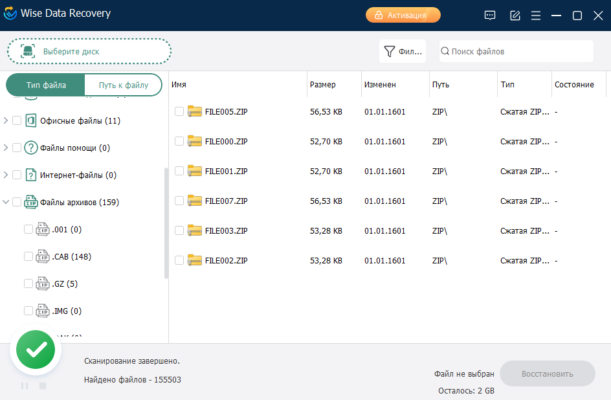
Developed by WiseCleaner, a well-known name in system utilities, this tool combines deep scanning power with a clean interface—making data recovery accessible to everyone, from beginners to IT professionals.
🚨 When Can Wise Data Recovery Pro Help?
This software excels in common data loss scenarios:
- ❌ Accidental deletion (even after emptying Recycle Bin)
- 💾 Formatted partitions (NTFS, FAT32, exFAT)
- 💥 Corrupted or RAW drives
- 📁 Files lost due to malware, power failure, or OS errors
- 📱 Deleted media from SD cards or USB flash drives
⚠️ Act quickly: Avoid writing new data to the affected drive to maximize recovery chances.
✨ Key Features of Wise Data Recovery Pro 6.2.2.520
🔍 1. Smart Two-Stage Scanning
- Quick Scan: Recovers recently deleted files in seconds
- Deep Scan: Uses advanced algorithms to find lost data from severely damaged or formatted drives
📂 2. Broad File Type Support
Recovers over 550+ file types, including:
- 📸 Photos: JPG, PNG, RAW (CR2, NEF, ARW)
- 🎥 Videos: MP4, AVI, MOV, MKV
- 📄 Documents: DOCX, PDF, XLSX, PPT, TXT
- 🎵 Audio: MP3, WAV, FLAC
- 💾 Archives: ZIP, RAR
💽 3. Works with All Storage Devices
- Internal/external HDDs & SSDs
- USB flash drives
- SD/microSD cards
- Memory sticks and MP3 players
👁️ 4. Preview Before Recovery
View recoverable photos and documents before restoring—so you only retrieve what you truly need.
🛡️ 5. Safe & Non-Destructive
Wise Data Recovery reads only—it never modifies or writes to the source drive, ensuring your original data stays intact.
🛠️ How to Recover Files in 3 Simple Steps
- 📥 Launch & Select Drive: Open Wise Data Recovery Pro and choose the drive or partition where data was lost.
- 🔍 Scan: Click “Scan” — Quick Scan starts automatically; switch to Deep Scan for formatted or corrupted drives.
- ✅ Recover: Preview found files, select the ones you need, and save them to a different drive (never the same one!).
💡 Use the search or filter function to quickly locate files by name, type, or size.
🆚 Wise Data Recovery Pro vs. Free Alternatives
Wise stands out for its balance of simplicity, speed, and reliability—especially for home and small business users.
💡 Final Thoughts: Don’t Panic—Recover with Confidence
Wise Data Recovery Pro 6.2.2.520 turns data disasters into recoverable moments. Whether it’s irreplaceable family photos, critical work documents, or years of creative projects, your files aren’t truly gone—as long as you act fast.
🛡️ Stop using the drive. Download Wise. Scan. Recover. Breathe easy.
🔒 Available for Windows 11/10/8/7.
🌐 Official download: https://www.wisecleaner.com/wise-data-recovery.html
✔ Tested: This software was tested on Windows 10 & Windows 11 and works smoothly without issues.
Frequently Asked Questions
- Is this software free?
Yes, it can be downloaded and used for free. - Does it support Windows 11?
Yes, it works perfectly on Windows 10 and 11. - Is it safe to use?
Yes, the software was scanned and tested before publishing.
Last updated: مايو 2026
Frequently Asked Questions
- هل هذا البرنامج مجاني؟ نعم، مجاني للاستخدام الشخصي.
- هل يعمل على Windows و Mac و Android؟ نعم، متوافق مع أغلب الأنظمة.
- هل الملفات آمنة؟ نعم، جميع الملفات يتم فحصها قبل النشر.