
WinDirStat 2.2.2: Take Control of Your Disk Space with Visual Clarity 🖥️💾
Running out of space on your hard drive but can’t figure out what’s eating it up? WinDirStat 2.2.2 is a free, open-source Windows utility that scans your drives and displays a visual map of where every byte is being used—so you can quickly identify and delete large, unnecessary files.
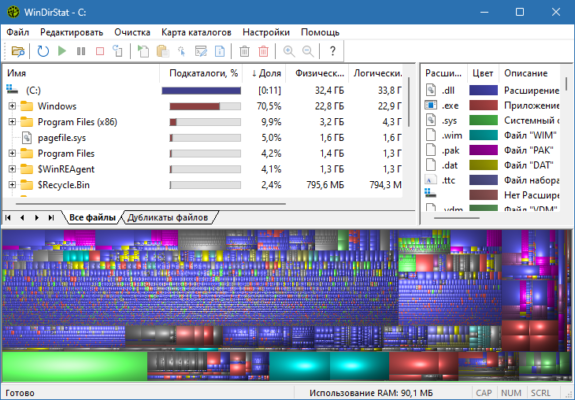
Unlike basic disk cleaners, WinDirStat shows you exactly what’s taking up space using an intuitive, color-coded treemap—making it the go-to tool for system administrators, power users, and anyone cleaning up their PC.
🎯 Why Use WinDirStat?
- ✅ Visual disk analysis – see space usage at a glance
- ✅ Free & open-source (no ads, no bloatware)
- ✅ Lightweight & fast – scans large drives quickly
- ✅ Color-coded treemap – easy to spot large folders/files
- ✅ Built-in deletion tools – delete files directly from the map
Perfect for freeing up disk space, organizing data, and identifying storage hogs.
✨ Key Features of Version 2.2.2
🗺️ 1. Interactive Treemap View
- Each rectangle represents a file or folder, sized by its disk usage
- Color-coded by file type (e.g., blue for documents, green for images)
- Hover over any block to see file/folder name and size
🔍 2. Detailed Folder Statistics
- Shows total folder size, file count, and percentage of drive
- Lists largest folders at the top for easy identification
- Drill down into any folder to see its contents visually
🗑️ 3. Built-in File Management
- Delete files directly from the treemap view
- Open containing folder to explore further
- Copy file paths for external tools
⚙️ 4. Flexible & Configurable
- Scan specific drives or folders
- Refresh the view after deletions
- Export results as HTML or text reports
- Customizable colors and display options
🛠️ How to Analyze Disk Space in 3 Steps
- 🔍 Scan Drive: Select the drive you want to analyze and click “Scan”.
- 🗺️ View Treemap: Explore the visual map to find large files/folders.
- 🗑️ Clean Up: Delete unwanted files directly from the map or open their location.
💡 Tip: Look for large, light-colored blocks—these are often the biggest space hogs.
🆚 WinDirStat vs. Windows File Explorer
WinDirStat provides visual clarity where File Explorer offers only lists.
💡 Final Thoughts: See Your Disk, Clean Your PC
WinDirStat 2.2.2 transforms the confusing task of disk cleanup into a visual, intuitive experience. By showing you exactly where your space is going, it empowers you to make informed decisions about what to keep and what to delete.
📊 Analyze. Visualize. Free up space.
🌐 Official website: https://windirstat.net
💻 Compatible with Windows 11/10/8.1/8/7/Vista/XP (32-bit & 64-bit) – 100% free, open-source.
✔ Tested: This software was tested on Windows 10 & Windows 11 and works smoothly without issues.
Frequently Asked Questions
- Is this software free?
Yes, it can be downloaded and used for free. - Does it support Windows 11?
Yes, it works perfectly on Windows 10 and 11. - Is it safe to use?
Yes, the software was scanned and tested before publishing.
Last updated: مايو 2026
Frequently Asked Questions
- هل هذا البرنامج مجاني؟ نعم، مجاني للاستخدام الشخصي.
- هل يعمل على Windows و Mac و Android؟ نعم، متوافق مع أغلب الأنظمة.
- هل الملفات آمنة؟ نعم، جميع الملفات يتم فحصها قبل النشر.