
A strong firewall is one of the first lines of defense against cyber threats. While Windows comes with a built-in firewall, its default interface can feel limited for advanced users. Malwarebytes Windows Firewall Control 6.18.0 enhances the standard Windows Firewall, offering a simple yet powerful way to manage network traffic, block suspicious connections, and improve overall system security.
🚀 Why Use Malwarebytes Windows Firewall Control?
1. Enhanced Network Security
The program provides better visibility and control over your inbound and outbound connections, keeping malicious traffic out.
2. Lightweight and Efficient
Unlike bulky security suites, this tool uses minimal system resources while delivering advanced firewall customization.
3. Intuitive User Interface
It simplifies Windows Firewall management, making it easy for both IT professionals and casual users to configure rules.
4. Seamless Malwarebytes Integration
When combined with Malwarebytes Anti-Malware, it adds an extra layer of defense against evolving online threats.
🔑 Key Features of Malwarebytes Windows Firewall Control 6.18.0
🛡️ Rule Management – create, edit, and monitor firewall rules with ease.
🔍 Connection Monitoring – view real-time network activity and identify suspicious processes.
🚦 Filtering Profiles – choose from High, Medium, Low, or No Filtering depending on your needs.
🔒 Secure Boot Integration – ensures firewall protection starts with Windows.
📊 Notifications System – get alerts when unknown applications attempt outbound connections.
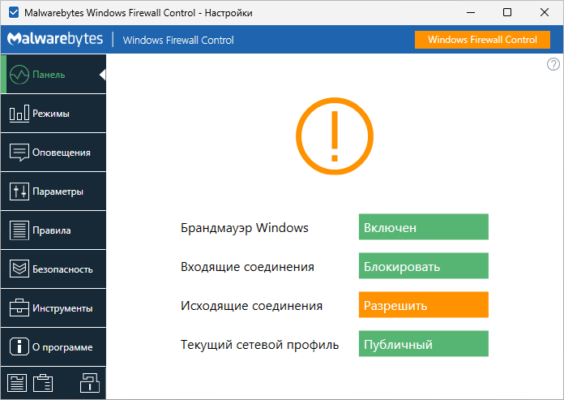
🖥️ User-Friendly Dashboard – central hub for all firewall settings.
⚡ Lightweight Performance – optimized for speed and efficiency.
📂 Portable Mode – run without installation for quick firewall configuration.
📌 What’s New in Version 6.18.0?
Improved rule creation process with more detailed options.
Better compatibility with Windows 11 updates.
Fixed issues with notification prompts for new connections.
Performance improvements and bug fixes.
💻 Software Information
Name: Malwarebytes Windows Firewall Control
Version: 6.18.0
Size: ~3 MB
Developer: Malwarebytes
System: Windows 7/8/10/11
License: Free with Premium features available
🛠 How to Use Malwarebytes Windows Firewall Control 6.18.0
Install the program on your Windows system.
Select a filtering profile (High, Medium, Low, or No Filtering).
Configure firewall rules for apps, ports, and IP addresses.
Monitor real-time network traffic through the dashboard.
Enable notifications to stay updated on new or blocked connections.
👨💼 Who Should Use It?
IT Administrators 🔧 – for advanced firewall rule customization and monitoring.
Businesses 🏢 – to ensure secure control of inbound and outbound network traffic.
Home Users 🏠 – who want better protection than the default Windows Firewall interface.
Security Enthusiasts 🔒 – for precise control over system connections.
✅ Final Verdict
Malwarebytes Windows Firewall Control 6.18.0 is a must-have tool for anyone who wants advanced firewall management without the complexity of enterprise-grade software. It combines lightweight performance, powerful filtering options, and seamless integration with Windows systems.
Whether you are an IT professional or a home user, this version makes network protection simple yet highly effective.
✔ Tested: This software was tested on Windows 10 & Windows 11 and works smoothly without issues.
Frequently Asked Questions
- Is this software free?
Yes, it can be downloaded and used for free. - Does it support Windows 11?
Yes, it works perfectly on Windows 10 and 11. - Is it safe to use?
Yes, the software was scanned and tested before publishing.
Last updated: مايو 2026
Frequently Asked Questions
- هل هذا البرنامج مجاني؟ نعم، مجاني للاستخدام الشخصي.
- هل يعمل على Windows و Mac و Android؟ نعم، متوافق مع أغلب الأنظمة.
- هل الملفات آمنة؟ نعم، جميع الملفات يتم فحصها قبل النشر.