
Geometric DFMPro 12.0.0.15811: Bridge the Gap Between Design & Manufacturing 🖥️✨
Designing a part in CAD is only the first step. Will it be easy to manufacture? Will it be cost-effective? These are critical questions that Geometric DFMPro 12.0.0.15811 helps answer. This powerful CAD plug-in integrates directly into your design environment (like SolidWorks, Autodesk Inventor, Siemens NX, PTC Creo) to analyze your 3D models for manufacturability issues in real-time.
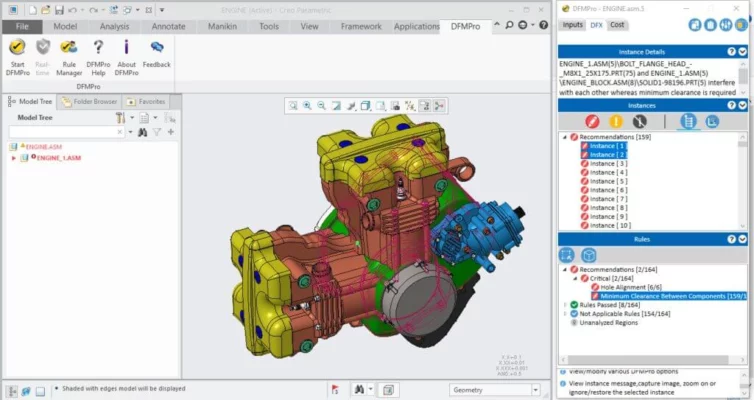
By identifying potential production problems early in the design phase, DFMPro helps reduce costs, minimize rework, and accelerate time-to-market by ensuring your designs are not just innovative, but also practical and efficient to produce.
🎯 Why Use Geometric DFMPro?
- ✅ Real-Time DFM Analysis: Get instant feedback while you design
- ✅ Rule-Based Expert System: Leverages manufacturing best practices
- ✅ Multi-CAD Support: Works with major CAD platforms (SolidWorks, Inventor, NX, Creo)
- ✅ Cost Reduction: Identify expensive features before production
- ✅ Error Prevention: Avoid costly design mistakes and re-spins
- ✅ Faster Time-to-Market: Streamline the design-to-production workflow
Perfect for design engineers, manufacturing engineers, product designers, and R&D teams aiming for efficient, manufacturable products.
✨ Key Features of Version 12.0.0.15811
📐 1. Comprehensive Manufacturing Rule Checks
- Machining Rules: Analyzes for milling, drilling, turning feasibility
- Injection Molding Rules: Checks wall thickness, draft angles, undercuts
- Sheet Metal Rules: Bend radii, hemming, forming features
- Die Casting & Investment Casting Rules: Draft, fillets, parting lines
⚙️ 2. Seamless CAD Integration
- Runs directly inside your CAD software (no need to export files)
- Interactive feedback with color-coded alerts on your model
- Guided suggestions to fix identified issues
- Preserves design intent while optimizing for manufacturing
📊 3. Detailed Reporting & Documentation
- Automated DFM reports for design reviews
- Highlight manufacturing risks and cost drivers
- Share reports with cross-functional teams (manufacturing, procurement)
- Track design improvements over iterations
🔄 4. Automation & Customization
- Batch processing for checking multiple parts
- Customizable design rules to match your factory’s capabilities
- Template creation for standard product families
- Integration with PLM/PDM systems (in enterprise versions)
🛠️ Ideal For:
- Product Designers: Ensuring new concepts are producible
- Mechanical Engineers: Optimizing parts for specific manufacturing processes
- Manufacturing Engineers: Bridging the gap between design and shop floor
- R&D Teams: Reducing prototype iterations and costs
- Anyone: Looking to improve product quality and manufacturing efficiency
💡 Tip: Run a DFM check before finalizing your design to catch issues that could delay production or increase costs.
🆚 DFMPro vs. Traditional Design Approaches
DFMPro shifts manufacturing awareness left in the product development cycle.
💡 Final Thoughts: Design Smarter, Manufacture Better
Geometric DFMPro 12.0.0.15811 empowers designers and engineers to create products that are not only innovative but also inherently manufacturable. By embedding manufacturing intelligence directly into the design process, it transforms the way teams develop products—making efficiency, cost-effectiveness, and quality core outcomes of the design phase.
📐 Design. Analyze. Optimize. Produce.
🌐 Official website (likely via Geometric Solutions or reseller)
💻 Requires a supported CAD platform (e.g., SolidWorks, Autodesk Inventor, Siemens NX, PTC Creo)
✔ Tested: This software was tested on Windows 10 & Windows 11 and works smoothly without issues.
Frequently Asked Questions
- Is this software free?
Yes, it can be downloaded and used for free. - Does it support Windows 11?
Yes, it works perfectly on Windows 10 and 11. - Is it safe to use?
Yes, the software was scanned and tested before publishing.
Last updated: مايو 2026
Frequently Asked Questions
- هل هذا البرنامج مجاني؟ نعم، مجاني للاستخدام الشخصي.
- هل يعمل على Windows و Mac و Android؟ نعم، متوافق مع أغلب الأنظمة.
- هل الملفات آمنة؟ نعم، جميع الملفات يتم فحصها قبل النشر.