
Transmission 4.0.6 – Fast, Lightweight & Secure BitTorrent Client
Transmission 4.0.6 is a trusted open-source BitTorrent client known for its simplicity, speed, and reliability. Unlike many torrent clients that are packed with ads or unnecessary extras, Transmission keeps things clean and efficient. It provides all the essential tools for downloading, managing, and seeding torrent files — without compromising performance or security.
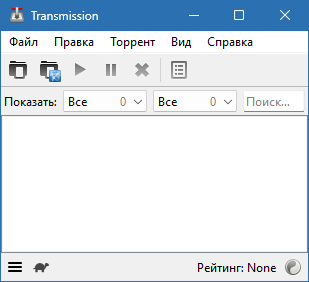
Transmission has earned a reputation among advanced users and beginners alike for being one of the most resource-friendly torrent applications available today. Whether you’re downloading movies, software, or large datasets, it offers a seamless and secure experience across all major platforms.
Key Features of Transmission 4.0.6
Lightweight & Fast:
Transmission uses minimal system resources, making it ideal for background downloading without slowing down your PC.Open Source & Ad-Free:
100% free and open-source — no ads, no premium versions, and no hidden costs. Users can review or modify the code to ensure full transparency and security.Cross-Platform Compatibility:
Works flawlessly on Windows, macOS, and Linux, allowing you to sync your downloading habits across devices easily.Magnet Link Support:
Instantly start downloads with magnet links — no need to download .torrent files manually.Encryption Support:
Transmission supports full peer encryption, ensuring privacy and security while transferring data over peer-to-peer (P2P) networks.Remote Web Interface:
Manage your downloads remotely through any web browser with Transmission’s intuitive and secure web interface.Scheduler & Bandwidth Control:
Set limits or create schedules for downloads and uploads to manage your bandwidth efficiently, especially during peak usage times.Auto-Add Torrents:
Automatically detect and add new torrent files from a specified folder for hands-free operation.
Why Choose Transmission 4.0.6
Transmission is not just another torrent client — it’s designed with efficiency and privacy in mind. The open-source nature means it’s free from corporate influence or tracking, giving users full control over their data and bandwidth. It’s also one of the few clients that integrates neatly into many Linux distributions by default.
This version, 4.0.6, brings several enhancements:
Improved download speed and connection handling
Enhanced DHT (Distributed Hash Table) performance
Better IPv6 support
UI refinements and stability improvements
Whether you’re a developer using Transmission in a server environment or a casual user downloading media, this client delivers unmatched stability and ease of use.
System Requirements
Operating Systems: Windows 11 / 10, macOS 10.14+, Linux
Processor: 1 GHz or faster
RAM: 512 MB (1 GB recommended)
Disk Space: 30 MB for installation
How to Use Transmission 4.0.6
Download & Install Transmission from the official website.
Launch the program and click Add Torrent or simply drag and drop torrent/magnet links.
Choose your download location and start downloading.
Monitor your progress, speed, and seed ratio in real-time.
Use bandwidth limits or schedules to optimize performance.
Advantages of Transmission 4.0.6
Completely free and open-source
No ads, bloatware, or hidden trackers
Lightweight and CPU-friendly
Remote web control for easy access
Secure encryption and fast performance
Perfect for home or server setups
Conclusion
Transmission 4.0.6 remains one of the best BitTorrent clients thanks to its unmatched simplicity, stability, and open-source foundation. It’s designed for users who value privacy, speed, and control without the clutter of commercial software. Whether for personal or professional use, Transmission ensures a clean, efficient, and secure torrenting experience across all major operating systems.
Official Website:
https://transmissionbt.com/
✔ Tested: This software was tested on Windows 10 & Windows 11 and works smoothly without issues.
Frequently Asked Questions
- Is this software free?
Yes, it can be downloaded and used for free. - Does it support Windows 11?
Yes, it works perfectly on Windows 10 and 11. - Is it safe to use?
Yes, the software was scanned and tested before publishing.
Last updated: مايو 2026
Frequently Asked Questions
- هل هذا البرنامج مجاني؟ نعم، مجاني للاستخدام الشخصي.
- هل يعمل على Windows و Mac و Android؟ نعم، متوافق مع أغلب الأنظمة.
- هل الملفات آمنة؟ نعم، جميع الملفات يتم فحصها قبل النشر.