
🖱️ Custom Context Menu 5.6.0.0: Master Your Windows Right-Click Experience
Tired of a cluttered, slow, or outdated right-click context menu in Windows? Custom Context Menu (CCM) 5.6.0.0 puts you back in control. This lightweight, free utility lets you add, remove, rename, or organize entries in your Windows context menu—without editing the registry or risking system stability.
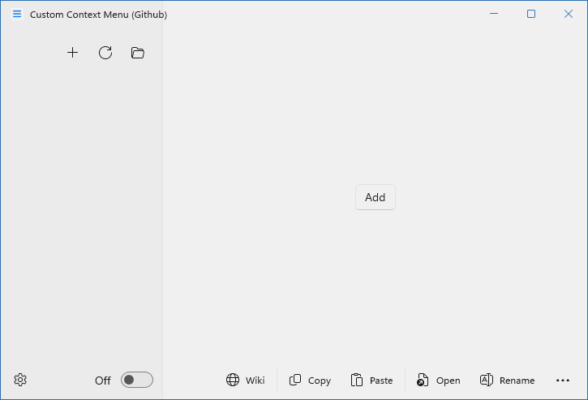
Whether you’re a power user, developer, or just someone who values a clean desktop experience, CCM 5.6.0.0 delivers precision customization with zero technical hassle.
⚙️ What Is Custom Context Menu?
Custom Context Menu is a portable Windows tool developed by Nenad Hrg that gives you full visual control over the right-click menu in File Explorer, desktop, and folders. Version 5.6.0.0 brings improved compatibility with Windows 10 and 11, enhanced UI responsiveness, and better handling of modern shell extensions.
Unlike manual registry tweaks—which can crash your system—CCM provides a safe, reversible, and intuitive interface to manage every menu item.
🌟 Key Features of CCM 5.6.0.0
✅ Add Custom Commands
Insert your own shortcuts (e.g., “Open in VS Code”, “Compress with 7-Zip”) with custom icons and keyboard shortcuts.
🗑️ Remove Unwanted Entries
Delete bloat from apps like OneDrive, Dropbox, Adobe, or antivirus tools that clutter your menu.
🔁 Rename or Reorder Items
Give confusing entries clearer names or move frequently used tools to the top.
📁 Context-Specific Menus
Customize menus separately for:
- 🖥️ Desktop
- 📂 Folders
- 📄 Files
- 💾 Drives
🛡️ Backup & Restore
Save your current menu configuration and restore it anytime—perfect before system updates.
📦 Portable & No Installation
Run directly from a USB drive—no admin rights or installation needed.
💻 Why Use CCM Instead of Manual Editing?
Editing the Windows Registry to modify the context menu is risky and time-consuming. One wrong key deletion can break Explorer or cause boot issues.
Custom Context Menu 5.6.0.0 eliminates that risk by:
- Validating changes before applying them
- Providing undo functionality
- Showing a live preview of your menu
- Automatically handling 32/64-bit registry paths
💡 Ideal for IT admins, developers, and minimalist users who demand efficiency.
📥 How to Get Started
- Download Custom Context Menu 5.6.0.0 from the official site:
🔗 https://customcontextmenu.com - Extract the ZIP file (no installer needed).
- Run
CustomContextMenu.exeas administrator. - Customize your menu using the drag-and-drop interface.
- Apply and test instantly—no reboot required!
✅ Fully compatible with Windows 7, 8, 10, and 11 (including ARM64 via emulation).
🆓 Free, Lightweight & Trusted
CCM is 100% free, ad-free, and open to inspection (no hidden telemetry). At under 2 MB, it’s one of the lightest system utilities available—yet powerful enough for advanced users.
Version 5.6.0.0 includes:
- Fixed compatibility with Windows 11’s new context menu design
- Improved detection of shell extensions
- Smoother UI on high-DPI displays
- Better support for non-English Windows versions
💬 Final Thoughts
Your right-click menu should work for you—not against you. With Custom Context Menu 5.6.0.0, you reclaim speed, simplicity, and personalization in Windows navigation.
Stop scrolling through useless options. Start clicking with purpose.
🖱️ Clean menu. Faster workflow. Total control.
🔗 Official Download: https://customcontextmenu.com
✔ Tested: This software was tested on Windows 10 & Windows 11 and works smoothly without issues.
Frequently Asked Questions
- Is this software free?
Yes, it can be downloaded and used for free. - Does it support Windows 11?
Yes, it works perfectly on Windows 10 and 11. - Is it safe to use?
Yes, the software was scanned and tested before publishing.
Last updated: مايو 2026
Frequently Asked Questions
- هل هذا البرنامج مجاني؟ نعم، مجاني للاستخدام الشخصي.
- هل يعمل على Windows و Mac و Android؟ نعم، متوافق مع أغلب الأنظمة.
- هل الملفات آمنة؟ نعم، جميع الملفات يتم فحصها قبل النشر.