
WinSetView 3.1.6 Overview 🧩
WinSetView 3.1.6 is a lightweight yet powerful utility designed to simplify how you control and customize folder views in Windows File Explorer. If you’re tired of inconsistent folder layouts or view settings constantly resetting, this tool gives you full control over how your files and folders are displayed across your system.
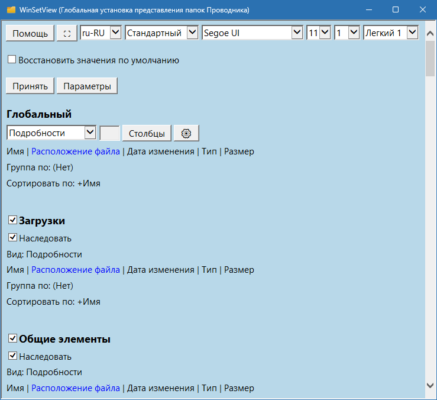
Developed by LesFerch, WinSetView focuses on giving users a consistent and personalized file browsing experience. It’s especially useful for those who frequently organize large sets of files or manage media, documents, or projects that require different folder layouts.
Key Features 🌟
1. Universal Folder View Control
You can apply the same view mode (Details, Icons, List, etc.) across all folders or specific ones. No more repetitive setup every time you open a new directory.
2. Advanced Customization Options
WinSetView allows you to define your preferred column layout, sort order, grouping, and icon size with ease. These settings can be applied system-wide for a uniform look.
3. Easy-to-Use Interface
With a clear and intuitive design, both beginners and professionals can navigate the program effortlessly. All configuration options are presented in an organized window, making it easy to save and apply changes instantly.
4. Portable and Lightweight
WinSetView doesn’t require installation. It’s a portable program, meaning you can run it from a USB drive or any folder without leaving traces on your system.
5. Restore Defaults Anytime
Made a mistake? You can easily revert back to the original Windows view settings with a single click.
How to Use WinSetView 🔧
Download and extract WinSetView to any folder on your computer.
Run the executable (WinSetView.exe).
Choose your preferred view layout and column setup.
Click “Apply” to enforce the changes system-wide.
Restart File Explorer to see your new settings take effect.
This makes it one of the easiest tools to ensure a consistent Windows file browsing experience.
Why Choose WinSetView 3.1.6? 💡
Keeps your folder views organized permanently.
Saves time for professionals managing thousands of files.
100% free, open-source, and ad-free.
Compatible with Windows 10 and Windows 11.
Whether you’re a casual user or a system administrator, WinSetView is a must-have tool for enhancing productivity and decluttering your workflow.
Conclusion 🏁
WinSetView 3.1.6 is a simple yet incredibly effective tool for anyone who values order and consistency in Windows File Explorer. With its lightweight design, customization options, and user-friendliness, it eliminates one of Windows’ most annoying quirks — inconsistent folder views.
🔗 Official Website:https://lesferch.github.io/WinSetView/
✔ Tested: This software was tested on Windows 10 & Windows 11 and works smoothly without issues.
Frequently Asked Questions
- Is this software free?
Yes, it can be downloaded and used for free. - Does it support Windows 11?
Yes, it works perfectly on Windows 10 and 11. - Is it safe to use?
Yes, the software was scanned and tested before publishing.
Last updated: مايو 2026
Frequently Asked Questions
- هل هذا البرنامج مجاني؟ نعم، مجاني للاستخدام الشخصي.
- هل يعمل على Windows و Mac و Android؟ نعم، متوافق مع أغلب الأنظمة.
- هل الملفات آمنة؟ نعم، جميع الملفات يتم فحصها قبل النشر.