
Introduction
Install Tweak Tool 04.09.2025 is a powerful Windows customization and optimization utility that allows users to fine-tune the installation process of Windows. Designed for professionals and advanced users, it offers complete control over system components, startup behavior, privacy settings, and performance tweaks—all before or right after installation.
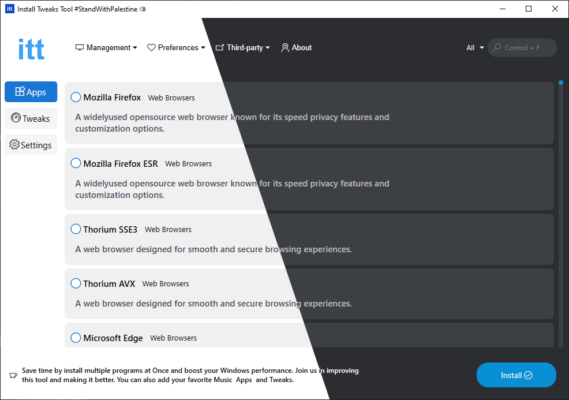
Key Features
1. Custom Windows Setup
Install Tweak Tool enables users to create personalized installation environments. You can disable unwanted Windows features, remove pre-installed bloatware, and configure system services according to your needs.
2. Performance Optimization
The software provides a set of performance tweaks to speed up boot time, enhance responsiveness, and minimize background resource usage. This ensures a cleaner and faster Windows experience after setup.
3. Privacy and Security Controls
With growing concerns about telemetry and background tracking, Install Tweak Tool offers privacy-focused options that disable data collection services, remove ads, and strengthen system protection.
4. Component Management
Users can easily add or remove system components such as Cortana, Edge, OneDrive, or preloaded apps. This makes it ideal for building lightweight and efficient Windows systems.
5. Automated Setup Scripts
The program supports custom installation scripts that automate repetitive configuration steps, saving time when deploying Windows on multiple machines.
6. Backup and Restore
Before applying any tweak, the tool allows users to create system backups or restore points, ensuring that you can revert changes safely if needed.
What’s New in Version 04.09.2025
The 2025 edition brings updated compatibility with Windows 11 24H2, new user interface enhancements, and improved automation features. It also includes a refined optimization engine that ensures smoother performance and more precise control over system components.
Benefits of Using Install Tweak Tool
Streamlined Installation
Simplify and accelerate the setup process with a fully optimized Windows installation tailored to your preferences.
Greater Control
Enjoy full control over every aspect of your Windows environment—from startup programs to privacy configurations.
Lightweight and Secure
Install Tweak Tool runs without unnecessary background services, keeping your system clean and stable.
Conclusion
Install Tweak Tool 04.09.2025 is a must-have utility for anyone who frequently installs or configures Windows systems. Whether you’re an IT technician, system builder, or enthusiast, it gives you complete authority over what gets installed and how your system performs. With its user-friendly design and advanced optimization options, this version sets a new standard for Windows customization and performance enhancement.
✔ Tested: This software was tested on Windows 10 & Windows 11 and works smoothly without issues.
Frequently Asked Questions
- Is this software free?
Yes, it can be downloaded and used for free. - Does it support Windows 11?
Yes, it works perfectly on Windows 10 and 11. - Is it safe to use?
Yes, the software was scanned and tested before publishing.
Last updated: مايو 2026
Frequently Asked Questions
- هل هذا البرنامج مجاني؟ نعم، مجاني للاستخدام الشخصي.
- هل يعمل على Windows و Mac و Android؟ نعم، متوافق مع أغلب الأنظمة.
- هل الملفات آمنة؟ نعم، جميع الملفات يتم فحصها قبل النشر.