
WinContig 5.3.2 Overview
WinContig 5.3.2 is a lightweight and portable defragmentation utility designed to help users quickly optimize their hard drives. Unlike traditional defragmenters that require installation, WinContig runs directly as an executable file, making it ideal for users who prefer simplicity and speed.
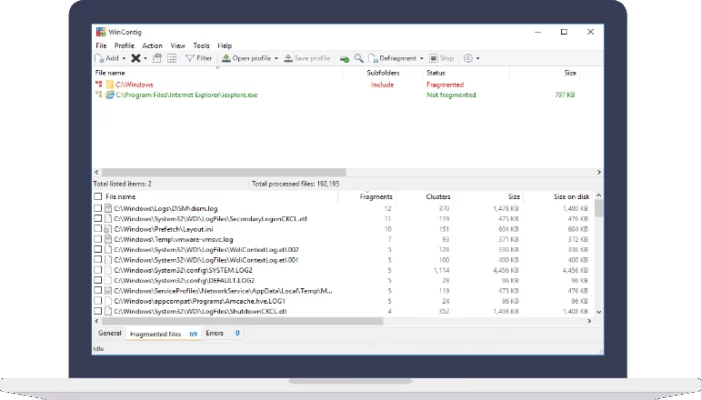
The tool focuses on individual file and folder defragmentation rather than processing the entire disk, saving both time and resources. Whether you want to optimize your gaming folder, project directory, or entire partition, WinContig delivers excellent performance without affecting your existing files.
Key Features of WinContig 5.3.2
Portable and Easy to Use – No installation required; simply run the executable and start defragmenting.
Fast File Optimization – Select specific files or folders for defragmentation to save time.
Customizable Filters – Include or exclude file types based on extensions and paths.
Batch Mode Support – Create and manage defragmentation profiles for automated tasks.
Detailed Reports – Monitor disk status and optimization progress in real time.
No System Changes – Leaves no traces in the Windows registry or system directories.
Why Choose WinContig?
WinContig 5.3.2 is an excellent solution for users who need fast defragmentation without complex configurations. Its portable nature makes it perfect for technicians and power users who frequently optimize multiple systems. The interface is intuitive, ensuring both beginners and advanced users can benefit from its efficiency.
If your system is slowing down due to file fragmentation, WinContig 5.3.2 provides an easy and effective way to restore speed and performance.
System Requirements
OS: Windows 7, 8, 10, 11
Processor: Intel or AMD 1 GHz or higher
RAM: 512 MB minimum
Disk Space: 10 MB free space
Conclusion
WinContig 5.3.2 is a fast, reliable, and portable defragmentation tool that enhances system performance by optimizing file storage efficiently. It’s an ideal choice for users who value speed, portability, and control.
✔ Tested: This software was tested on Windows 10 & Windows 11 and works smoothly without issues.
Frequently Asked Questions
- Is this software free?
Yes, it can be downloaded and used for free. - Does it support Windows 11?
Yes, it works perfectly on Windows 10 and 11. - Is it safe to use?
Yes, the software was scanned and tested before publishing.
Last updated: مايو 2026
Frequently Asked Questions
- هل هذا البرنامج مجاني؟ نعم، مجاني للاستخدام الشخصي.
- هل يعمل على Windows و Mac و Android؟ نعم، متوافق مع أغلب الأنظمة.
- هل الملفات آمنة؟ نعم، جميع الملفات يتم فحصها قبل النشر.