Overview of Bigasoft WTV Converter 5.8.1.9133
Bigasoft WTV Converter 5.8.1.9133 is a professional tool designed to convert Windows Recorded TV Show (.WTV) files into popular video formats like MP4, AVI, MKV, MOV, WMV, and MPEG.
It’s the perfect solution for users who want to play, edit, or share their recorded TV content outside Windows Media Center.
This version improves performance, conversion speed, and compatibility with Windows 10 and 11, ensuring a seamless experience for users who regularly work with recorded video files.
Key Features
1. Convert WTV to Popular Formats
The main purpose of Bigasoft WTV Converter is to make WTV recordings compatible with most devices. It supports conversion to MP4, AVI, MOV, MKV, MPG, and FLV, allowing playback on smartphones, tablets, and smart TVs.
2. Fast and High-Quality Conversion
Version 5.8.1.9133 uses advanced encoding technology to ensure lossless video quality while delivering fast conversion speeds. You can convert multiple files at once with its batch processing feature.
3. Audio and Subtitle Support
The software can extract or retain original audio tracks and subtitles from WTV files. This is especially useful for multilingual TV shows or recorded broadcasts with commentary.
4. Built-in Video Editor
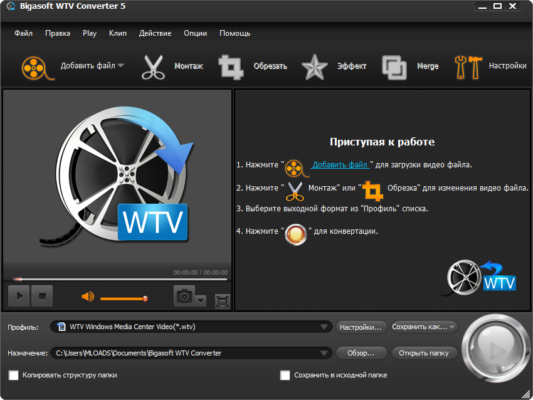
Before converting, you can use the simple editing tools to trim, crop, merge, or add subtitles. This makes it easy to prepare content for YouTube, mobile playback, or home archives.
How to Use Bigasoft WTV Converter
Step 1: Import WTV Files
Drag and drop your WTV recordings into the main interface or click Add File to select them manually.
Step 2: Choose Output Format
From the format list, select your preferred output, such as MP4 (H.264) or AVI. You can also adjust video resolution, bitrate, and frame rate for best results.
Step 3: Start Conversion
Click Convert to begin. The software will process your files quickly and save the converted videos to your selected folder.
Compatibility and Performance
Bigasoft WTV Converter 5.8.1.9133 works on Windows 7, 8, 10, and 11.
It supports HD and SD WTV recordings and can handle large files efficiently thanks to its optimized CPU and GPU acceleration.
Even older systems can run the program smoothly due to its lightweight design and minimal resource usage.
Pros and Cons
Pros
Converts WTV to all popular video formats
Maintains original video and audio quality
Includes batch conversion and editing tools
Easy to use with a clean interface
Cons
Limited advanced editing options
Available only for Windows
Conclusion
Bigasoft WTV Converter 5.8.1.9133 is the ultimate solution for anyone who wants to convert recorded TV shows into widely supported video formats.
With its fast performance, intuitive design, and excellent output quality, it’s an essential tool for managing WTV files effectively.
Whether you’re archiving your favorite shows or preparing clips for online sharing, Bigasoft WTV Converter delivers smooth, reliable, and high-quality results every time.
✔ Tested: This software was tested on Windows 10 & Windows 11 and works smoothly without issues.
Frequently Asked Questions
- Is this software free?
Yes, it can be downloaded and used for free. - Does it support Windows 11?
Yes, it works perfectly on Windows 10 and 11. - Is it safe to use?
Yes, the software was scanned and tested before publishing.
Last updated: مايو 2026
Frequently Asked Questions
- هل هذا البرنامج مجاني؟ نعم، مجاني للاستخدام الشخصي.
- هل يعمل على Windows و Mac و Android؟ نعم، متوافق مع أغلب الأنظمة.
- هل الملفات آمنة؟ نعم، جميع الملفات يتم فحصها قبل النشر.