What is VIDBOX VHS to DVD 11.2?
VIDBOX VHS to DVD 11.2 is a professional yet beginner-friendly software that helps users convert their old VHS, Hi8, or camcorder tapes into modern digital formats. Whether you want to preserve family memories, create DVDs, or upload old videos to YouTube, this software makes the process fast and straightforward. Designed for both Windows and macOS, VIDBOX combines easy setup with excellent video quality and buy.
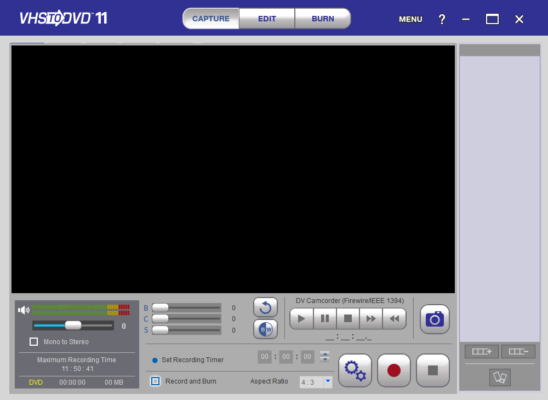
Key Features of VIDBOX VHS to DVD 11.2
Simple Setup and Interface
The software includes all the necessary tools to start converting your tapes immediately. With a user-friendly interface, even first-time users can easily connect their VCR or camcorder through the included USB capture device and start recording.
Multiple Output Formats
VIDBOX VHS to DVD 11.2 supports several output options. You can:
- Burn your recordings directly onto DVDs.
- Save them as digital files (MP4, AVI, or MOV) for storage or editing.
- Share videos online via social platforms.
High-Quality Conversion
Thanks to advanced video processing technology, the software delivers sharp, color-accurate conversions. It minimizes flicker and static issues that are common when converting older analog tapes.
Editing and Enhancement Tools
After converting your video, you can trim unwanted scenes, add titles, background music, and even create custom DVD menus. These features make your old footage feel brand new again.
How to Use VIDBOX VHS to DVD 11.2
Step 1: Connect the Devices
Connect your VCR or camcorder to your computer using the VIDBOX USB video capture device and RCA cables.
Step 2: Launch the Software
Open VIDBOX VHS to DVD 11.2 and select your input source (VHS, camcorder, or Hi8).
Step 3: Record and Convert
Play your tape and start recording within the software. Once finished, save or burn the video directly to a DVD or digital format.
This straightforward process ensures that anyone, even with minimal technical knowledge, can preserve their analog videos digitally.
Why Choose VIDBOX VHS to DVD 11.2?
VIDBOX stands out for its simplicity, reliability, and high-quality results. Many competing converters either complicate the setup process or produce poor-quality video. VIDBOX 11.2 eliminates those issues with a plug-and-play experience, automatic video detection, and professional-grade results.
Whether you’re an enthusiast archiving home videos or a small business digitizing old footage, this software offers excellent value and performance.
Conclusion
VIDBOX VHS to DVD 11.2 is the perfect solution for anyone looking to convert VHS or camcorder tapes into a modern digital format. With intuitive tools, great quality, and flexible export options, it helps you preserve precious memories for decades to come.
Turn your old videotapes into digital treasures today with VIDBOX VHS to DVD 11.2 — simple, fast, and reliable.
✔ Tested: This software was tested on Windows 10 & Windows 11 and works smoothly without issues.
Frequently Asked Questions
- Is this software free?
Yes, it can be downloaded and used for free. - Does it support Windows 11?
Yes, it works perfectly on Windows 10 and 11. - Is it safe to use?
Yes, the software was scanned and tested before publishing.
Last updated: مايو 2026
Frequently Asked Questions
- هل هذا البرنامج مجاني؟ نعم، مجاني للاستخدام الشخصي.
- هل يعمل على Windows و Mac و Android؟ نعم، متوافق مع أغلب الأنظمة.
- هل الملفات آمنة؟ نعم، جميع الملفات يتم فحصها قبل النشر.