AVS Video ReMaker 8.1.3.4: Edit Videos Instantly—Without Re-encoding! ⚡💻
Tired of waiting hours for video editing software to re-encode your clips just to cut, trim, or join them? AVS Video ReMaker 8.1.3.4 is a fast, user-friendly video editing tool that allows you to perform basic edits like cutting, splitting, and merging videos without re-encoding, preserving original quality and saving significant time.
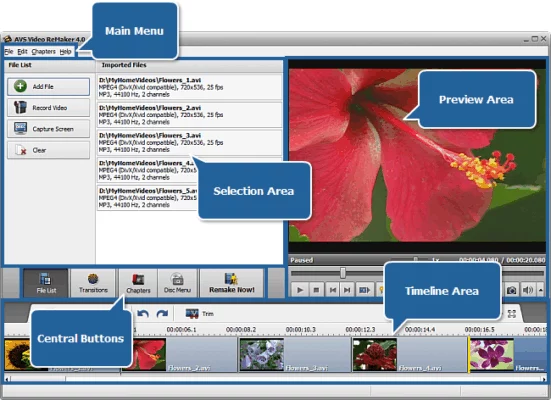
Perfect for quick edits, removing unwanted parts, or combining video clips, it focuses on speed and simplicity for common video tasks.
🎯 Why Use AVS Video ReMaker?
- ✅ No Re-encoding: Cuts and joins happen almost instantly
- ✅ Preserves Original Quality: No quality loss during editing
- ✅ Beginner-Friendly: Simple interface, no complex settings
- ✅ Supports Many Formats: Works with common video formats (AVI, MP4, MKV, MPG, etc.)
- ✅ Batch Processing: Edit multiple files in sequence
- ✅ Built-in Player: Preview your video directly in the application
Perfect for home users, students, and anyone needing quick, quality-preserving video edits.
✨ Key Features of Version 8.1.3.4
✂️ 1. Fast, Lossless Editing
- Cut/Split: Remove unwanted parts without re-encoding
- Join/Merge: Combine multiple video files seamlessly
- Trim: Select specific start and end points
- Operations are near-instantaneous due to no re-encoding
📽️ 2. Format Compatibility
- Input: Supports AVI, MP4, MKV, MPG, MPEG, VOB, WMV, ASF, MOV, FLV, 3GP, WEBM, and more
- Output: Saves in the same format as the input file (no format conversion unless specified)
- Preserves original codecs
🎮 3. Integrated Video Player
- Preview your video within the application
- Set precise cut points by playing and pausing
- Easy navigation through the timeline
⚙️ 4. Simple Workflow
- Drag and drop video files into the program
- Set start/end markers visually or by timecode
- Apply edits with a single click
- Save the edited file
🛠️ Ideal For:
- Removing Intro/Outro: From movies, TV shows, or YouTube videos
- Cutting Clips: For presentations or social media
- Joining Parts: Of a split movie or series episode
- Quick Edits: Before using more complex software
- Anyone: Needing fast, simple video trimming without quality loss
💡 Tip: Use the frame-by-frame navigation in the player to set very precise cut points.
🆚 AVS Video ReMaker vs. Other Video Editors
AVS Video ReMaker excels at fast, quality-preserving basic edits.
⚠️ Important Notes
- Limited Features: Focuses on cutting, joining, and basic trimming; lacks effects, titles, or advanced features.
- No Format Conversion: Output is typically the same format as input (for no re-encode benefit).
- Quality Preservation: Only applies to cut/join operations. Any format conversion will require re-encoding.
💡 Final Thoughts: Edit Videos Quickly & Safely
AVS Video ReMaker 8.1.3.4 is the ideal tool for anyone who needs to perform simple video edits quickly without compromising on original video quality. Its no-re-encoding approach makes it unbeatably fast for its core functions.
✂️ Cut. Join. Save. Instantly.
🌐 Official website: https://www.avs4you.com (Note: Verify exact product page for AVS Video ReMaker 8.1.3.4)
💻 Compatible with Windows.
✔ Tested: This software was tested on Windows 10 & Windows 11 and works smoothly without issues.
Frequently Asked Questions
- Is this software free?
Yes, it can be downloaded and used for free. - Does it support Windows 11?
Yes, it works perfectly on Windows 10 and 11. - Is it safe to use?
Yes, the software was scanned and tested before publishing.
Last updated: مايو 2026
Frequently Asked Questions
- هل هذا البرنامج مجاني؟ نعم، مجاني للاستخدام الشخصي.
- هل يعمل على Windows و Mac و Android؟ نعم، متوافق مع أغلب الأنظمة.
- هل الملفات آمنة؟ نعم، جميع الملفات يتم فحصها قبل النشر.