
Searching through multiple files for a specific word or phrase can be time-consuming, especially when dealing with large document collections. SeekFast 5.6 Build 2 solves this problem efficiently by offering a fast, intelligent, and easy-to-use solution that helps you locate text across hundreds of documents in seconds.
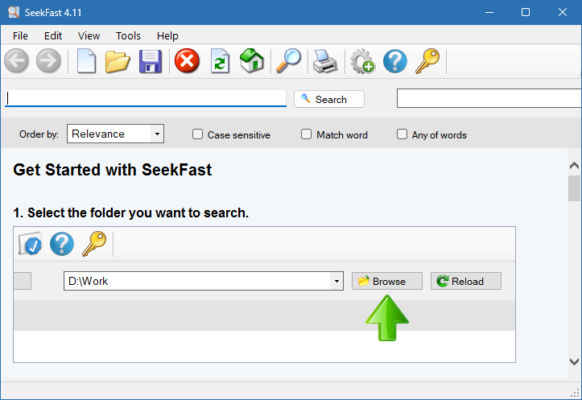
What Is SeekFast 5.6 Build 2?
SeekFast 5.6 Build 2 is a professional-grade text search utility designed for Windows users who need to quickly find information inside files. Whether you are a programmer, researcher, writer, or office worker, this tool allows you to search through Word documents, PDFs, text files, and other file types instantly without manually opening each one.
SeekFast uses an advanced search algorithm that scans and indexes your files, displaying accurate results with context — so you can see exactly where each search term appears.
Key Features of SeekFast 5.6 Build 2
Lightning-Fast Search Performance
SeekFast can scan thousands of documents within seconds. It intelligently reads the content and shows all occurrences of your search term in an organized list.Supports Multiple File Formats
The program supports various file types, including DOC, DOCX, PDF, TXT, RTF, HTML, XML, and many others. This flexibility makes it suitable for almost any kind of work environment.Contextual Results Display
Each search result includes a short text snippet showing where your keyword appears, helping you understand the context immediately.Batch Folder Search
Instead of searching one file at a time, SeekFast allows you to search entire folders or drives. This is especially useful for large projects or document archives.Seamless Integration with Windows Explorer
You can right-click any folder and choose “SeekFast” from the context menu to start a quick search without opening the main program.Advanced Filtering Options
Narrow down your searches using filters like file type, keyword combinations, or folder exclusions for more precise results.
Why Choose SeekFast 5.6 Build 2?
SeekFast is designed to save time and improve productivity. Unlike the built-in Windows search, which can be slow and limited, SeekFast provides accurate, instant, and detailed search results even in complex folder structures.
For developers, it’s a great way to locate specific code snippets across multiple source files. For researchers or students, it helps quickly extract relevant information from a large number of documents. And for office professionals, it’s a practical tool for managing large documentation systems.
How to Use SeekFast
Using SeekFast 5.6 Build 2 is straightforward:
Launch the program.
Choose a folder or directory containing your documents.
Type the keyword or phrase you want to find.
Press “Search,” and within moments, SeekFast displays all matching results with clear previews.
You can then click any result to open the corresponding file directly from the search interface.
System Requirements
Operating System: Windows 7, 8, 10, 11 (32-bit or 64-bit)
Processor: 1GHz or faster
RAM: Minimum 1GB
Disk Space: 100MB free space
Final Thoughts
SeekFast 5.6 Build 2 is an essential utility for anyone who works with large collections of documents or source code. Its powerful search engine, simplicity, and speed make it a must-have productivity tool.
Whether you’re managing technical documentation, researching a topic, or searching through business records, SeekFast delivers reliable and immediate results — saving you time and effort every day.
✔ Tested: This software was tested on Windows 10 & Windows 11 and works smoothly without issues.
Frequently Asked Questions
- Is this software free?
Yes, it can be downloaded and used for free. - Does it support Windows 11?
Yes, it works perfectly on Windows 10 and 11. - Is it safe to use?
Yes, the software was scanned and tested before publishing.
Last updated: مايو 2026
Frequently Asked Questions
- هل هذا البرنامج مجاني؟ نعم، مجاني للاستخدام الشخصي.
- هل يعمل على Windows و Mac و Android؟ نعم، متوافق مع أغلب الأنظمة.
- هل الملفات آمنة؟ نعم، جميع الملفات يتم فحصها قبل النشر.