In today’s digital-first world, PDF files are everywhere — from work reports and legal contracts to academic papers and personal documents. While most people can view PDFs, truly managing them requires more than just a reader. You need tools to edit text, convert formats, combine files, add passwords, and protect sensitive information and buy.
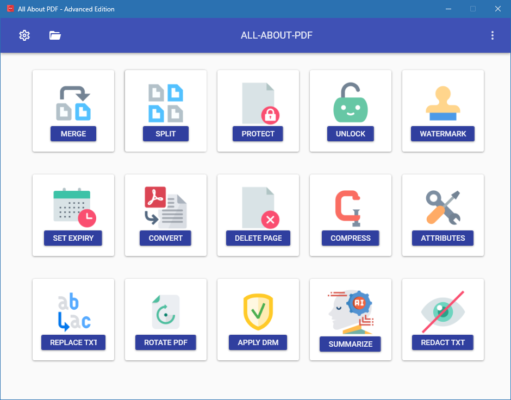
That’s where All About PDF 3.2033 comes in — a comprehensive, user-friendly PDF suite designed to give you full control over your documents. Developed for Windows users who want professional results without complexity or high costs, this software combines essential PDF tools into one intuitive interface .
Whether you’re a student, office worker, freelancer, or home user, All About PDF 3.2033 helps you handle every aspect of PDF management with confidence and precision.
Let’s explore why this tool is a top choice for anyone who works with PDFs regularly.
📌 What Is All About PDF 3.2033?
All About PDF 3.2033 is a desktop application for Windows that offers a complete set of features for creating, editing, converting, and securing PDF files. Unlike basic viewers like Adobe Reader, it allows you to modify existing content , not just read it.
It’s built as an all-in-one solution , so you don’t need multiple apps for different tasks. Whether you want to:
- Fix a typo in a contract
- Combine multiple forms into one file
- Extract pages from a manual
- Password-protect a report before sending
…you can do it all within a single, lightweight program.
Best of all? It runs offline , keeping your files private and secure on your local machine — no uploading or cloud dependency.
🛠️ Key Features of All About PDF 3.2033
1. ✏️ Edit PDF Text & Images
Change existing text, adjust fonts, reposition paragraphs, and resize or replace images directly within the PDF — just like in a Word processor.
No need to recreate the entire document.
2. 🔁 Convert PDFs to & From Multiple Formats
Convert PDFs to:
- Word (.docx) – Editable text with layout preserved
- Excel (.xlsx) – Extract tables and data
- PowerPoint (.pptx) – Turn presentations into slides
- TXT, HTML, JPG, PNG
And create high-quality PDFs from any of these formats.
3. 🧩 Merge & Combine PDF Files
Join multiple PDFs into a single document — ideal for creating portfolios, reports, or eBooks.
You can drag and drop to reorder pages before merging.
4. ✂️ Split & Extract Pages
Break large PDFs into smaller parts by page range, or extract specific pages to share only what’s needed.
5. 🔐 Secure Your PDFs
Protect sensitive files with:
- User passwords (to restrict opening)
- Owner permissions (to block copying, printing, or editing)
- AES-128 encryption for strong security
Perfect for legal, financial, or personal documents.
6. 💬 Annotate & Comment
Highlight text, add sticky notes, underline, draw freehand, and insert stamps or arrows to provide feedback or mark up contracts.
7. 🖋️ Fill & Sign PDF Forms
Complete interactive forms electronically and add digital signatures using your mouse, touchscreen, or stylus.
Signatures are embedded in the PDF — legally valid and secure.
8. 📦 Batch Processing Support
Apply edits, conversions, or security settings to multiple files at once — saves time when handling large volumes of documents.
9. 🖥️ Works Without Adobe Acrobat
Runs independently — no need for Adobe Reader, Pro, or third-party plugins.
Also doesn’t require .NET or Java frameworks.
10. 🧼 Lightweight & Fast
Small installation size and quick startup make it ideal for older PCs or portable use (e.g., USB drive).
No ads, no bloat, no watermarks.
👥 Who Should Use All About PDF 3.2033?
- Business Professionals: Edit contracts, proposals, and invoices.
- Legal & Administrative Staff: Sign, redact, and secure official documents.
- Students & Educators: Annotate research papers and submit assignments.
- Freelancers & Remote Workers: Deliver clean, professional PDF deliverables.
- Home Users: Handle bills, manuals, receipts, and personal records easily.
🖥️ System Requirements
- Operating System: Windows 10 / 11 (64-bit recommended)
- RAM: 2 GB minimum (4 GB suggested)
- Hard Disk Space: 200 MB free space
- No Internet Required – Full offline operation
- Administrator Rights: Needed for installation
✅ Fully portable version available.
📈 Why Choose All About PDF 3.2033?
- ✅ All Core PDF Tools in One Place
- ✅ No Subscription – One-Time Purchase
- ✅ Offline & Private – No File Uploads
- ✅ Simple Interface – Easy for Beginners
- ✅ Trusted Alternative to Adobe Acrobat
- ✅ Lightweight & Reliable Performance
✅ Final Thoughts
All About PDF 3.2033 may not have the brand recognition of Adobe, but it delivers exactly what most users need: a fast, reliable, and complete PDF toolkit without the high price or complexity.
With its powerful editing capabilities, accurate conversions, and focus on user privacy, it’s an excellent choice for anyone who wants to take full control of their PDFs — whether at work, school, or home.
If you’re tired of juggling multiple tools or relying on online converters that compromise your data, All About PDF 3.2033 is definitely worth installing .
For simplicity, speed, and full functionality, this tool proves that sometimes, “all” really means all .
✔ Tested: This software was tested on Windows 10 & Windows 11 and works smoothly without issues.
Frequently Asked Questions
- Is this software free?
Yes, it can be downloaded and used for free. - Does it support Windows 11?
Yes, it works perfectly on Windows 10 and 11. - Is it safe to use?
Yes, the software was scanned and tested before publishing.
Last updated: مايو 2026
Frequently Asked Questions
- هل هذا البرنامج مجاني؟ نعم، مجاني للاستخدام الشخصي.
- هل يعمل على Windows و Mac و Android؟ نعم، متوافق مع أغلب الأنظمة.
- هل الملفات آمنة؟ نعم، جميع الملفات يتم فحصها قبل النشر.