Keeping your storage drives healthy is essential for data safety and system performance. Failing hard drives can cause data loss, slow performance, and unexpected crashes. CrystalDiskInfo 9.7.2 is a free and reliable disk monitoring tool that provides detailed information about your HDDs, SSDs, and NVMe drives. With its smart diagnostics, real-time monitoring, and user-friendly interface, this latest version helps users identify potential drive issues before they become critical.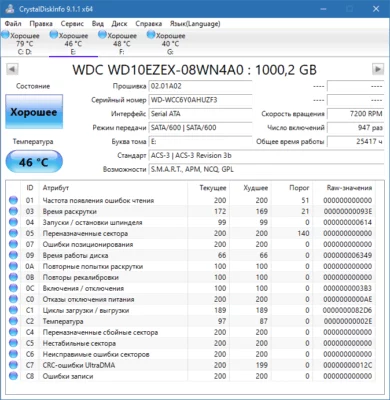
Why Choose CrystalDiskInfo 9.7.2?
Real-Time Drive Monitoring
CrystalDiskInfo constantly tracks the health status, temperature, and performance of your storage devices. It uses S.M.A.R.T. (Self-Monitoring, Analysis, and Reporting Technology) data to alert you about any unusual drive behavior.
Support for HDD, SSD, and NVMe
Whether you are using traditional hard drives, modern solid-state drives, or ultra-fast NVMe storage, CrystalDiskInfo 9.7.2 fully supports them, making it a versatile tool for every user.
Free and Lightweight
Unlike heavy system utilities, CrystalDiskInfo is lightweight, fast, and completely free. It consumes minimal system resources while running in the background.
Key Features of CrystalDiskInfo 9.7.2
1. S.M.A.R.T. Data Analysis
The software provides detailed drive statistics such as read/write errors, spin-up time, reallocated sectors, and power-on hours. These insights help detect early signs of drive failure.
2. Temperature Monitoring
Overheating is one of the most common causes of hardware failure. CrystalDiskInfo shows real-time drive temperatures, helping users prevent overheating and extend the lifespan of their storage devices.
3. Health Status Indicators
Drives are rated with simple health statuses: Good, Caution, or Bad. This makes it easy for even non-technical users to understand their drive’s condition at a glance.
4. Customizable Alerts
You can set up sound notifications and pop-up alerts when drive health or temperature reaches a critical level. This ensures you take action before losing important data.
5. NVMe and RAID Support
CrystalDiskInfo 9.7.2 comes with improved support for NVMe drives and certain RAID configurations, giving advanced users more control and insight into their storage hardware.
What’s New in Version 9.7.2?
The latest update introduces improvements and bug fixes:
Better compatibility with the newest NVMe controllers.
Updated user interface for easier navigation.
Enhanced background monitoring for multiple drives.
Minor bug fixes and stability improvements.
These updates make CrystalDiskInfo 9.7.2 more accurate and reliable for everyday use.
Benefits for Users
For Professionals
Monitor multiple drives in real-time.
Detect hardware issues before they cause downtime.
Ensure data safety with early failure warnings.
For Everyday Users
Prevent data loss by keeping an eye on drive health.
Extend the lifespan of HDDs and SSDs.
Stay informed with simple and clear health indicators.
Conclusion
CrystalDiskInfo 9.7.2 is one of the most essential tools for anyone who values data safety and system reliability. Its detailed monitoring, S.M.A.R.T. analysis, and real-time alerts make it a must-have utility for both professionals and everyday computer users.
If you want to keep your hard drives and SSDs healthy, prevent unexpected failures, and safeguard your data, installing CrystalDiskInfo 9.7.2 is a smart choice.
✔ Tested: This software was tested on Windows 10 & Windows 11 and works smoothly without issues.
Frequently Asked Questions
- Is this software free?
Yes, it can be downloaded and used for free. - Does it support Windows 11?
Yes, it works perfectly on Windows 10 and 11. - Is it safe to use?
Yes, the software was scanned and tested before publishing.
Last updated: مايو 2026
Frequently Asked Questions
- هل هذا البرنامج مجاني؟ نعم، مجاني للاستخدام الشخصي.
- هل يعمل على Windows و Mac و Android؟ نعم، متوافق مع أغلب الأنظمة.
- هل الملفات آمنة؟ نعم، جميع الملفات يتم فحصها قبل النشر.