Lively Wallpaper 2.2.0: Bring Your Desktop to Life with Dynamic Wallpapers 🌈💻
Tired of static backgrounds? Lively Wallpaper 2.2.0 is a free, open-source Windows app that transforms your desktop into a dynamic, interactive canvas—using videos, GIFs, webpages, or even real-time visualizers as your wallpaper. Best of all? It’s lightweight, customizable, and won’t slow down your PC.
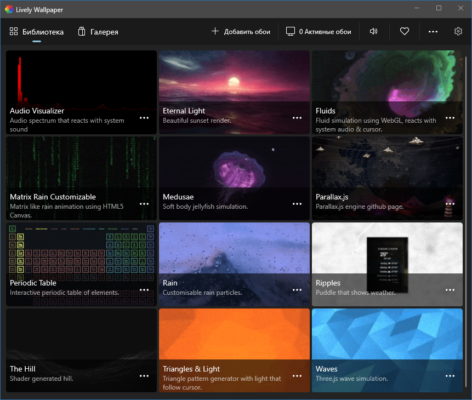
Whether you love anime clips, nature timelapses, music visualizers, or live web dashboards, Lively makes your desktop truly yours.
🌟 Why Use Lively Wallpaper?
Unlike built-in Windows wallpaper options, Lively supports:
- MP4, WebM, AVI videos
- Animated GIFs
- YouTube videos (via URL)
- Web-based wallpapers (HTML/JS/CSS)
- Wallpaper Engine compatibility (via plugin)
And it does all this without high CPU or GPU usage—thanks to smart hardware acceleration and pause-on-fullscreen features.
✨ Key Features of Lively Wallpaper 2.2.0
🎥 1. Video & GIF Wallpapers
Set any local video or GIF as your background. Lively plays it seamlessly in the background—with volume control, loop options, and playback speed adjustment.
🌐 2. Web & Interactive Wallpapers
Create or download HTML-based wallpapers that show live clocks, weather widgets, system monitors, or even mini-games! The community has built thousands of creative designs.
▶️ 3. YouTube & Online Video Support
Paste a YouTube link, and Lively will stream it as your wallpaper (cached for efficiency). Perfect for music videos, ambient streams, or relaxing visuals.
⚙️ 4. Smart Performance Management
- Auto-pauses when fullscreen apps (games, videos) are running
- Low resource usage with hardware decoding
- Per-wallpaper performance settings (quality vs. performance)
🎨 5. Full Customization
- Adjust brightness, saturation, blur
- Set different wallpapers per monitor
- Schedule wallpaper changes by time of day
🛠️ How to Get Started with Lively Wallpaper 2.2.0
- 📥 Download: Get the latest version from the Microsoft Store or GitHub .
- ➕ Add Wallpaper: Click “+” and choose from video, GIF, URL, or web app.
- ⚙️ Customize: Tweak playback, performance, and visual effects.
- 🖥️ Enjoy: Your desktop is now alive—with zero lag!
💡 Pro Tip: Browse the built-in Wallpaper Gallery for free community-created live wallpapers—ranging from calming rain to cyberpunk cityscapes!
🆚 Lively vs. Other Live Wallpaper Apps
Lively offers Wallpaper Engine-like power—without the cost or platform lock-in.
💡 Final Thoughts: Your Desktop, Reimagined
Lively Wallpaper 2.2.0 proves that personalization doesn’t have to cost a thing—or sacrifice performance. With its blend of flexibility, efficiency, and creativity, it’s the best free live wallpaper app for Windows 10 and 11.
🎨 Make your desktop breathe. Animate your space. Express yourself—live.
🔒 Always download from official sources (Microsoft Store or GitHub) to ensure safety and authenticity.
✔ Tested: This software was tested on Windows 10 & Windows 11 and works smoothly without issues.
Frequently Asked Questions
- Is this software free?
Yes, it can be downloaded and used for free. - Does it support Windows 11?
Yes, it works perfectly on Windows 10 and 11. - Is it safe to use?
Yes, the software was scanned and tested before publishing.
Last updated: مايو 2026
Frequently Asked Questions
- هل هذا البرنامج مجاني؟ نعم، مجاني للاستخدام الشخصي.
- هل يعمل على Windows و Mac و Android؟ نعم، متوافق مع أغلب الأنظمة.
- هل الملفات آمنة؟ نعم، جميع الملفات يتم فحصها قبل النشر.