
In today’s digital world, PDF files are widely used for sharing documents across different platforms. While many programs offer PDF creation features, sometimes you just need a simple, lightweight, and free tool that gets the job done — and that’s exactly what Doro PDF Writer 2.25 offers.
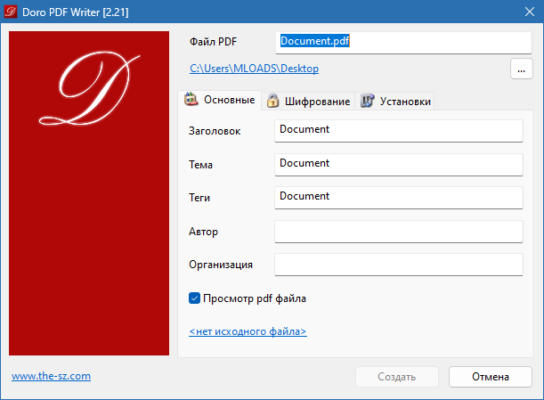
In this article, we’ll explore what Doro PDF Writer 2.25 is, its main features, and why it’s a great choice for users who need a no-frills PDF creation tool.
📌 What Is Doro PDF Writer 2.25?
Doro PDF Writer 2.25 is a free PDF creation tool for Windows that works as a virtual printer . Once installed, it appears as a printer option in any Windows application, allowing you to “print” documents directly into PDF format.
It’s a minimalist tool designed for simplicity and efficiency , making it ideal for users who need to convert files to PDF without installing heavy software suites.
🛠️ Key Features of Doro PDF Writer 2.25
1. 🖨️ Virtual PDF Printer
Doro PDF installs as a virtual printer, enabling you to create PDFs from any Windows application — including Word, Excel, web browsers, and more.
2. 📄 High-Quality PDF Output
The software generates clean, high-quality PDF files that retain the original formatting of the source document.
3. 🧼 Lightweight and Fast
With a small file size and minimal system requirements, Doro PDF Writer is fast to install and runs efficiently without slowing down your PC.
4. 📁 PDF Compression Options
You can choose between image quality settings to control file size, making it easy to balance quality and storage space.
5. 📎 Embed Fonts and Metadata
Doro PDF allows you to embed fonts and add metadata like author, title, and subject to your PDF files.
6. 🔐 PDF Security Options
Set passwords to protect your PDFs from unauthorized access or editing, and restrict printing or copying if needed.
7. 🌍 Multi-Language Support
The software supports multiple languages, making it accessible to users around the world.
👥 Who Should Use Doro PDF Writer 2.25?
- Students & Educators: For converting assignments, notes, and research papers into PDF format.
- Office Workers: To share reports, invoices, and other business documents securely.
- Home Users: For creating PDFs from web pages, emails, or personal documents.
- Developers & IT Professionals: For generating documentation or testing PDF output.
🖥️ System Requirements
- Operating System: Windows XP, Vista, 7, 8, 8.1, 10 (32-bit & 64-bit)
- RAM: 256 MB (512 MB recommended)
- Hard Disk Space: 5 MB free space
- Microsoft .NET Framework 2.0 or higher
📈 Why Choose Doro PDF Writer 2.25?
- Free to Use: No cost, no subscriptions, and no ads.
- Simple Interface: Easy to install and use — just “print” to PDF.
- Lightweight: Doesn’t consume system resources or slow down your PC.
- No Installation Hassles: Quick setup and minimal configuration needed.
- Portable Option Available: Some versions can be run from a USB drive without installation.
✅ Final Thoughts
Doro PDF Writer 2.25 is a reliable and lightweight PDF creation tool that delivers exactly what it promises — the ability to convert any document into a high-quality PDF with ease. It may not have the advanced editing features of premium PDF suites, but for simple and fast PDF creation, it’s one of the best free options available.
If you’re looking for a straightforward, no-cost PDF writer that works across all Windows applications, Doro PDF Writer 2.25 is definitely worth trying.
✔ Tested: This software was tested on Windows 10 & Windows 11 and works smoothly without issues.
Frequently Asked Questions
- Is this software free?
Yes, it can be downloaded and used for free. - Does it support Windows 11?
Yes, it works perfectly on Windows 10 and 11. - Is it safe to use?
Yes, the software was scanned and tested before publishing.
Last updated: مايو 2026
Frequently Asked Questions
- هل هذا البرنامج مجاني؟ نعم، مجاني للاستخدام الشخصي.
- هل يعمل على Windows و Mac و Android؟ نعم، متوافق مع أغلب الأنظمة.
- هل الملفات آمنة؟ نعم، جميع الملفات يتم فحصها قبل النشر.