Mirillis Action! 4.45.0 – Professional Screen and Gameplay Recording
If you’re looking for a professional tool to record your screen, gameplay, or webcam in high quality, Mirillis Action! 4.45.0 is one of the best solutions available. This latest version improves stability, performance, and adds new features that make video recording smoother and easier than ever. Whether you are a gamer, content creator, or teacher, this software delivers everything you need to capture your screen with precision.
What Is Mirillis Action! 4.45.0?
Mirillis Action! is an advanced screen recording and live streaming software designed for Windows users. It allows you to record HD gameplay, desktop activities, tutorials, and video from external devices. The software provides real-time recording with zero lag, ensuring your gameplay or presentation stays smooth and in sync.
Version 4.45.0 introduces multiple improvements for Windows 10 and 11 users, including better performance on high-refresh-rate monitors and enhanced recording quality for 4K content.
Key Features
1. Real-Time Recording with Zero Lag
The latest version enhances system efficiency, ensuring you can record gameplay or screen activity without frame drops. This feature is crucial for gamers who need smooth, lag-free video performance.
2. Real-Time Video Zoom
A new highlight of Action! 4.45.0 is the real-time zoom feature. You can zoom in and out during recording using simple keyboard shortcuts. This is especially useful for tutorials, allowing viewers to focus on key details while you demonstrate.
3. Full Desktop Capture
Now, users can capture the entire desktop across multiple screens. This means you can record every monitor at once, ideal for multitasking, gaming setups, or professional software demonstrations.
4. Built-In Video Editor
The built-in editor lets you trim, cut, and enhance your videos instantly after recording. You can quickly remove unwanted parts or add simple effects before saving or uploading your video.
5. High-Quality Audio Recording
Mirillis Action! records system audio, microphone input, or both simultaneously. This makes it perfect for creating voice-over tutorials, reaction videos, or live commentaries.
6. Streaming Made Simple
You can broadcast live directly to popular streaming platforms without needing external tools. The interface is easy to navigate, and the real-time preview ensures your stream looks professional.
How to Use Mirillis Action! 4.45.0
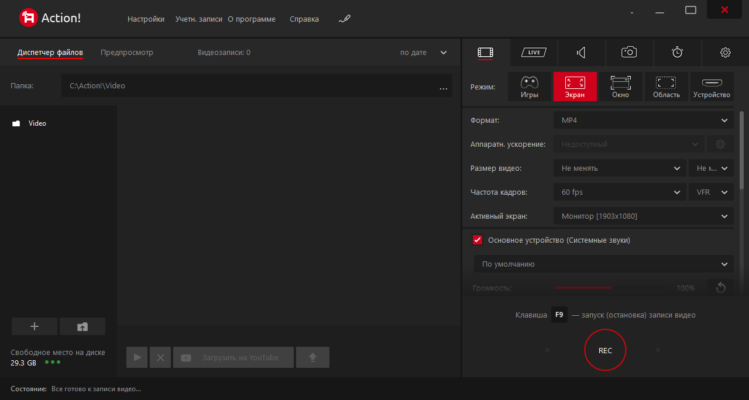
Install and Launch – After installation, open the program and choose your recording mode (desktop, gameplay, or specific window).
Adjust Settings – Set your preferred resolution, frame rate, and audio options.
Start Recording – Press the record button or use the hotkey to begin.
Use Zoom Feature – During recording, zoom in or out to highlight parts of the screen.
Stop and Edit – Once finished, use the built-in editor to refine your video before exporting.
The software saves recordings in popular formats like MP4 or AVI using advanced codecs such as H.264 and H.265.
Why Choose Mirillis Action! 4.45.0?
Mirillis Action! stands out from other screen recorders due to its smooth performance and clean interface. Unlike many free alternatives, it offers professional-grade video compression without losing quality. The balance between ease of use and advanced control makes it ideal for beginners and professionals alike.
It’s also optimized for modern hardware, using GPU acceleration to reduce CPU load during recording. This ensures stable performance even during long recording sessions or high-intensity gameplay.
Final Verdict
Mirillis Action! 4.45.0 continues to set the standard for high-performance screen recording software. It’s reliable, powerful, and packed with innovative tools that simplify the entire recording process. Whether you’re capturing gameplay highlights, creating tutorials, or streaming live sessions, this version ensures top-notch results every time.
If you value high quality, smooth recording, and professional tools — Mirillis Action! 4.45.0 is the perfect choice for you.
✔ Tested: This software was tested on Windows 10 & Windows 11 and works smoothly without issues.
Frequently Asked Questions
- Is this software free?
Yes, it can be downloaded and used for free. - Does it support Windows 11?
Yes, it works perfectly on Windows 10 and 11. - Is it safe to use?
Yes, the software was scanned and tested before publishing.
Last updated: مايو 2026
Frequently Asked Questions
- هل هذا البرنامج مجاني؟ نعم، مجاني للاستخدام الشخصي.
- هل يعمل على Windows و Mac و Android؟ نعم، متوافق مع أغلب الأنظمة.
- هل الملفات آمنة؟ نعم، جميع الملفات يتم فحصها قبل النشر.