Brightness.Manager.OK 1.33 – Smart Screen Brightness Control
Brightness.Manager.OK 1.33 is an efficient utility designed to give users complete control over their screen brightness on Windows PCs. It allows automatic and manual adjustment of brightness levels, improving visual comfort, reducing eye strain, and saving energy.
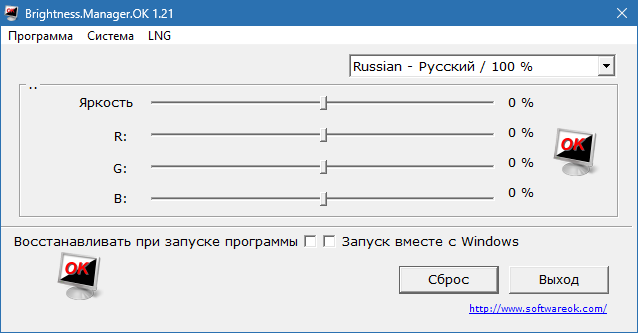
What Is Brightness.Manager.OK?
Modern laptops and monitors often lack advanced brightness customization options. Brightness.Manager.OK 1.33 fills this gap by providing a lightweight, easy-to-use tool that lets users set precise brightness levels depending on time of day, ambient light, or personal preference.
Key Features
Automatic Brightness Adjustment:
Automatically changes screen brightness based on your schedule or ambient light conditions.Manual Brightness Control:
Quickly adjust brightness levels using a simple slider or keyboard shortcuts.Energy Saving Mode:
Reduce power consumption by lowering brightness when full intensity is not needed.Eye Comfort Optimization:
Minimize eye strain during long computer sessions with balanced brightness.Lightweight and Portable:
Runs efficiently without slowing down your system and can work from a USB drive.Customizable Profiles:
Save multiple brightness settings for different scenarios or tasks.
Why Use Brightness.Manager.OK 1.33?
Poor screen brightness can cause headaches, eye strain, and unnecessary battery drain. Brightness.Manager.OK 1.33 ensures your display is always at an optimal level, enhancing comfort while working, gaming, or browsing.
It’s ideal for:
Office workers who spend long hours in front of the monitor.
Gamers seeking a balanced visual experience.
Laptop users wanting to extend battery life.
System Requirements
OS: Windows 11, 10, 8.1, 8, 7
RAM: Minimum 512 MB
Disk Space: 20 MB free space
Processor: Intel/AMD compatible CPU
How to Use
Install Brightness.Manager.OK 1.33.
Open the application and set your preferred brightness level.
Enable automatic adjustment if desired.
Use custom profiles for different times or tasks.
Monitor your screen comfort and energy consumption.
Final Verdict
Brightness.Manager.OK 1.33 is a simple yet effective tool for managing screen brightness on Windows PCs. Its combination of automatic adjustments, customizable profiles, and energy-saving options makes it a must-have for anyone looking to protect their eyes and optimize their display.
✔ Tested: This software was tested on Windows 10 & Windows 11 and works smoothly without issues.
Frequently Asked Questions
- Is this software free?
Yes, it can be downloaded and used for free. - Does it support Windows 11?
Yes, it works perfectly on Windows 10 and 11. - Is it safe to use?
Yes, the software was scanned and tested before publishing.
Last updated: مايو 2026
Frequently Asked Questions
- هل هذا البرنامج مجاني؟ نعم، مجاني للاستخدام الشخصي.
- هل يعمل على Windows و Mac و Android؟ نعم، متوافق مع أغلب الأنظمة.
- هل الملفات آمنة؟ نعم، جميع الملفات يتم فحصها قبل النشر.