 ZLAM TOOLS Smart Digital Tools to Boost Your Productivity.
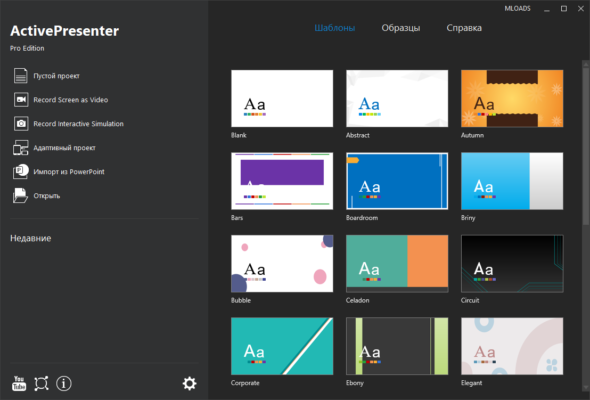
ActivePresenter Pro 9.3.0 is a powerful all-in-one screen recording, video editing, and e-learning authoring software developed by Atomi Systems. With its wide range of features, it has become a go-to solution for educators, trainers, marketers, and YouTubers who want to create engaging instructional content, interactive courses, and professional videos and buy.
🎯 Key Features of ActivePresenter Pro 9.3.0
🖥️ 1. Screen Recording with High Performance
ActivePresenter allows users to record the entire screen, specific applications, or custom regions. It supports full-motion recording, which means everything that happens on screen is captured with high accuracy and performance.
🎙️ 2. Audio and Webcam Support
Users can add voiceovers using microphones or include webcam footage during the recording. This is especially useful for tutorials and presentations that need a personal touch.
✂️ 3. Powerful Video Editing Capabilities
After capturing your screen, you can utilize the built-in video editor that supports:
-
Cut, trim, and crop clips
-
Add text annotations and shapes
-
Insert images, zoom-and-pan effects
-
Green screen (chroma key)
-
Transition effects
-
Audio normalization and noise reduction
📚 4. E-learning Authoring Tools
What sets ActivePresenter apart from other video editors is its strong e-learning support. It allows the creation of:
-
Quizzes with multiple question types
-
SCORM/xAPI-compliant packages
-
Interactive courses with branching scenarios
-
Responsive content for different devices
💡 5. Smart Capture Technology
The software can automatically capture every mouse click, keystroke, or screen action and convert them into a slide-based tutorial, saving time for software trainers.
🆕 What’s New in Version 9.3.0?
-
Improved performance for large projects
-
Enhanced export options to HTML5 and SCORM
-
Bug fixes related to timeline editing and audio syncing
-
Updated user interface with customizable themes
-
Better compatibility with Windows 11
🛠️ Who Should Use ActivePresenter Pro?
ActivePresenter Pro is ideal for:
-
Teachers and Educators: To create lessons, quizzes, and interactive modules.
-
Corporate Trainers: For compliance training and onboarding content.
-
Marketers and YouTubers: For creating promotional and explainer videos.
-
Software Developers: To build tutorials and demos for apps and tools.
📤 Export Options
The program supports exporting your project to:
-
MP4, AVI, MKV, and WebM video formats
-
HTML5 interactive content
-
PDF, Word, Excel documents
-
LMS-compliant SCORM/xAPI packages
✅ System Requirements
-
OS: Windows 7/8/10/11 (64-bit)
-
CPU: Dual-core 2.0 GHz or faster
-
RAM: Minimum 4GB (8GB recommended)
-
Storage: 1GB of free disk space for installation
-
GPU: Integrated or dedicated GPU for rendering
📝 Conclusion
ActivePresenter Pro 9.3.0 stands out as a versatile and efficient tool that combines screen recording, video editing, and e-learning content creation in one platform. Whether you’re a professional instructor or a beginner looking to create high-quality educational videos, this software can help you produce polished and interactive content with ease.
✔ Tested: This software was tested on Windows 10 & Windows 11 and works smoothly without issues.
Frequently Asked Questions
- Is this software free?
Yes, it can be downloaded and used for free. - Does it support Windows 11?
Yes, it works perfectly on Windows 10 and 11. - Is it safe to use?
Yes, the software was scanned and tested before publishing.
Last updated: February 2026
📥 Download ActivePresenter Pro 9.3.0
File Size: 96.2 MB – ActivePrester