 ZLAM TOOLS Smart Digital Tools to Boost Your Productivity.

Ashampoo Core Tuner 2.0.1 is a powerful Windows utility designed to optimize your computer’s CPU performance by managing processor cores, adjusting process priorities, and monitoring system load in real-time. It allows both advanced users and beginners to get more performance from their multi-core CPUs with just a few clicks.
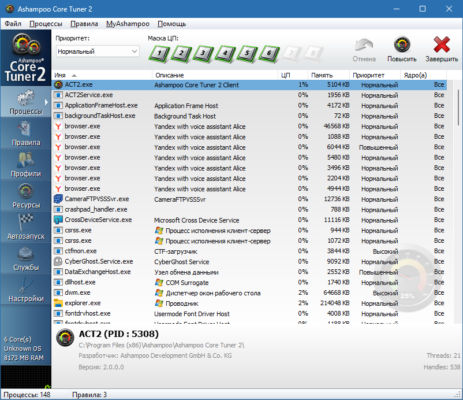
Developed by Ashampoo, a trusted name in PC utilities, this tool provides a user-friendly interface to tweak how your system uses its CPU resources—boosting speed, enhancing multitasking, and ensuring better stability and see ET-Optimizer .
🌟 Key Features
🧠 Intelligent Core Management
Assign processes to specific CPU cores to ensure better distribution of tasks and avoid system bottlenecks.
🎯 Optimize with One Click
Use automatic optimization modes to improve system performance without needing technical expertise.
🔍 Real-Time Monitoring
Visualize CPU load, core usage, and running processes with live charts and detailed insights.
🔧 Manual Process Control
Change the priority levels and affinity settings of running applications to get maximum performance for critical tasks.
💾 Save Custom Profiles
Create and save optimization profiles that suit gaming, video editing, or daily use.
🛠️ Startup Optimization
Control which processes run at system startup to improve boot time and reduce background load.
🆕 What’s New in Version 2.0.1?
-
Enhanced user interface with improved navigation
-
Updated core detection for modern CPUs
-
Improved process management and stability
-
Minor bug fixes and performance tweaks
-
Better compatibility with Windows 10 and Windows 11
🖥️ Why Use Ashampoo Core Tuner?
In today’s multi-core processor environment, most software does not fully utilize the CPU’s potential. Ashampoo Core Tuner helps bridge this gap by:
-
Giving priority to resource-intensive applications
-
Distributing workload evenly across cores
-
Allowing you to manually or automatically adjust core assignments
-
Freeing up unused CPU power for more demanding tasks
Whether you’re a gamer, video editor, or simply a power user, Core Tuner can help you unlock better performance from your hardware.
💼 System Requirements
-
Operating System: Windows 7 / 8 / 10 / 11
-
CPU: Multi-core processor recommended
-
RAM: 2 GB or more
-
Storage: 50 MB of free space
-
Permissions: Administrator rights required for tuning features
🧑💻 How to Use Ashampoo Core Tuner 2.0.1
-
Download and install from the official Ashampoo website.
-
Launch the application to access your system’s core overview.
-
Use Auto-Optimize for quick setup, or manually assign cores and set priorities.
-
Monitor live charts to see the impact of changes.
-
Save your preferred setup as a profile.
🛡️ Is Ashampoo Core Tuner Safe?
Yes. It is a trusted product by Ashampoo with no malware or ads. It interacts only with system-level process settings and does not modify hardware or Windows internals in a harmful way. Always ensure you download it from the official site or trusted software providers.
✔ Tested: This software was tested on Windows 10 & Windows 11 and works smoothly without issues.
Frequently Asked Questions
- Is this software free?
Yes, it can be downloaded and used for free. - Does it support Windows 11?
Yes, it works perfectly on Windows 10 and 11. - Is it safe to use?
Yes, the software was scanned and tested before publishing.
Last updated: February 2026
📥 Download Ashampoo Core Tuner 2.0.1
File Size: 13.9 MB – Ashampoo Core Tuner (2.0.1)