 ZLAM TOOLS Smart Digital Tools to Boost Your Productivity.

🧠 CPU-Z 2.17 – Lightweight Tool for Detailed CPU & System Analysis
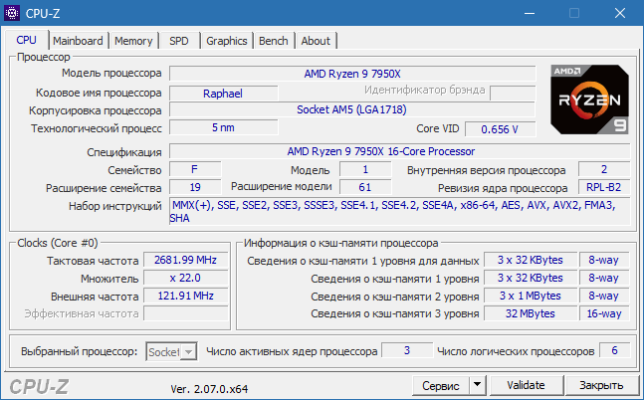
CPU-Z 2.17 is a free and reliable utility developed by CPUID that provides comprehensive information about your computer’s processor, motherboard, memory, and system performance.
Known for its precision and speed, CPU-Z is a must-have tool for hardware enthusiasts, overclockers, and technicians who want to monitor and understand their system’s components.
⚙️ Key Features of CPU-Z 2.17
-
🔍 Complete CPU Identification:
Displays detailed information about your processor — including name, architecture, cores, threads, cache levels, and clock speeds. -
🧩 Motherboard Details:
Shows manufacturer, chipset, BIOS version, and model information in real time. -
🧠 Memory Information:
View type, size, frequency, and latency of installed RAM modules (DDR, DDR4, DDR5). -
⚙️ Real-Time Monitoring:
Track CPU frequency, voltage, and multiplier dynamically as you work or overclock. -
📊 Benchmark Tool:
Compare your CPU performance against reference processors and measure single/multi-thread scores. -
💾 Portable Version Available:
Run CPU-Z without installation — perfect for quick diagnostics or use from a USB drive.
🚀 What’s New in Version 2.17
✅ Updated support for Intel Core Ultra (Meteor Lake) and AMD Ryzen 9000 CPUs
✅ Improved DDR5 detection and memory timing accuracy
✅ Updated benchmark database and performance scaling
✅ Bug fixes and stability enhancements
💡 Why You Should Use CPU-Z
Whether you’re testing new hardware, checking overclocking stability, or verifying specs before a system upgrade, CPU-Z 2.17 gives you the clarity you need.
It’s perfect for:
-
🧑🔧 PC builders and hardware enthusiasts
-
⚡ Gamers testing CPU performance
-
🧠 IT professionals diagnosing hardware issues
With its fast scan and detailed output, CPU-Z eliminates guesswork — giving you accurate system insights in seconds.
🧰 System Requirements
-
Operating System: Windows 7, 8, 10, 11 (32-bit & 64-bit)
-
RAM: 512 MB minimum
-
License: Freeware
-
Developer: CPUID
🌐 Official Website
🔗 https://www.cpuid.com/softwares/cpu-z.html
✔ Tested: This software was tested on Windows 10 & Windows 11 and works smoothly without issues.
Frequently Asked Questions
- Is this software free?
Yes, it can be downloaded and used for free. - Does it support Windows 11?
Yes, it works perfectly on Windows 10 and 11. - Is it safe to use?
Yes, the software was scanned and tested before publishing.
Last updated: February 2026
📥 Download CPU
File size: 4.1 MB CPU-Z (2.17)