 ZLAM TOOLS Smart Digital Tools to Boost Your Productivity.
Introduction
Epubor All DRM Removal 1.0.22.296 is a desktop software designed to help users manage and convert their legally purchased eBooks by removing Digital Rights Management (DRM) restrictions. The program supports multiple eBook platforms and formats, making it a popular solution for readers who want greater flexibility across devices and applications.
With a simple interface and fast processing engine, Epubor All DRM Removal allows users to back up, organize, and access their personal eBook libraries more conveniently.
What Is Epubor All DRM Removal?
Epubor All DRM Removal is a desktop application compatible with Windows and macOS. It supports popular eBook platforms such as Kindle, Kobo, and Adobe Digital Editions. Users can easily remove DRM protection from books in EPUB, PDF, MOBI, AZW, AZW3, and KFX formats, enabling reading across various devices and eReaders.
Key Features
1. Multi-Platform Support
Epubor works with eBooks from multiple vendors, including Kindle, Kobo, and Adobe, making it a centralized solution for managing all your eBooks in one place.
2. Wide Format Compatibility
After removing DRM, the software allows users to save books in EPUB, PDF, or MOBI formats, ensuring compatibility with almost any eReader, tablet, or reading application.
3. Fast and Efficient Conversion
Version 1.0.22.296 includes performance improvements for fast batch processing, keeping original layouts, images, and text intact.
4. Simple Drag-and-Drop Interface
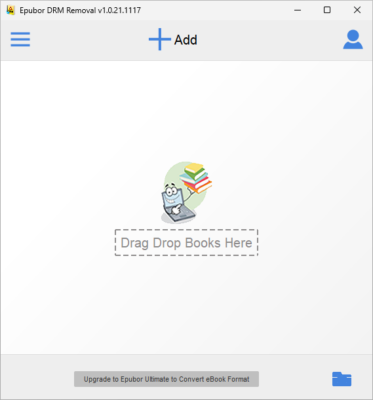
Users can drag and drop eBooks into the program for automatic DRM removal. The interface is clean, user-friendly, and designed for easy operation.
5. Maintains Original Quality
Epubor preserves the original book structure, including fonts, images, chapters, metadata, and covers, ensuring the DRM-free version looks identical to the original.
What’s New in Version 1.0.22.296
-
Improved compatibility with newer eBook formats
-
Enhanced stability for batch conversions
-
Faster DRM detection for large libraries
-
Minor bug fixes and performance optimizations
These updates ensure smoother operation and better user experience.
How It Works
-
Install the Software: Launch Epubor All DRM Removal on your computer.
-
Import eBooks: Drag and drop your purchased eBooks into the program.
-
Automatic DRM Detection: The software automatically detects DRM-protected files.
-
Choose Output Format: Select EPUB, PDF, or MOBI if conversion is needed.
-
Start Conversion: Click the convert button to generate DRM-free eBooks.
The process is straightforward and suitable for both individual readers and professionals.
Common Uses
-
Personal Library Management: Organize purchased eBooks in one place.
-
Cross-Device Reading: Make books compatible with different eReaders.
-
Backup Copies: Secure personal backups of legally purchased books.
-
Format Conversion: Easily switch between EPUB, PDF, MOBI, and other formats.
System Requirements
-
Operating System: Windows 7/8/10/11 or macOS
-
Memory: 2 GB minimum (4 GB recommended)
-
Disk Space: 200 MB free
-
Additional Software: Official reading apps may be needed for importing some books
Conclusion
Epubor All DRM Removal 1.0.22.296 is a reliable and easy-to-use tool for managing DRM-protected eBooks. It provides users with flexibility to access and convert their purchased books across multiple devices without losing quality. Its clean interface, batch processing, and multi-platform support make it a must-have for avid readers, librarians, and digital book enthusiasts.
✔ Tested: This software was tested on Windows 10 & Windows 11 and works smoothly without issues.
Frequently Asked Questions
- Is this software free?
Yes, it can be downloaded and used for free. - Does it support Windows 11?
Yes, it works perfectly on Windows 10 and 11. - Is it safe to use?
Yes, the software was scanned and tested before publishing.
Last updated: February 2026
📥 Download Epubor All DRM Removal 1.0.22.296
File Size: 55.3 MB — Epubor All DRM Removal