 ZLAM TOOLS Smart Digital Tools to Boost Your Productivity.

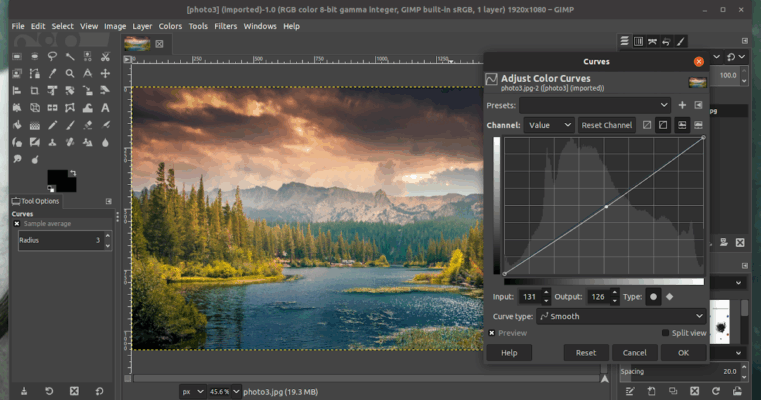
GIMP (GNU Image Manipulation Program) is a free and open-source image editor that offers advanced photo manipulation, graphic design, and digital art tools. GIMP 3.1.2 brings enhanced performance, new features, and improved stability, making it a top choice for creative professionals, hobbyists, and students who need a Photoshop alternative without any cost and buy.
🚀 Why GIMP 3.1.2 Stands Out

Professional-Grade Editing Tools
GIMP provides a complete suite of tools for photo retouching, image composition, and digital artwork creation. Users can manipulate layers, apply filters, and edit high-resolution images with precision.
Open-Source and Free
Unlike proprietary software, GIMP is completely free, allowing users to install, modify, and distribute it without any licensing fees.
Cross-Platform Compatibility
Works seamlessly on Windows, Mac, and Linux, enabling users to work on any system without limitations.
🔑 Key Features of GIMP 3.1.2
1. Advanced Image Manipulation
-
Layer-based editing with masks and channels.
-
Powerful selection tools for precise edits.
-
Custom brushes, gradients, and patterns for creative designs.
2. Photo Retouching & Enhancement
-
Remove unwanted objects, adjust colors, and correct exposure.
-
Apply filters and effects to improve photo quality.
-
Batch processing for multiple images.
3. Graphic Design Tools
-
Create banners, logos, icons, and illustrations.
-
Support for vector graphics and text manipulation.
-
Export designs in various formats including PNG, JPEG, GIF, and SVG.
4. Plug-ins & Extensibility
-
Extend functionality with hundreds of plug-ins and scripts.
-
Automate repetitive tasks with built-in scripting support.
5. Improved Performance
-
Faster rendering and processing in version 3.1.2.
-
Enhanced UI for smoother workflow and better user experience.
📌 System Requirements
-
OS: Windows 7 or later, macOS 10.12+, Linux distributions
-
RAM: 2 GB minimum, 4 GB recommended
-
Disk Space: ~500 MB for installation
-
Graphics: Standard GPU support for hardware acceleration
🛠 Who Should Use GIMP 3.1.2?
-
Graphic Designers 🎨 – create professional-quality designs without paying for software.
-
Photographers 📸 – retouch and enhance photos with advanced tools.
-
Students & Educators 🎓 – learn and teach image editing techniques.
-
Digital Artists 💻 – design illustrations, icons, and digital art.
✅ Final Verdict
GIMP 3.1.2 is a powerful and free image editing solution that rivals expensive professional software. With its extensive editing tools, cross-platform compatibility, and open-source flexibility, it’s perfect for creative professionals, hobbyists, and students alike. Whether for photo editing, graphic design, or digital art, GIMP provides a robust, cost-free platform to unleash creativity.
✔ Tested: This software was tested on Windows 10 & Windows 11 and works smoothly without issues.
Frequently Asked Questions
- Is this software free?
Yes, it can be downloaded and used for free. - Does it support Windows 11?
Yes, it works perfectly on Windows 10 and 11. - Is it safe to use?
Yes, the software was scanned and tested before publishing.
Last updated: February 2026
📥 Download GIMP 3.1.2
File Size: 305 MB – GIMP (3.1.2)