 ZLAM TOOLS Smart Digital Tools to Boost Your Productivity.
Capturing and sharing screenshots has become a daily necessity for both professionals and casual users. Greenshot 1.3.300 is a lightweight, open-source screenshot software for Windows that makes screen capturing fast and efficient. Whether you need to grab an entire window, a specific region, or the full screen, Greenshot provides all the tools you need in a simple package.
🚀 Why Choose Greenshot 1.3.300?
1. Easy to Use
With intuitive hotkeys and a user-friendly interface, taking screenshots is quick and hassle-free.
2. Built-in Image Editor
No need for third-party tools – edit, crop, annotate, and highlight directly after capturing.
3. Fast Sharing Options
Export your screenshots directly to email, printers, Office applications, or online platforms.
4. Lightweight and Free
Greenshot runs smoothly in the background without slowing down your system.
🔑 Key Features of Greenshot 1.3.300
-
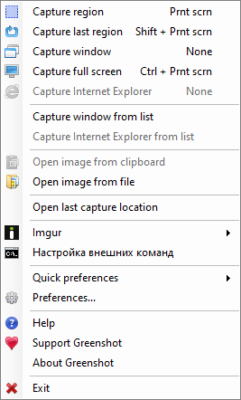
📌 Capture Modes – Region, window, fullscreen, or last region.
-
✏️ Editing Tools – Add text, shapes, arrows, or blur sensitive information.
-
⚡ Quick Export – Send screenshots to clipboard, file, or cloud services.
-
🔧 Configurable Hotkeys – Set custom shortcuts for faster capturing.
-
🖼 Multiple Output Formats – Save images in PNG, JPEG, BMP, or GIF.
-
🌍 Integrations – Works seamlessly with Microsoft Office and productivity apps.
📌 What’s New in Version 1.3.300?
-
Improved screenshot performance with less memory usage.
-
Enhanced compatibility with the latest Windows versions.
-
Bug fixes for smoother editing and exporting.
-
Updated user interface with clearer icons and menus.
💻 System Requirements
-
OS: Windows 7 / 8 / 10 / 11
-
Size: ~5 MB
-
License: Free / Open-Source
-
Languages: Multilingual support available
👥 Who Can Benefit from Greenshot?
-
Students 🎓 – For taking notes, capturing slides, or sharing assignments.
-
Professionals 💼 – Create tutorials, documentation, or quick reports.
-
Designers 🎨 – Highlight and annotate design feedback efficiently.
-
Everyday Users 🖥️ – Save useful information, troubleshoot, or share visuals easily.
🛠 Tips for Using Greenshot Efficiently
-
Learn the hotkeys for faster screenshot capturing.
-
Use the editor to blur sensitive information before sharing.
-
Save default settings to automatically export in your preferred format.
-
Integrate Greenshot with email or Office apps for seamless workflow.
-
Keep it running in the background for instant screen captures.
✅ Final Verdict
Greenshot 1.3.300 is one of the most reliable and lightweight screenshot tools for Windows. Its combination of fast capture, built-in editing, and easy export options makes it an essential productivity tool. Whether you’re a student, a professional, or just someone who needs a quick way to save and share information, Greenshot provides everything you need in a simple, free package.
✔ Tested: This software was tested on Windows 10 & Windows 11 and works smoothly without issues.
Frequently Asked Questions
- Is this software free?
Yes, it can be downloaded and used for free. - Does it support Windows 11?
Yes, it works perfectly on Windows 10 and 11. - Is it safe to use?
Yes, the software was scanned and tested before publishing.
Last updated: February 2026
📥 Download Greenshot 1.3.300
File size: 3.4 MB — Greenshot (1.3.300)