 ZLAM TOOLS Smart Digital Tools to Boost Your Productivity.

HFS (HTTP File Server) 3 0.57.7 is a portable, open-source application that turns your Windows PC into a web file server. Unlike traditional file-sharing software, HFS allows you to share files directly from your local drives over HTTP—no uploads to third-party servers required. This version includes bug fixes and performance improvements that enhance stability and usability and see HttpMaster.
🔑 Key Features
-
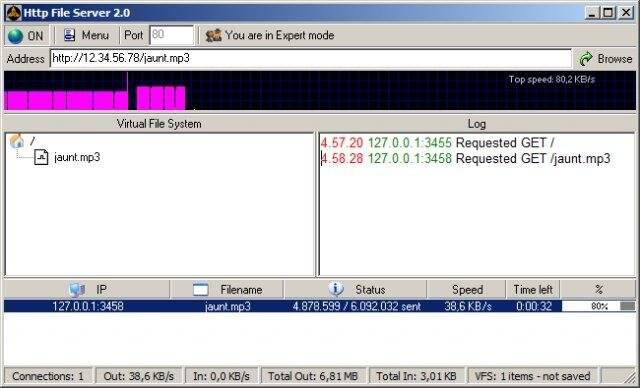
Virtual File System: Share files or folders with custom virtual paths and names.
-
HTTPS Support: Generate self-signed certificates for encrypted connections.
-
Resumable Uploads & Downloads: Users can pause and resume transfers seamlessly.
-
Bandwidth Management: Control global or per-IP upload/download speeds.
-
Administrative Interface: Monitor client activity and file accesses in real-time.
-
Plugins & Extensions: Support for customizable add-ons like thumbnails, geo-blocking, or themes.
-
Download Folders as ZIP: Export entire directories in compressed format via web.
-
Mobile-Friendly Interface: Responsive design works across phones, tablets, and desktops.
-
User Accounts & Access Control: Apply permissions to files and folders for secure sharing.
-
Geographic Firewall: Restrict access based on geographic IP locations.
🆕 Updates in Version 3 0.57.7
-
Fixes addressing recent stability issues reported in version 3.0.57.5.
-
Improved plugin reliability and logging accuracy.
-
Performance optimizations for folder download and admin UI responsiveness.github
💡 How It Works
-
Launch the HFS executable on your Windows machine.
-
Use the virtual file system interface to select folders or single files for sharing.
-
Configure HTTPS, bandwidth, and access settings using the admin panel.
-
Share the generated HTTP(S) link with recipients—downloads start instantly and can be resumed if interrupted.
-
Observe activity and manage files in real-time using the browser-based administration dashboard.
🧩 Who Should Use HFS?
-
Power users sharing large files directly over the internet without third-party services.
-
Small teams needing quick, secure intranet file sharing.
-
Developers and testers distributing builds or logs across devices.
-
Home users sharing personal files like videos or backups with family.
-
Archivists and researchers enabling easy access to collections of documents and images.
✅ Why Choose HFS 3 0.57.7?
-
One single portable executable—no installation required.
-
Zero-reliance on cloud servers; keep control of your data.
-
Lightweight yet feature-packed—supports HTTPS, plugins, and uploads.
-
Ideal for both casual sharing and technical workflows.
-
Regular updates ensure stability and plugin improvements.


✔ Tested: This software was tested on Windows 10 & Windows 11 and works smoothly without issues.
Frequently Asked Questions
- Is this software free?
Yes, it can be downloaded and used for free. - Does it support Windows 11?
Yes, it works perfectly on Windows 10 and 11. - Is it safe to use?
Yes, the software was scanned and tested before publishing.
Last updated: February 2026
📥 Download HFS
File size: 18.2 MB – HFS (HTP File Server) 0.57.7