 ZLAM TOOLS Smart Digital Tools to Boost Your Productivity.
ID Photos Pro 8.16.4.1 is a specialized software designed for creating biometric-compliant ID and passport photos. Tailored for photographers, print shops, and institutions, it ensures fast processing, strict compliance with international standards, and high-quality print results and buy.
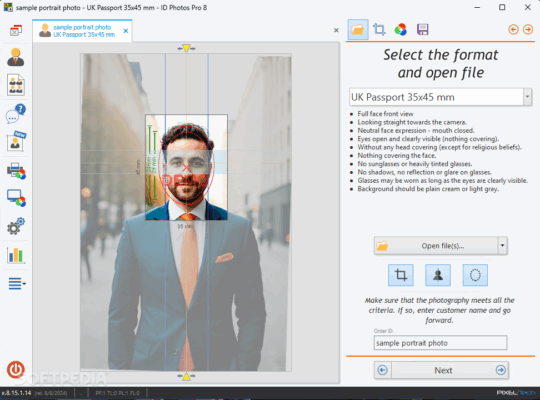
🚀 Why Choose ID Photos Pro?
📏 Biometric Compliance
-
Automatically adjusts and validates photos according to ICAO and local government regulations.
-
Supports more than 280 ID and passport formats from over 87 countries.
⚡ Fast & Automated Processing
-
Detects face, eyes, nose, and mouth for automatic cropping.
-
Processes photos in less than 10 seconds per image.
🎨 Professional Image Adjustments
-
Built-in tools for brightness, contrast, sharpness, and color correction.
-
Automatic background enhancement for better print results.
🎯 Key Features of ID Photos Pro 8.16.4.1
🗂 Huge Database of Formats
-
Covers passports, visas, and ID card requirements from multiple countries.
-
Frequent database updates to keep compliance accurate.
🖨 Print & Export Options
-
Direct printing with multi-photo layout options.
-
Export digital copies in various formats for online applications.
👨💼 Customer Database
-
Save customer data and photo history for repeat orders.
-
Useful for photo studios and corporate ID production.
📡 Online Submission
-
Supports e-passport and e-visa photo uploads directly to official portals (where applicable).
💡 What’s New in Version 8.16.4.1
-
Updated compliance database with new country requirements.
-
Enhanced face detection accuracy.
-
Improved printing templates and color management.
-
Stability and performance optimizations.
📋 System Requirements
-
OS: Windows 7/8/10/11 (64-bit)
-
Processor: 2 GHz dual-core or higher
-
RAM: 4 GB minimum
-
Storage: 250 MB free space
-
Printer: Any high-quality photo printer supported by Windows
💼 Who Should Use ID Photos Pro?
-
📷 Professional Photosgraphers – Offer fast, compliant ID photo services.
-
🏢 Corporate Offices – Create staff ID cards efficiently.
-
🛂 Visa Agencies – Ensure clients meet photo requirements.
-
📍 Government Institutions – Handle large volumes of ID photo processing.
✅ Final Verdict
ID Photos Pro 8.16.4.1 is more than just a photo editing tool—it’s a precision biometric ID photo system. With global compliance coverage, fast processing, and professional output options, it’s ideal for any business or organization that needs accurate ID photos in seconds.
✔ Tested: This software was tested on Windows 10 & Windows 11 and works smoothly without issues.
Frequently Asked Questions
- Is this software free?
Yes, it can be downloaded and used for free. - Does it support Windows 11?
Yes, it works perfectly on Windows 10 and 11. - Is it safe to use?
Yes, the software was scanned and tested before publishing.
Last updated: February 2026
📥 Download ID Photos Pro 8.16.4.1
File Size: 95.6 MB — ID Photos