 ZLAM TOOLS Smart Digital Tools to Boost Your Productivity.
When it comes to enjoying videos and music on Windows, a fast, lightweight, and reliable media player is essential. MPC-BE (Media Player Classic – Black Edition) 1.8.6 is an open-source media player designed to deliver high-quality playback without unnecessary resource usage. Based on the original Media Player Classic project, MPC-BE continues to improve performance and support for modern audio and video formats.
What is MPC-BE?
MPC-BE is a modern fork of the classic Media Player Classic, developed by independent programmers. Unlike bloated multimedia suites, MPC-BE focuses on speed, simplicity, and compatibility. Its lightweight design makes it perfect for users who want a no-nonsense video player that just works.
Key Features of MPC-BE 1.8.6
1. Wide Format Support
-
Plays virtually all popular audio and video formats.
-
Supports AVI, MP4, MKV, FLAC, MP3, and more without external codecs.
2. Lightweight Performance
-
Minimal system resource usage.
-
Runs smoothly on both older PCs and modern systems.
3. Customizable Interface
-
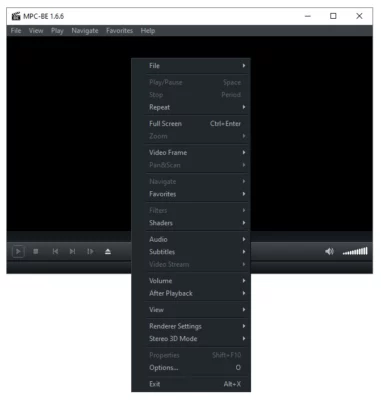
Sleek and modern user interface with Black Edition design.
-
Offers skins, themes, and UI customization.
4. Advanced Playback Options
-
Subtitle support with customizable fonts and styles.
-
Audio delay and video sync adjustments.
-
Frame-by-frame playback for precision viewing.
5. Open-Source and Free
-
100% free to use with no ads.
-
Regularly updated by the community.
6. Portable Version Available
-
Can be run without installation.
-
Ideal for USB drives or temporary setups.
What’s New in MPC-BE 1.8.6?
-
Enhanced video rendering performance.
-
Updated codec support for modern formats.
-
Bug fixes for playback stability.
-
Improved subtitle handling and UI tweaks.
Benefits of Using MPC-BE 1.8.6
For Everyday Users
-
Simple, clean interface that anyone can use.
-
Reliable playback for movies, TV shows, and music.
For Advanced Users
-
Detailed configuration for audio, video, and subtitles.
-
Supports hardware acceleration for smoother playback.
For Professionals
-
Useful for video editors and testers who need precision playback tools.
-
Offers frame analysis and codec debugging support.
How to Use MPC-BE 1.8.6
Step 1: Download and Install
Get the installer or portable version of MPC-BE 1.8.6.
Step 2: Open Media Files
Drag and drop files into the player or open them via the menu.
Step 3: Customize Settings
Adjust video rendering, subtitles, and audio options for the best experience.
Step 4: Enjoy Smooth Playback
Play your favorite movies, shows, or music with high-quality performance.
Why Choose MPC-BE Over Other Players?
-
Faster performance than bloated players like VLC or Windows Media Player.
-
Clean, ad-free experience with no unnecessary extras.
-
Wide compatibility with media formats out of the box.
-
Community-driven development ensures regular updates.
Conclusion
MPC-BE 1.8.6 is a reliable, lightweight, and versatile media player that delivers excellent playback quality on Windows. Whether you’re a casual viewer or a power user, MPC-BE provides a fast, free, and customizable experience without consuming system resources.
If you want a modern, open-source alternative to traditional media players, MPC-BE 1.8.6 is one of the best choices available today.
✔ Tested: This software was tested on Windows 10 & Windows 11 and works smoothly without issues.
Frequently Asked Questions
- Is this software free?
Yes, it can be downloaded and used for free. - Does it support Windows 11?
Yes, it works perfectly on Windows 10 and 11. - Is it safe to use?
Yes, the software was scanned and tested before publishing.
Last updated: February 2026
📥 Download MPC
Download MPC-BE 1.8.6