 ZLAM TOOLS Smart Digital Tools to Boost Your Productivity.

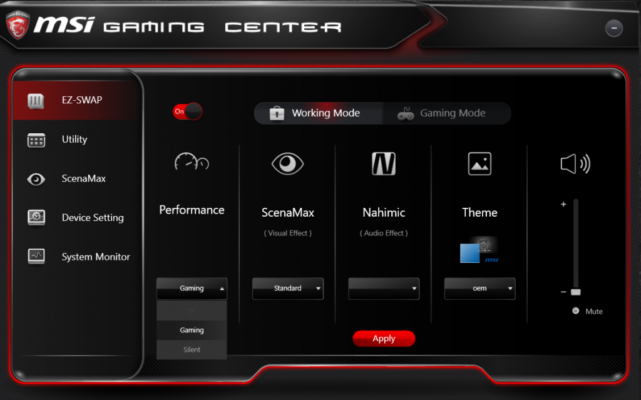
MSI Gaming App 6.2.0.98 is a simple Windows utility designed for MSI gaming hardware. It lets users boost performance with one-click modes, control fan speed, tweak GPU lighting, and monitor system stats like FPS and temperature—without overwhelming them with complex settings and see MSI Super Charger .
🔑 Key Features
-
One-Click Modes: Switch between OC, Gaming, Silent, and VR profiles to adjust clock speeds, fan curves, and performance settings easily. OC mode maximizes output, while Silent mode prioritizes quiet operation.
-
On-Screen Stats: Display real-time FPS, GPU/CPU clocks, usage, temperatures, and VRAM load while gaming for performance awareness.
-
Lighting Control: Customize RGB and LED effects on compatible MSI graphics cards using built-in presets to match themes or mood.
-
Eye Rest Mode: Offers preset display profiles (Gaming, Movie, EyeRest) to reduce eye strain by adjusting contrast and color settings.
-
VR Optimization: Activates a VR mode to optimize system performance and minimize interference for virtual reality use.
-
Lightweight & Portable: Easy to install, requiring minimal resources—and now effectively integrated into MSI Dragon Center for newer systems.
🛠 Compatibility & Requirements
-
Operating Systems: Supported on Windows 7, 8, 10, and 11.
-
Hardware: Best suited for MSI gaming branded graphics cards or motherboards.
-
Dependencies: May require Microsoft .NET Framework and Visual C++ redistributables to run.
⚠ Known Issues
-
Some reports indicate the app may crash or close unexpectedly on systems with outdated firmware or lacking Intel ME drivers, especially when used alongside newer MSI utilities.
-
MSI has since transitioned many of these features into MSI Dragon Center, marking this app as legacy for newer hardware.
🎯 Who Is It For?
-
Gamers wanting easy performance tuning without advanced overclocking tools.
-
MSI hardware owners seeking quick lighting and display adjustments.
-
Users looking for basic real-time system monitoring on-screen.
-
Anyone using older MSI hardware or preferring standalone utilities over centralized suites.
✅ Why Choose MSI Gaming App?
-
Simple and intuitive interface—no steep learning curve.
-
Effective one-click mode switching for different usage scenarios.
-
Smart blend of performance tuning, eye-care settings, and lightweight monitoring.
-
Retains full functionality even on older Windows systems and MSI setups.
✔ Tested: This software was tested on Windows 10 & Windows 11 and works smoothly without issues.
Frequently Asked Questions
- Is this software free?
Yes, it can be downloaded and used for free. - Does it support Windows 11?
Yes, it works perfectly on Windows 10 and 11. - Is it safe to use?
Yes, the software was scanned and tested before publishing.
Last updated: February 2026
📥 Download MSI Gaming App 6.2.0.98
File size: 59.7 MB – MSI Gaming App (6.2.0.98)