 ZLAM TOOLS Smart Digital Tools to Boost Your Productivity.

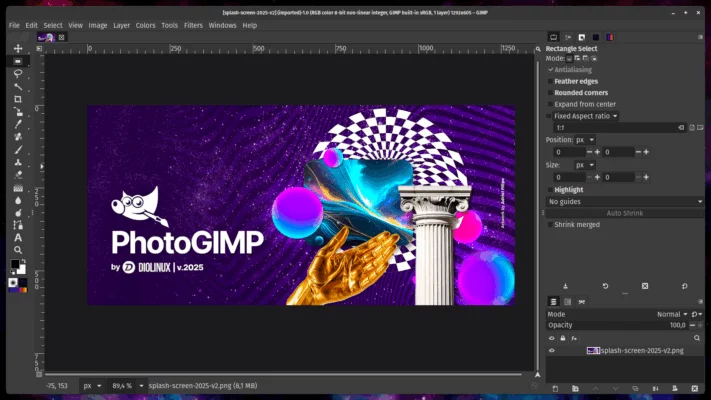
PhotoGIMP 3.0 is a popular customization pack for GIMP that reimagines its interface and key mappings to closely resemble Adobe Photoshop. It offers a smooth learning curve for users transitioning from Photoshop, while enhancing productivity for regular GIMP users.
What Is PhotoGIMP 3.0?
PhotoGIMP is not a standalone application but a configuration overlay for GIMP. It restructures the layout, tool icons, shortcuts, and menu categories to mimic the Adobe Photoshop user experience, offering a cleaner and more intuitive editing environment.

Key Features
🧱 Docked Layout
Switches GIMP’s multi-window interface to a single-window mode with docked panels, similar to Photoshop.
🎨 Photoshop Icons and Theme
Includes clean dark themes and icon sets that look familiar to Adobe users.
🔑 Shortcut Mapping
Remaps keys to match Photoshop’s workflow:
-
V= Move Tool -
B= Brush Tool -
C= Crop Tool -
E= Eraser Tool -
L= Lasso Tool
🖌 Preloaded Assets
Includes brushes, templates, gradients, and effects tailored for quick use.
🔁 PSD Support
Fully supports importing and editing .PSD files while preserving layer structure.
What’s New in Version 3.0?
-
Fully updated for GIMP 2.10+
-
Improved file structure and icons
-
Better keyboard shortcut stability
-
Faster loading times
-
Enhanced UI visibility on high-res displays
Why Use PhotoGIMP?
PhotoGIMP is perfect for:
-
Photoshop users migrating to open-source tools
-
Designers needing a faster GIMP workflow
-
Educators teaching digital editing with simplified layouts
-
Artists working across platforms (Windows/macOS/Linux)
System Requirements
-
Operating System: Windows, macOS, or Linux
-
Software: GIMP 2.10 or later
-
RAM: Minimum 2 GB
-
Disk Space: 50 MB
-
Installation: Manual config folder replacement
How to Install
-
Install the latest version of GIMP.
-
Download the PhotoGIMP 3.0 config pack.
-
Replace GIMP’s user configuration folder with the downloaded one.
-
Launch GIMP and enjoy the new interface.
Final Thoughts
PhotoGIMP 3.0 makes GIMP more accessible to users who are used to Photoshop. With familiar shortcuts, a docked layout, and modern icons, it improves your workflow without changing GIMP’s core power. Whether you’re editing photos, creating digital art, or designing layouts, PhotoGIMP helps you do it faster and smarter.
✔ Tested: This software was tested on Windows 10 & Windows 11 and works smoothly without issues.
Frequently Asked Questions
- Is this software free?
Yes, it can be downloaded and used for free. - Does it support Windows 11?
Yes, it works perfectly on Windows 10 and 11. - Is it safe to use?
Yes, the software was scanned and tested before publishing.
Last updated: February 2026
📥 Download PhotoGIMP 3.0
File size: 6.1 MB – PhotoGIMP (3.0)