 ZLAM TOOLS Smart Digital Tools to Boost Your Productivity.

🖼️ PillowView 1.0.0 Overview
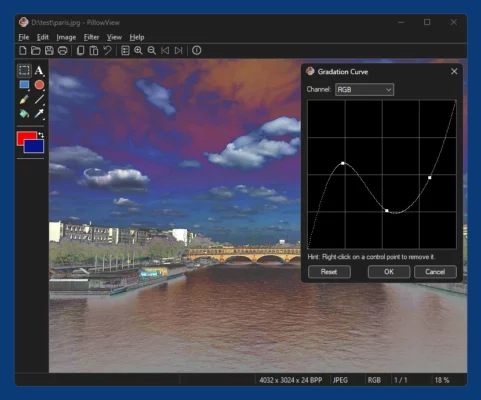
PillowView 1.0.0 is a modern, lightweight image viewer for Windows designed to deliver lightning-fast performance and simplicity. It supports a wide variety of image formats and provides a smooth, clean interface ideal for photographers, designers, and everyday users who want a fast way to browse their pictures.
⚙️ Main Features
🌟 Fast & Lightweight
PillowView opens large images instantly, even in high resolutions, using optimized memory management that minimizes CPU usage.
🖼️ Wide Format Support
The software supports all popular image formats, including JPG, PNG, BMP, GIF, TIFF, and WebP — ensuring seamless access to all your visual content.
🧭 Smooth Navigation
Use the arrow keys or scroll wheel to move effortlessly between images in a folder. PillowView offers a distraction-free browsing experience.
🧰 Essential Tools
Zoom in/out, rotate, and fit images to screen with quick shortcuts. Everything is accessible from a clean toolbar with no unnecessary clutter.
🎨 Dark & Light Themes
Switch between themes to match your workspace or mood. The modern UI blends perfectly with Windows 10 and 11 styles.
💡 Why Choose PillowView?
Many image viewers are packed with unnecessary features that slow performance. PillowView focuses on what truly matters — speed, simplicity, and clarity. It’s perfect for users who need a reliable viewer without bloated editing tools or ads.
💻 System Requirements
-
OS: Windows 7, 8, 10, 11
-
Processor: 1 GHz or faster
-
RAM: 1 GB minimum
-
Storage: 50 MB free space
🚀 How to Use PillowView
-
Install and launch PillowView.
-
Open your image folder or drag images directly into the window.
-
Use keyboard arrows or the mouse to navigate between photos.
-
Adjust zoom, rotation, or view mode as needed.
🔽 Download PillowView 1.0.0
Download the latest version of PillowView 1.0.0 directly from the developer’s official website to ensure safe and verified installation.
✔ Tested: This software was tested on Windows 10 & Windows 11 and works smoothly without issues.
Frequently Asked Questions
- Is this software free?
Yes, it can be downloaded and used for free. - Does it support Windows 11?
Yes, it works perfectly on Windows 10 and 11. - Is it safe to use?
Yes, the software was scanned and tested before publishing.
Last updated: February 2026
📥 Download PillowView 1.0.0
File Size: 24.1 MB PillowView (1.0.0)