 ZLAM TOOLS Smart Digital Tools to Boost Your Productivity.

Overview of Q-Dir 12.33
Q-Dir 12.33 is a lightweight and highly efficient file manager for Windows designed to make file organization faster and more convenient. Unlike the default Windows File Explorer, Q-Dir offers a unique quad-pane interface that allows you to view and manage multiple folders simultaneously.
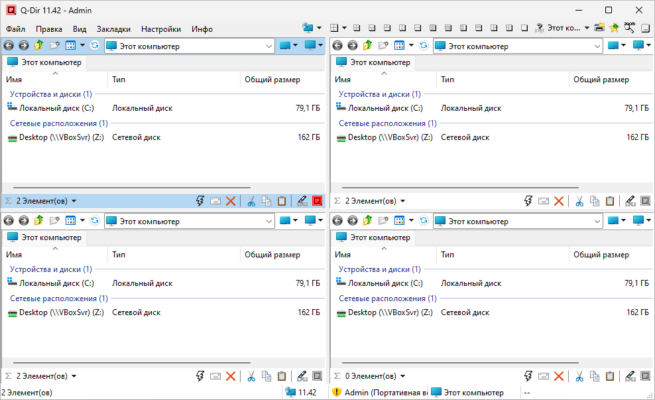
With advanced navigation tools, customizable layouts, and drag-and-drop support, Q-Dir has become a go-to tool for professionals who handle large amounts of files on a daily basis.
Key Features
1. Quad-Pane Interface
-
View and organize files across four panes at once.
-
Each pane supports independent navigation.
-
Switch between dual, triple, or quad layouts.
2. Tabbed Navigation
-
Multiple tabs for each pane.
-
Quickly switch between folders without losing track.
-
Save and restore favorite layouts.
3. Customization Options
-
Change color filters for different file types.
-
Create favorite folder shortcuts.
-
Personalize toolbar and layout settings.
4. Advanced File Management
-
Drag-and-drop across panes.
-
Copy, move, or compare files easily.
-
Supports ZIP archives and network folders.
Benefits
-
Greatly improves productivity with a multi-pane layout.
-
Saves time when working with complex folder structures.
-
Portable version available for use without installation.
-
Lightweight and fast compared to traditional file managers.
System Requirements
-
OS: Windows 7, 8, 10, 11 (32-bit & 64-bit)
-
RAM: 2 GB or higher recommended
-
Storage: At least 50 MB free space
-
Processor: 1 GHz or faster
Q-Dir 12.33 is the perfect choice for users who want a faster, smarter, and customizable alternative to the default Windows File Explorer.
✔ Tested: This software was tested on Windows 10 & Windows 11 and works smoothly without issues.
Frequently Asked Questions
- Is this software free?
Yes, it can be downloaded and used for free. - Does it support Windows 11?
Yes, it works perfectly on Windows 10 and 11. - Is it safe to use?
Yes, the software was scanned and tested before publishing.
Last updated: February 2026
📥 Download Q
File size: 5.4 MB – Q-Dir x86/64