 ZLAM TOOLS Smart Digital Tools to Boost Your Productivity.

What Is Windows Service Auditor?
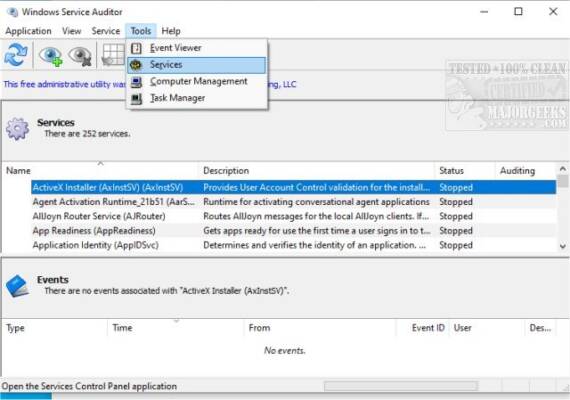
Windows Service Auditor, developed by Core Technologies Consulting, is a free, portable tool that audits Windows services by probing the Event Logs and offering a user-friendly interface to monitor service changes—like start, stop, deletion, and errors . It simplifies digging through complex Event Viewer data and lets both system admins and advanced users discover “who did what” with services.
New in Version 4.1.0.39 (Released September 5, 2024)
🔔 Added Features
-
“Startup Type” column now visible in the services list.
-
Disabled services displayed in italics, with auditing-enabled ones in bold .
🛠️ Fixes & Improvements
-
Better non-English UI support.
-
Switched to SHA‑256 digital signature; dropped SHA‑1.
-
Improved logging and service‑list loading speed.
-
Fixed handling of read‑only services and performance glitch when parsing huge Event Logs.
-
Enhanced compatibility with services lacking descriptions.
-
Prevented starting disabled services .
Key Features
Easily Track Service Events
Select a service to instantly view all related events—timestamps, types, sources, Event IDs, and descriptions—in a clean, split-pane UI. Double-click to see full details and copy to clipboard .
Enable or Disable Auditing
One click enables Windows’ Advanced Security Audit Policies, tracking who started/stopped/updated services. Windows Service Auditor also restores User Information in logs once auditing is set .
Export Services to XML or CSV
You can export all or selected services—including dependencies, executable hashes, recovery settings, etc.—to XML for documentation or analysis .
Portable & Lightweight
No installation required. Runs directly from the EXE (approx. 1.9 MB), uses about 10–25 MB RAM, and is easy to carry on USB sticks .
Why Use It?
🎯 For System Administrators
Quickly troubleshoot critical service issues—find out who stopped a service, when, and if any errors occurred—without diving deep into Event Viewer.
🧠 For Auditing & Compliance
Enforce service-related security policies, detect unauthorized modifications, and easily export findings for audits or review.
🛡️ For Personal or IT Power Users
Learn more about how Windows services behave—debug background issues, monitor service events, and gain transparency over system changes.
How to Use It – Quick Start
-
Download
WindowsServiceAuditor.exe. -
Run directly—no install needed.
-
Select a service to view its recent event history.
-
To track user account, enable auditing via Service → Enable Auditing—the tool adjusts security audit settings automatically .
-
View auditing details in the lower pane or export services via Services → Export (XML).
System Requirements & Technical Info
| Feature | Specification |
|---|---|
| OS | Windows 7 / 8 / 8.1 / 10 / 11 / Server 2016–2025 Core Technologies |
| RAM Usage | ~10–25 MB |
| File Size | ~1.9 MB executable |
| License | Freeware, portable |
✔ Tested: This software was tested on Windows 10 & Windows 11 and works smoothly without issues.
Frequently Asked Questions
- Is this software free?
Yes, it can be downloaded and used for free. - Does it support Windows 11?
Yes, it works perfectly on Windows 10 and 11. - Is it safe to use?
Yes, the software was scanned and tested before publishing.
Last updated: February 2026