 ZLAM TOOLS Smart Digital Tools to Boost Your Productivity.
🧠 What Is WinToHDD?
WinToHDD is a Windows deployment tool enabling users to install, reinstall, or clone operating systems like Windows 7/8/10/11 or Server editions using ISO, WIM, ESD, VHD/VHDX files—without requiring USB, CD, or DVD media. It’s ideal for system deployment, cloning, or rescue tasks and buy.
🔍 Editions Comparison: Professional vs Enterprise
✅ Professional Edition
-
Licenses up to 2 PCs for individual or small home/business use.
-
Offers faster cloning, no upgrade reminders, lifetime free updates, and technical support.
-
Supports BitLocker partition encryption and GPT/UEFI installations.
✅ Enterprise Edition
-
Designed for organizational use with unlimited machine licensing at one site.
-
Includes all Professional features plus support for Windows Server editions.
-
Ideal for IT teams managing multiple deployments or cloning setups across networks.
✳️ What’s New in Version 6.6.1
-
Improved stability and compatibility when installing from ISO/WIM/ESD across both BIOS & UEFI systems.
-
Enhanced clone performance and reduced errors during system migration.
-
Fixed issues related to USB drive creation failures while building WinPE environments for installation.
-
Added support for BitLocker encryption during install or clone workflows.
⚙️ Key Features of WinToHDD
-
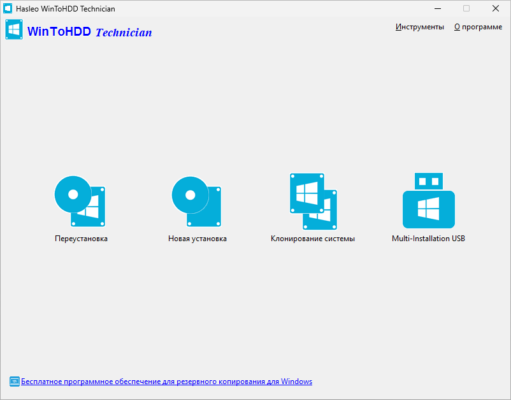
OS Deployment: Install or reinstall Windows directly from virtual image files, eliminating reliance on external media.
-
System Clone: Create exact copies of existing Windows partitions to HDD or SSD without loss of data or need for reinstallation.
-
Multi‑Install USB Creator: Build a single USB drive containing multiple Windows images for BIOS and UEFI devices.
-
BitLocker Encryption: Secure Windows partition during installation or clone operations.
-
Legacy Requirements Bypass: Install newer Windows versions while bypassing TPM or hardware requirements (useful for older PCs).
🧩 Why It Matters
-
Saves time and resources: Nobody needs to create bootable media—just use the local system image directly.
-
Ideal for cloning and migrations: Perfect for system administrators who need to replicate setups across PCs quickly.
-
Supports enterprise environments: The Enterprise license empowers corporations to deploy across many endpoints with ease.
-
Encryption support: Ensures data remains protected even during OS migrations.
✅ System Requirements & Licensing
| Criteria | Details |
|---|---|
| Supported OS | Windows Vista / 7 / 8 / 8.1 / 10 / 11 / Windows Server 2008+ |
| CPU | 1 GHz or faster (32‑bit or 64‑bit) |
| RAM | At least 1 GB (2 GB recommended) |
| Disk Space | ~10 MB installation size |
| License (Professional) | Up to 2 PCs; free lifetime updates |
| License (Enterprise) | Unlimited PCs at one organization site |
✔ Tested: This software was tested on Windows 10 & Windows 11 and works smoothly without issues.
Frequently Asked Questions
- Is this software free?
Yes, it can be downloaded and used for free. - Does it support Windows 11?
Yes, it works perfectly on Windows 10 and 11. - Is it safe to use?
Yes, the software was scanned and tested before publishing.
Last updated: February 2026
📥 Download WinToHDD 6.6.1
File Size: 11.4 MB — WinToHDD