 ZLAM TOOLS Smart Digital Tools to Boost Your Productivity.

Zebra CardStudio Pro 2.5.35: Design & Print Professional ID Cards Effortlessly 🖥️✨
Need to create and print professional identification cards, employee badges, visitor passes, or access control cards? Zebra CardStudio Pro 2.5.35 is a specialized software application designed for Zebra card printers that provides intuitive design tools and efficient printing capabilities for high-quality, secure card production.
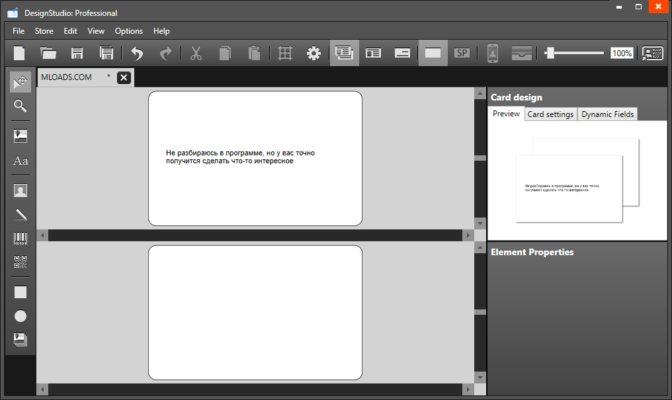
Whether you’re managing employee identification, visitor management, or access control systems, CardStudio Pro offers the tools and features to meet your card creation needs.
🎯 Why Use Zebra CardStudio Pro?
- ✅ Designed for Zebra Printers: Optimized for seamless integration and performance
- ✅ Professional Card Design: Intuitive tools for creating visually appealing cards
- ✅ Data Integration: Import employee data from databases or spreadsheets
- ✅ Security Features: Options for adding security elements and encoding
- ✅ Batch Printing: Efficiently print large numbers of cards
- ✅ Template Library: Pre-built templates for common card types
Perfect for HR departments, security teams, schools, hospitals, and any organization requiring custom ID cards.
✨ Key Features of Version 2.5.35
🎨 1. Intuitive Card Design Interface
- Drag-and-drop tools for easy layout creation
- Text, image, and barcode insertion
- Customizable color schemes and backgrounds
- Template customization for consistent branding
📸 2. Photo & Data Management
- Capture photos directly using a webcam
- Import photos from files or databases
- Link data fields (e.g., name, ID number) to design elements
- Support for various image formats
🔐 3. Security & Encoding Options
- Add security features like watermarks or logos
- Magnetic stripe encoding (on compatible printers)
- Smart card encoding (on compatible printers)
- Over-the-Air (OTA) encoding for mobile credentials (in some versions)
🗃️ 4. Data Integration & Printing
- Import data from CSV, Excel, or databases
- Print single cards or batches efficiently
- Automatic sequential numbering
- Print job management and status monitoring
🛠️ Ideal For:
- Human Resources: Creating employee ID badges
- Security Teams: Issuing access control or visitor cards
- Educational Institutions: Student ID cards and staff badges
- Healthcare Facilities: Staff and visitor identification
- Government Agencies: Secure credential printing
💡 Tip: Use the template designer to create a standard layout and then import data to quickly populate multiple cards.
🆚 CardStudio Pro vs. General Design Software
CardStudio Pro provides specialized tools for ID card creation that general software lacks.
💡 Final Thoughts: Create Professional ID Cards
Zebra CardStudio Pro 2.5.35 is the essential tool for organizations needing to produce high-quality, secure ID cards efficiently. Its integration with Zebra printers, data handling capabilities, and security features make it the standard choice for professional card printing.
🆔 Design. Print. Secure. Identify.
🌐 Official website: https://www.zebra.com (Note: Verify exact product page for CardStudio Pro 2.5.35)
💻 Compatible with Windows. Requires a Zebra card printer for full functionality.
✔ Tested: This software was tested on Windows 10 & Windows 11 and works smoothly without issues.
Frequently Asked Questions
- Is this software free?
Yes, it can be downloaded and used for free. - Does it support Windows 11?
Yes, it works perfectly on Windows 10 and 11. - Is it safe to use?
Yes, the software was scanned and tested before publishing.
Last updated: February 2026
📥 Download Zebra CardStudio Pro 2.5.35
File size: 224 MB Zebra CardStudio Professional